Select Offers to Be Sent to Bally CMP
Stay is enhanced to allow users to select the promotional and non-promotional offers to be sent to Bally CMP.
To support this enhancement, the following changes have been made:
-
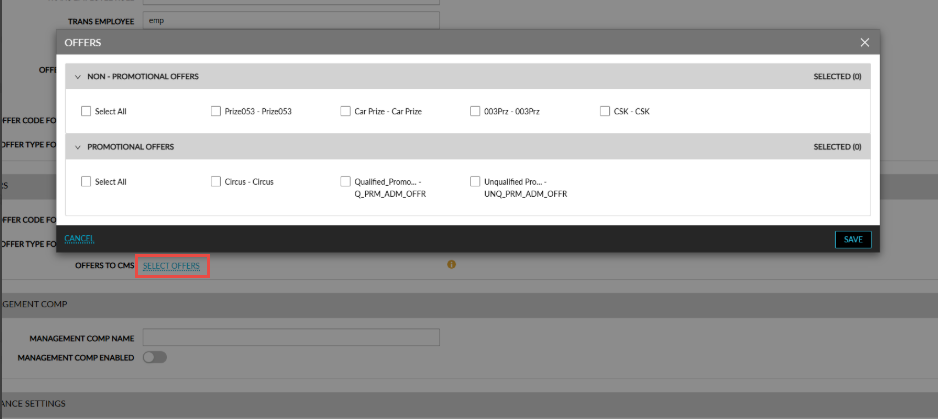
A new hyperlink, Select Offers, has been added to the Offers to CMS field in the Offers section of the Scientific Games CMP interface (Interfaces à Cloud Settings à Settings). When clicked, the Offers pop-up screen appears. The following sections are displayed in this pop-up screen:
-
Non-Promotional Offers: The section header is displayed with an accordion. When expanded, all the non-promotional offers available at the property are displayed. By default, no offer will be selected. Users can select the preferred offers to be sent to Bally CMP during the date roll.
-
Promotional Offers: The section header is displayed with an accordion. When expanded, all the promotional offers available at the property are displayed. By default, no offer will be selected. Users can select the preferred offers to be sent to Bally CMP during the date roll.
-
The count of the selected offers will be displayed in the header.
-
A new column, Type, has been added to the Offer Redemption report (Dynamic) that displays the type of offer selected.