Coupons Setup
When the feature setting is enabled, users can configure coupons in the Coupons dashboard (All Settings ➜ Templates ➜ Coupons ➜ Add). For Printable coupons, the following fields are displayed in the Add pop-up screen:
-
Active
-
Name
-
Description
-
List of Keywords
-
Coupon Template
For e-coupons, the following additional details are displayed:
|
Field |
Description |
|---|---|
|
Active |
This flag is enabled by default. Users must enable this flag to create active coupons. |
|
Type |
The type of coupon. This is a mandatory field that allows users to select from the following options:
|
|
Name |
The coupon name. This is a mandatory field that allows users to enter a unique coupon name. This field accepts a maximum of 13 characters. |
|
Code |
The coupon code. This is a mandatory field that allows users to enter a unique coupon code. This field accepts a maximum of 2 characters. |
|
Description |
The coupon description. This is a mandatory field that allows users to enter a description for the coupon. This field accepts a maximum of 200 characters. |
|
Validity |
The validity of the coupon. This is an optional field that allows users to select from the following options:
By default, the Per Stay option is selected. |
|
House Account |
This is a mandatory single-select drop-down list that displays the active house accounts available at the property. When the coupon is applied to a reservation, the selected charges will be routed to the house account selected. Users can select the same house account for multiple coupons. |
|
Folio |
This is a mandatory single-select drop-down list that displays the active folios available in the selected house account. |
|
List of Keywords |
The following key words are displayed for users to configure the coupon template:
|
|
Coupon Template |
The selected key words are displayed in this field. |
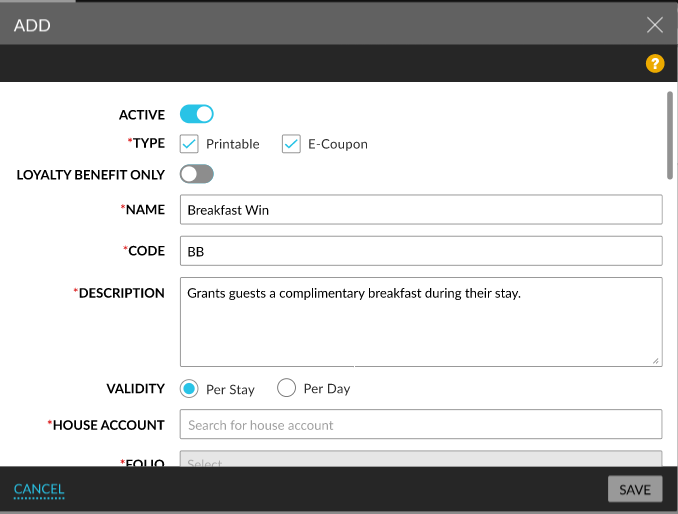
When users click Save, the coupons are saved and displayed in the Coupons Setup screen. The details of the coupons created are displayed in the following columns in the screen:
-
Name
-
Code
-
Type
-
Description
-
Validity
-
House Account
-
Status
The following columns can be sorted:
-
Name
-
Code
-
Type
-
Validity
-
Status
Users can search for a record using the name and house account. Records can be filtered based on the following options:
-
Type
-
Printable
-
E-Coupon
-
-
Validity
-
Per Stay
-
Per Day
-
-
House Account: The house accounts associated with a coupon are displayed.
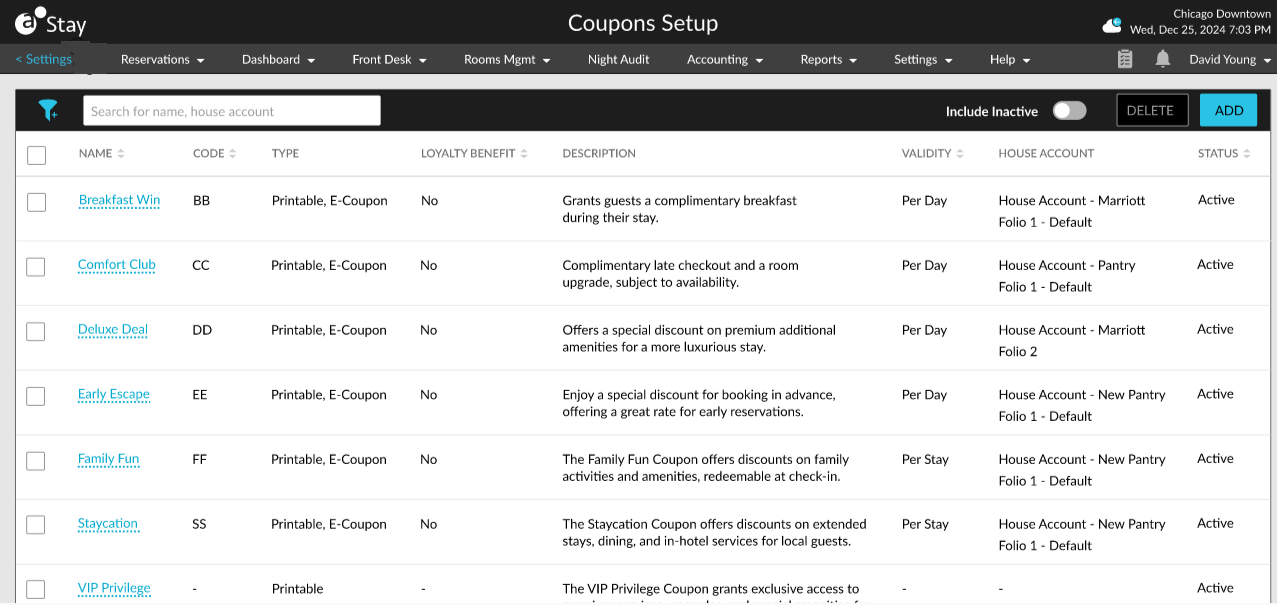
The coupon name is displayed as a hyperlink. When clicked, the Edit Coupon pop-up screen appears that allows users to modify the coupon details if required. The modified details will be applied only for coupons that are not added to a reservation. For coupons already added to reservations, only the coupon name, code, and description are updated.
Users can neither close a house account nor its folios when associated with an active/inactive coupon.
-
The following message is displayed when users try to close the account: This House Account cannot be closed as it is associated with one or more Coupons. To close it, Disassociate this from coupon setup.
-
The following message is displayed when users try to close the house account folio: Folio is associated with one or more Coupons. To close it, Disassociate this from coupon setup.
Users can convert printable coupons to e-coupons and vice versa.