Map a Data Retention Policy
The Data Retention Policy tab allows users to map the guest data retention policy to the guest type. Once data retention policies have been created, the property must associate a policy with the relevant guest types, so guest data gets anonymized as per this mapping.
Perform the following steps to map the guest data retention policy with relevant guest types:
Navigate to Settings ➜ All Settings ➜ Data Retention Management (under General). The Data Retention Management page is displayed.
Navigate to Data Retention Policy in the Policy Mapping tab to map a guest data retention policy with relevant guest types.
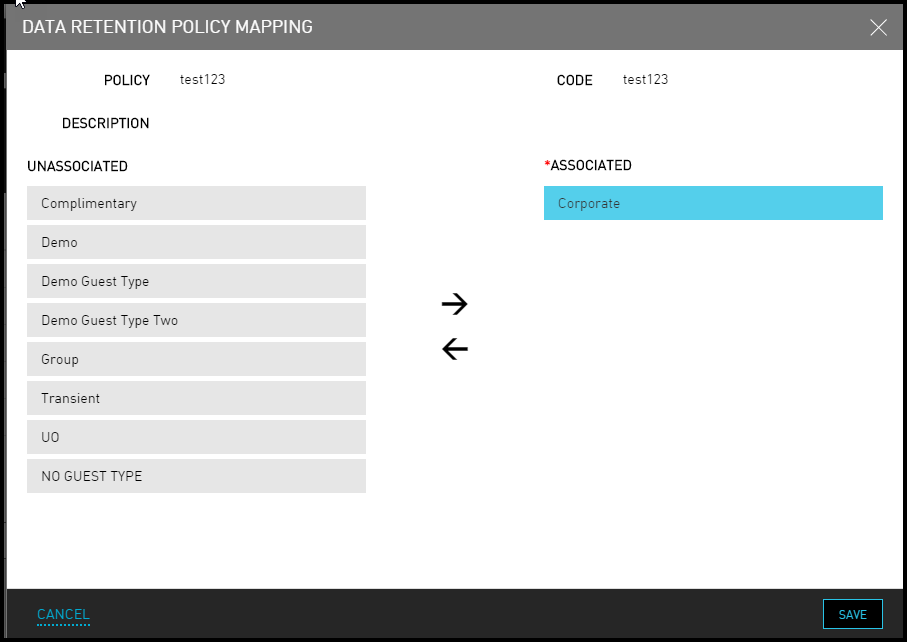
Click the Complimentary, Corporate link under the Associate Guest Type column to map the relevant guest types for any policy name. The Data Retention Policy Mapping page appears.
Move the guest types from the Unassociated column to the Associated column.
Multiple guest types can be associated to a guest retention policy.
Click Save. The guest types are successfully associated with the guest retention policy.