Outlets
The Outlets option allows users to add information about the outlets, including where they are located inside the property. The property may host additional venues that do not include rooms, such as a gift shop, a café, a pool area, or other locations where guests may purchase an item. It option allows users to create outlets and add the preferred meal periods.
Perform the following steps to create an outlet:
Navigate to Settings ➜ All Settings ➜ Property, buildings, & outlets (under General).
Navigate to the Outlets tab.
Click Add. The New Outlet dialog box appears.
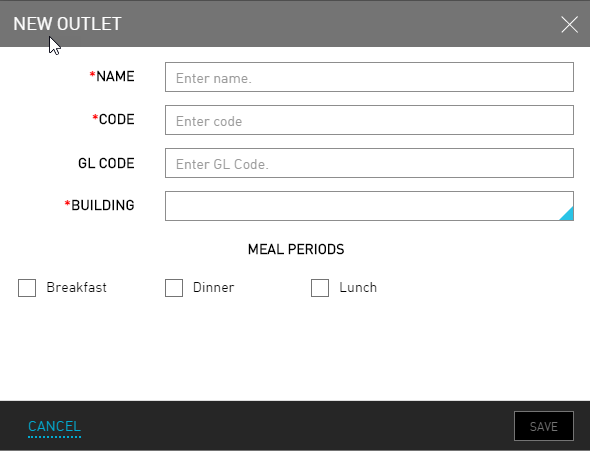
Refer to the following table and fill in the fields to set up an outlet:
|
Field |
Description |
|---|---|
|
Name |
The name of the outlet. |
|
Code |
A unique code to identify the outlet. |
|
GL Code |
A unique general ledger code to identify the outlet. |
|
Building |
The building where the outlet is located within |
|
Meal Periods |
|
|
Breakfast |
Indicates that breakfast is associated with the venue. |
|
Dinner |
Indicates that dinner is associated with the venue. |
|
Lunch |
Indicates that lunch is associated with the venue. |
Click Save. A new outlet is created.