Schedule Reservation Folio Emails
Stay provides users with the ability to email reservation folios to guests either at the scheduled time or after the night audit. Only the guest folios can be sent via email. Based on the status of the reservation, the folios are emailed to the guests as per the email template configured by the users.
Feature Setting
-
Name: Auto Email Folio to the Guest
-
Value: Must be Enabled
-
Comments: License is not required.
The Enhanced Scheduled E-Mail Folios section on the Folio Template Setup (Settings ➜ All Settings ➜ Templates ➜ Folio) screen displays the following tabs:
-
Before Checkout
-
After Checkout
-
Immediate Checkout
-
Rules
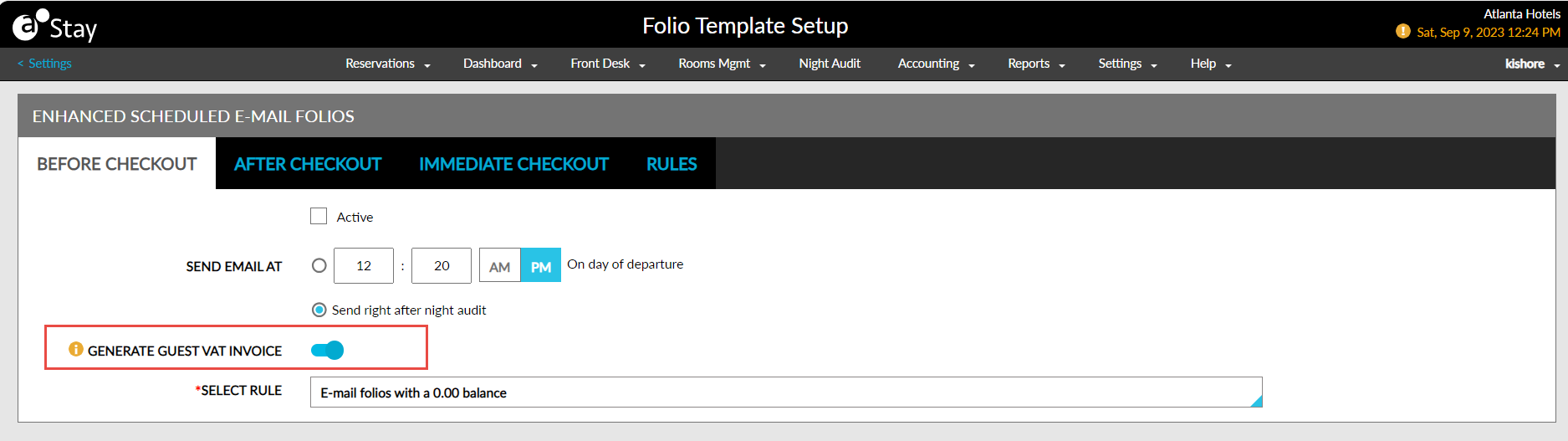
When the Auto Email Folio to the Guest feature setting and the Generate Guest VAT Invoice checkbox is enabled, users can choose to include the VAT details in the reservation folios that are emailed to guests during check-out. Users must enable the Generate Guest VAT Invoice flag in the following tabs of the Folio Template Setup screen:
-
Before Checkout
-
After Checkout
Modifying the Template Associated with the Rules
Users can modify the template associated with the rules by clicking on the Edit hyperlink for the rule on the Rules tab. When clicked, the Edit Email Template screen appears that allows users to configure the template in which the email should be sent to guests by selecting from the list of keywords displayed.
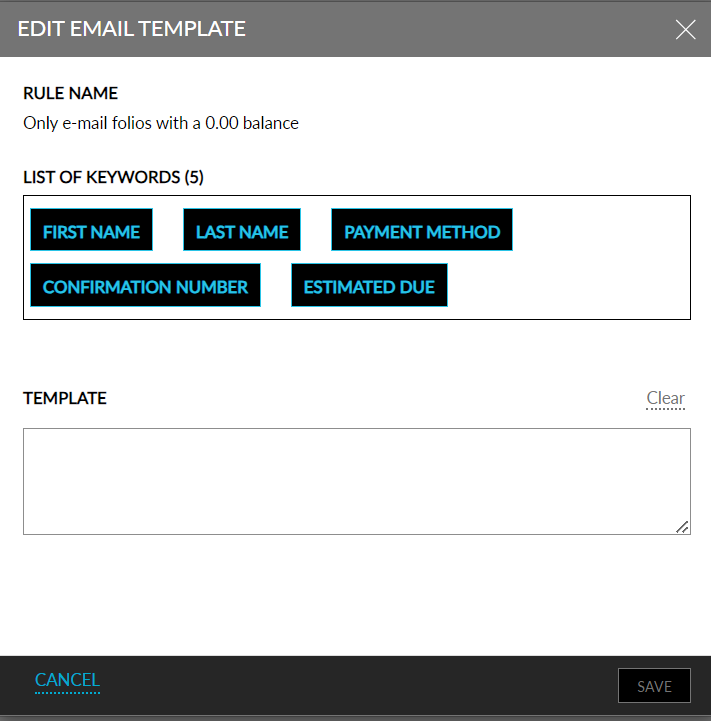
The footer message and the Bcc email address configured on the Folio Template Setup screen are included in the email sent to the guests.
The following fields are displayed in the Before Checkout and After Checkout tabs:
|
Field |
Description |
|---|---|
|
Active |
When enabled, the scheduled email is sent to guests at the scheduled time on the day of departure. |
|
Send Email At |
Allows users to select the time at which the folios must be emailed to guests on the day of departure of the reservation. |
|
Send Right After Night Audit |
When enabled, the folios are emailed to the guests immediately after the night audit, on the day of departure of the reservation. |
|
Select Rule |
This is a mandatory field that allows users to select the conditions based on which the folios must be emailed. This drop-down list displays the conditions configured on the Rules tab. |
The following fields are displayed on the Immediate Checkout tab:
|
Field |
Description |
|---|---|
|
Active |
When enabled, the scheduled email is sent to guests immediately after checkout. |
|
Select Rule |
This is a mandatory filed that allows users to select the conditions based on which the folios should be emailed. This drop-down list displays the conditions configured on the Rules tab. |
The following default conditions are displayed on the Rules tab. These conditions cannot be modified, and users cannot create new conditions.
|
Rule |
Description |
|---|---|
|
E-mail folios with a 0.00 balance |
The scheduled email is sent to guests only when the balance of all the folios in the reservation is $0. If any of the folios have a non-zero balance, the email is not sent to guests. |
|
E-mail unsettled folios with sufficient authorization |
The scheduled email is sent to guests when the folio is not settled but has sufficient authorization. If the unsettled folio does not have sufficient authorization, the mail is not sent to guests. |
|
E-mail unsettled folios with insufficient authorization or without payment |
The scheduled email is sent to guests if the folio is not settled and has insufficient authorization or no authorization/payment. |
|
E-mail a partially settled folio |
The scheduled email is sent to guests if some of the folios of the reservation are settled, and some are not settled due to insufficient authorization or payment. |
|
All Folios |
All the folios of the reservation are emailed at the scheduled time. |