Settings
The Lost and Found settings allow users to create settings to track all lost and found items in a property.
This menu includes the following options:
-
Type - allows users to create new item type
-
Storage Location - allows users to create new storage locations
-
Recent Items - allows users to set the number of days for showing the recent items
Type
The Type tab allows users to create new item types.
Perform the following steps to create a new type:
Navigate to Settings ➜ All Settings ➜ Lost and Found (under Back of House). The Type tab appears by default.
Click Add. The Add dialog box appears.
Refer the following table and fill in the fields to create an item type:
|
Field |
Description |
|---|---|
|
Active |
Enable the checkbox to activate the type. |
|
Type |
The name of the item type. |
|
Code |
A unique code to identify the item type. |
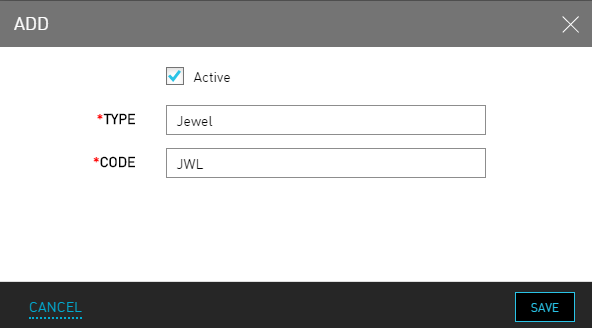
Click Save. The new item type is created successfully.
Storage Location
The Storage Location tab allows users to create new storage locations.
Perform the following steps to create a new storage location:
Navigate to Settings ➜ All Settings ➜ Lost and Found (under Back of House).
Click the Storage Location tab.
Click Add. The Add dialog box appears.
Refer the following table and fill in the fields to create a storage location:
|
Field |
Description |
|---|---|
|
Active |
Enable the checkbox to activate the storage location. |
|
Storage Location |
The name of the storage location. |
|
Code |
A unique code to identify the storage location. |
|
Description |
The relevant description about the storage location. |
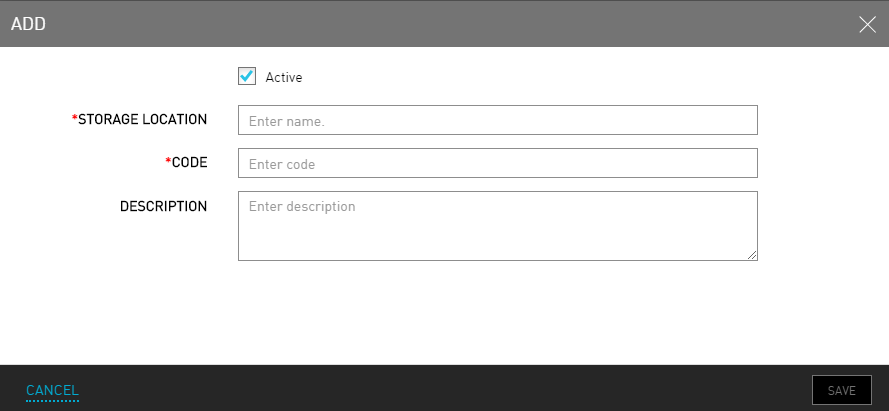
Click Save. The new storage location is created successfully.
Recent Items
The Recent Items tab allows users to set the number of days for showing the recent items.
Perform the following steps to set the number of days for showing the recent items:
Navigate to Settings ➜ All Settings ➜ Lost and Found (under Back of House).
Click Recent Items.
From the drop-down select the number of days up to which the user wants to view the items in the Show Recent Items field.
Select from the following options:
-
Past 5
-
Past 10
-
Past 15
-
Past 20
-
Past 25
-
Past 30

Click Save. The default number of days to show the recent lost or found item records are selected successfully.