AR Accounts List Report
The AR Accounts List report lists the details of A/R accounts available for a property.
Perform the following steps to generate the report:
Navigate to Reports ➜ Dynamic Reports ➜ Front Desk ➜ AR Accounts List.
Refer to the following table and fill in the fields.
|
Field |
Description |
|---|---|
|
Account Status |
This is an optional multi-select drop-down list that allows users to select from the following account statuses:
|
|
Sort By |
This is an optional single-select drop-down list that allows users to select from the following options:
|
Click Run to generate the report.
Click Save to save the report under User Favorites section.
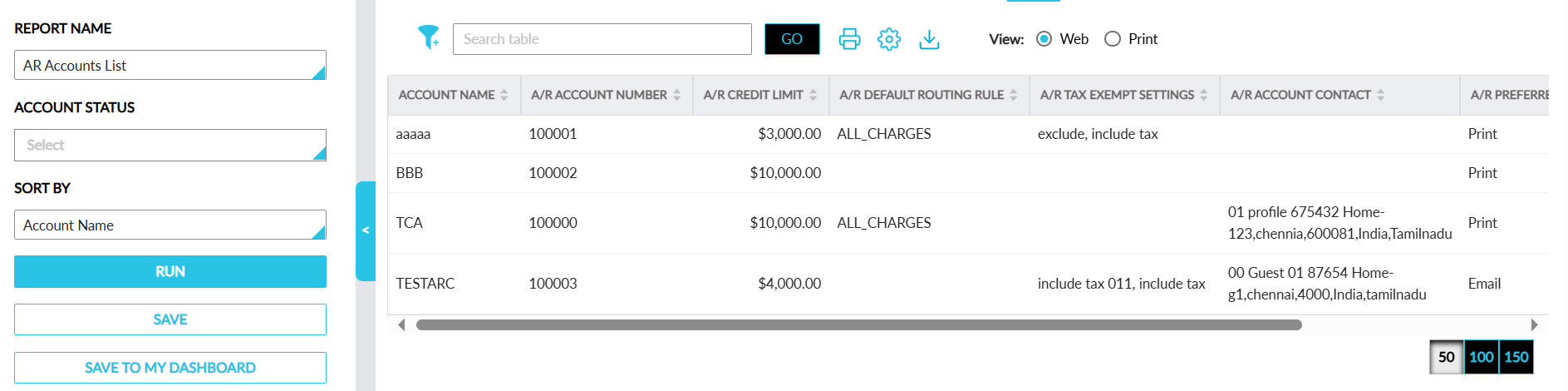
Sample Report
Report Fields
This report displays the following fields:
|
Field |
Description |
|---|---|
|
Account Name |
The name of the account. Users can filter records using this value. This column can be sorted. |
|
A/R Account Number |
The account number of the A/R account. Users can filter records using this value. This column can be sorted. |
|
A/R Credit Limit |
The credit limit of the A/R account. Users can filter records using this value. This column can be sorted. |
|
A/R Default Routing Rule |
The default routing rule associated with the account. Users can filter records using this value. This column can be sorted. |
|
A/R Tax Exempt Settings |
The tax-exempt settings configured for the account. Users can filter records using this value. This column can be sorted. |
|
A/R Account Contact |
The contacts associated with the account. Users can filter records using this value. This column can be sorted. |
|
A/R Preferred Invoice Method |
The preferred invoice method associated with the account. Users can filter records using this value. This column can be sorted. |
|
Account Status |
The status of the account. Users can filter records using this value. This column can be sorted. |