AR Aging Forecast Summary Report
The AR Aging Summary report allows users to track the following details of the A/R accounts available across all properties under a tenant:
-
The sum of the charges for which invoices were created, calculated for the following ageing buckets:
-
Duration between the selected date up to 30 days in the past.
-
Duration between 61-90 days in the past from the selected date
-
Duration between 91-120 days in the past from the selected date
-
Beyond 121 days in the past from the selected date
-
-
The sum of the charges in the Non-Invoiced Charges section of the A/R accounts for which invoices are not created calculated for the selected date.
-
The sum of the unapplied payments remaining in the Unapplied Payments section of the A/R accounts calculated for the selected date.
Perform the following steps to generate the report:
Navigate to Reports ➜ Dynamic Reports ➜ Accounting ➜ AR Aging Summary report.
Refer to the following table and fill in the fields.
|
Field |
Description |
|---|---|
|
Report Name |
AR Aging Forecast Summary |
|
Property |
This is a mandatory multi-select drop-down list that allows users to select the properties to be included in the generated report. |
|
Date |
This mandatory field allows users to select either a past or future date. By default, the current property date is displayed. All aging buckets in the generated report will display balances as of the selected date. When a future date is selected, the balance is calculated by projecting the aging of the current charges forward to that date. |
|
Aging By |
This is an optional field that allows users to select from the following options:
|
|
Options |
This is an optional field that allows users to select from the following options:
|
Click Run to generate the report.
Click Save to save the report under User Favorites section.
Sample Report
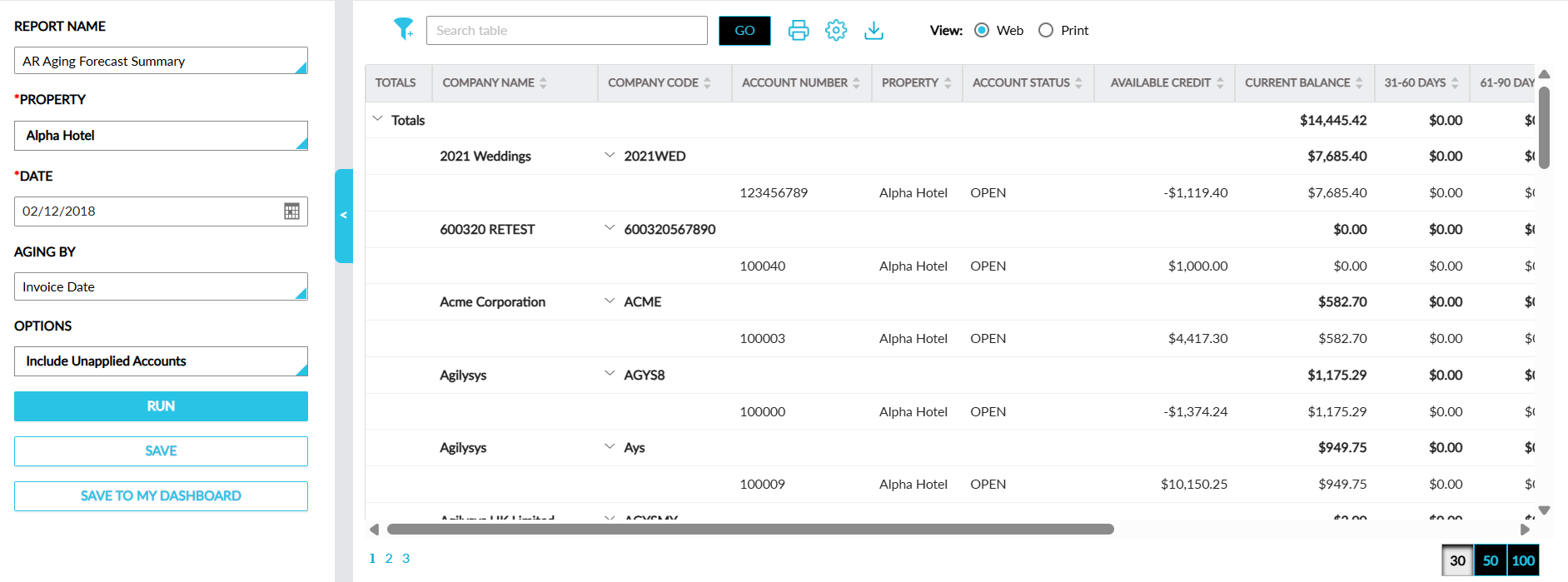
Report Fields
This report displays the following fields:
|
Field |
Description |
|---|---|
|
Total |
The Totals label in this column displays the total amount in the following columns with an accordion:
When the accordion is expanded, values are displayed in each column for the A/R accounts in the selected properties. This column can be sorted. |
|
Company Name |
The name of the A/R account. This column can be sorted and filtered. |
|
Company Code |
The A/R account code. This column can be sorted and filtered. |
|
Account Number |
The account number of the account. This column can be sorted and filtered. |
|
Property |
The property associated with the account. This column can be sorted and filtered. |
|
Account Status |
The status of the account. This column can be sorted and filtered. |
|
Available Credit |
The credit amount available in the account. This column can be sorted and filtered. |
|
Current Balance |
The current balance of the account. This column can be sorted. |
|
31-60 Days |
The sum of the charges for which invoices were created between 31-60 days in the past from the selected date. This column can be sorted. |
|
61-90 Days |
The sum of the charges for which invoices were created between 61-90 days in the past from the selected date. This column can be sorted. This column can be sorted. |
|
91-120 Days |
The sum of the charges for which invoices were created between 91-120 days in the past from the selected date. This column can be sorted. |
|
121+ Days |
The sum of the charges for which invoices were created beyond 121 days in the past from the selected date. This column can be sorted. |
|
Invoiced |
The sum of the charges for which invoices were created for the account. This column can be sorted. |
|
Un-Invoiced |
The sum of the charges in the Non-Invoiced Charges section of the A/R accounts for which invoices are not created, calculated for the selected date. This column can be sorted. |
|
Unapplied |
The sum of the unapplied payments remaining in the Unapplied Payments section of the A/R accounts calculated for the selected date. This column can be sorted. |
|
Total Balance |
The total balance of the A/R account. This column can be sorted. |