Account Balances
The Account Balances report allows users to view all accounts and the sum of their folio balances. This includes the primary folios (folio 1) on the guest reservations and accounts in Stay, and secondary (guest folio 2, package, master, etc.) folios if they exist for an account.
Perform the following steps to generate the report:
Navigate to Reports ➜ All Reports ➜ Account Balances (under Accounting).
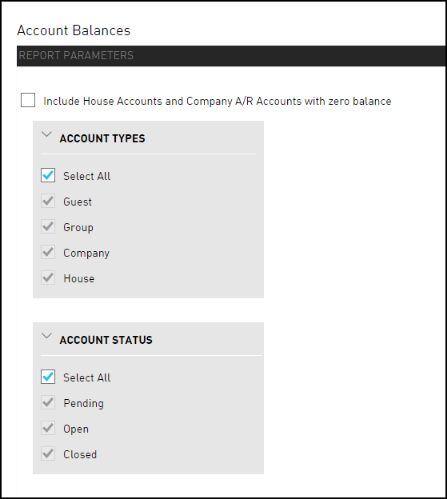
Select the Include House Accounts and Company A/R accounts with zero balance checkbox to include accounts with zero balances on the report. If the checkbox is selected, Zero Balance Accounts Included appears in the header of the report.
Choose which Account Types field to include in the report:
|
Field |
Description |
|---|---|
|
Select All |
Includes all account types. |
|
Guest |
Includes the accounts for a guest reservation. |
|
Group |
Includes the accounts for a guest reservation that is related to a group. |
|
Company |
Includes the accounts for a guest reservation that is related to a company. |
|
House |
Includes the accounts for a guest reservation that is related to an internal house account. |
Choose which Account Status field to include in the report:
|
Field |
Description |
|---|---|
|
Select All |
Includes all account statuses. |
|
Pending |
Pending accounts will be used in the future. For example, if a reservation is due to arrive in the future. |
|
Open |
Open accounts are active. For example, a reservation or group that is In House has open accounts. Alternatively, an A/R account that is active and available for use is considered an open account. |
|
Closed |
Closed accounts are no longer active. For example, a reservation or group that has departed, checked out, cancelled, or is a no show has a closed account. Alternatively, an A/R account that is no longer open and available for use is considered a closed account. |
Choose which Payment Methods field to include in the report.
Click Generate. The report with the selected data appears.
Click Print to send a copy of the report to the printer.
Sample Report
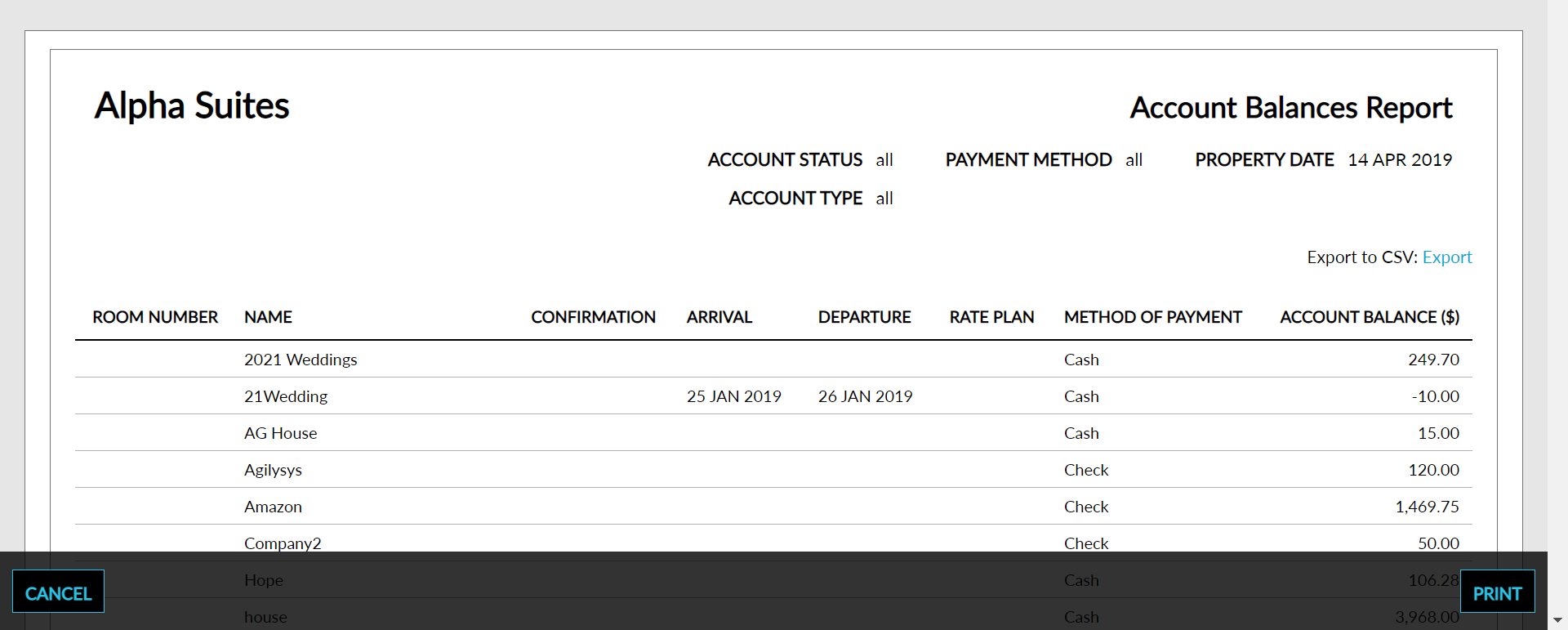
Report Parameters
The following new columns are added to the Account Balances (Dynamic) report, to display the credit limit and available credit of AR accounts and house accounts, the start date and end date of AR accounts, and the property associated with the accounts:
-
Credit limit
-
Available credit
-
Start date
-
End date
-
Property
This report displays the following parameters:
|
Field |
Description |
|---|---|
|
Room Number |
The room number that the guest is staying in, if assigned. |
|
Name |
The guest name on the reservation. |
|
Confirmation |
The reservation confirmation number. |
|
Arrival |
The Arrival date for the reservation. |
|
Departure |
The Departure date for the reservation. |
|
Rate Plan |
The rate plan associated with the reservation. If multiple rate plans are associated with the reservation, the rate plan currently in effect appears on the report. |
|
Method of Payment |
The primary method of payment for the account. For example, cash, credit card, direct bill. |
|
Account Balance |
The sum of all folios associated with the account. |
|
Grand Total |
The sum of all postings listed in the report. |