Comments Report
The Comments Report allows users to view the comments entered for the guest profiles, reservations, and travel agent profiles.
Perform the following steps to generate the report:
Navigate to Reports ➜ Dynamic Reports ➜Front Desk ➜ Comments Report.
Refer to the following table and fill in the fields.
|
Field |
Description |
|---|---|
|
Report Name |
Comments Report. |
|
Start Date |
The start date from which the report must be generated. |
|
End Date |
The end date up to which the report must be generated. |
|
Reservation Status |
The reservation statuses to be included in the report. Users can select from the following options:
|
|
View |
The comments to be displayed in the report. Users can select from the following options:
|
|
Comment Type |
The type of comments to be included in the report. Users can select from the following options:
|
|
Severity |
The severity of comments to be included in the report. Users can select from the following options:
|
Click Run to generate the report.
Click Save to save the report under User Favorites section.
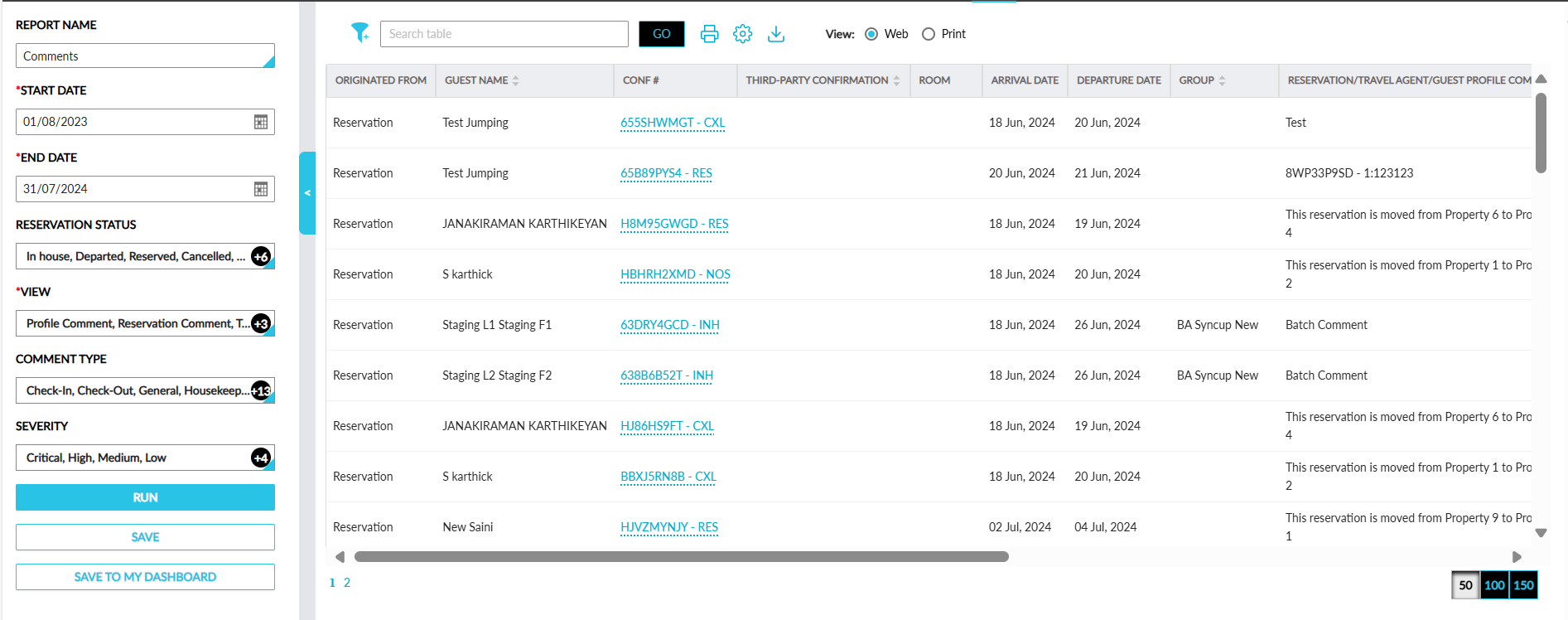
Sample Report
Report Fields
This report displays the following fields:
|
Field |
Description |
|---|---|
|
Originated From |
The source account for the comment. |
|
Guest Name |
The guest name associated with the profile or reservation. Users can search records using this value. This column can be sorted. |
|
Conf # |
The confirmation ID associated with a reservation. Users can search records using this value. |
|
Third-Party Confirmation |
The third-party confirmation number for a reservation if available. |
|
Room |
The room number assigned to a reservation. Users can search records using this value. |
|
Arrival Date |
The arrival date of the reservation. |
|
Departure Date |
The departure date of the reservation. |
|
Reservation/Travel Agent/Guest Profile Comments |
The comments entered for reservations, guest profiles, and travel agent profiles. Users can search records using this value. |
|
Comment Type |
The type selected for the comment. Users can filter and search records using this value. This column can be sorted. |
|
Severity |
The severity of the comment. Users can filter and search records using this value. This column can be sorted. |
|
Commented By |
The username of the user who created the comment. Users can search records using this value. |
|
Created Date & Time |
The date and time when the comment was created. Users can search records using this value. |
|
Default Payment Method |
The default payment method selected for the reservation or profile. Users can filter and search records using this value. |
|
Company Name |
The company name associated with the reservation or profile. Users can search records using this value. This column can be sorted. |
|
Do Not Move |
Displays Yes if the reservation is marked as Do Not Move. Users can search records using this value. |
|
Group |
The groups associated with the reservation or profile. Users can search records using this value. This column can be sorted. |