Comp Postings Report
The Comp Postings report allows users to track the amounts comped by each department’s authorizer for both admin and casino comp-type offers redeemed for a reservation.
Perform the following steps to generate the report:
Navigate to Reports ➜ Dynamic Reports ➜ Accounting ➜ Comp Postings report.
Refer to the following table and fill in the fields.
|
Field |
Description |
|---|---|
|
Report Name |
Comp Postings |
|
Start Date |
This is a mandatory field that allows users to select the start date from which the comp offers were issued. By default, the current property date is displayed. Users can select past dates. Future dates cannot be selected. |
|
End Date |
This is a mandatory field that allows users to select the end date up to which comp offers were issued. By default, the current property date is displayed. Users can select past dates. Future dates cannot be selected. |
|
Department |
This is a mandatory multi-select drop-down list that allows users to select the comp departments available for a property. |
Click Run to generate the report.
Click Save to save the report under User Favorites section.
Sample Report
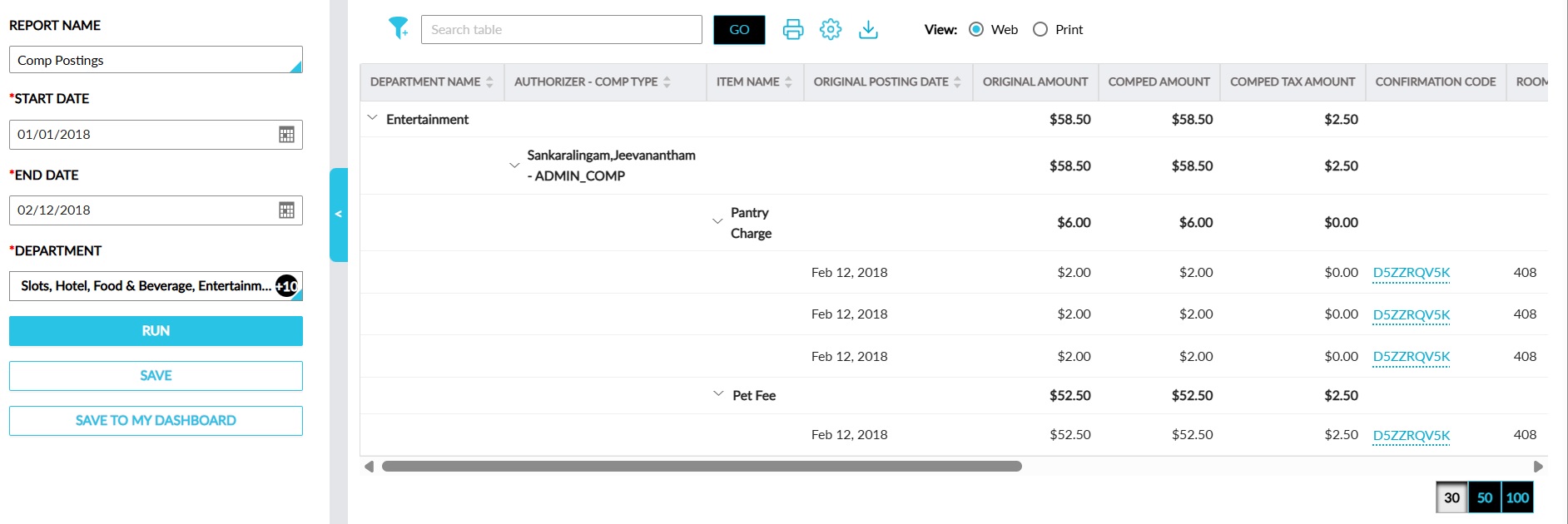
Report Fields
This report displays the following fields:
|
Field |
Description |
|---|---|
|
Department Name |
The department name is displayed with an accordion and the total amount for the department in the following columns:
When the accordion is expanded, values are displayed for the remaining columns. This column can be sorted. |
|
Authorizer-Comp Type |
The authorizer name along with the comp type. This column can be sorted. |
|
Item Name |
The transaction item that was comped. This column can be sorted. |
|
Original Posting Date |
The date when the charge was posted. This column can be sorted. |
|
Original Amount |
The amount for which the charge was posted. |
|
Comped Amount |
The amount comped. |
|
Comped Tax Amount |
The tax amount for the items that are comped. |
|
Confirmation Code |
The confirmation ID of the reservation. This column can be filtered. |
|
Room Number |
The room number for which the comp posting took place. This column can be sorted and filtered. |
|
Guest Name |
The guest name associated with the reservation. This column can be sorted and filtered. |
|
Arrival Date |
The arrival date of the reservation. |
|
Departure Date |
The departure date of the reservation. |
|
Player ID |
The player ID of the patron associated with the reservation. |
|
Comp Date/Time |
The date when the items were comped. |
|
User Name |
The username for the comp posting. This column can be sorted and filtered. |
|
Group Name |
The group name associated with the reservation. This column can be sorted and filtered. |
|
Group Code |
The group code of the group associated with the reservation. This column can be sorted and filtered. |