Departures - Housekeeping
The Departures - Housekeeping report allows users to view the list of rooms depending on the property on the selected date. As a housekeeping manager, this helps the user to manage the volume of departures service requests, state and maintenance requirements, expected departures, or reservations that have already departed.
Perform the following steps to generate the report:
Navigate to Reports ➜ All Reports ➜ Housekeeping ➜ Departures - Housekeeping.

Select a date from the calendar to generate dates for the report.
Enable the Include Housekeeping Features checkbox to display the housekeeping features for each room.
The Include Housekeeping Features checkbox is also added to the Housekeeping Departures report (Dynamic) as a report generation parameter. A new column, Features, displays the features available for the room.
Click Generate. The report with the selected data appears.
Click Print to send a copy of the report to the printer.
Sample Report
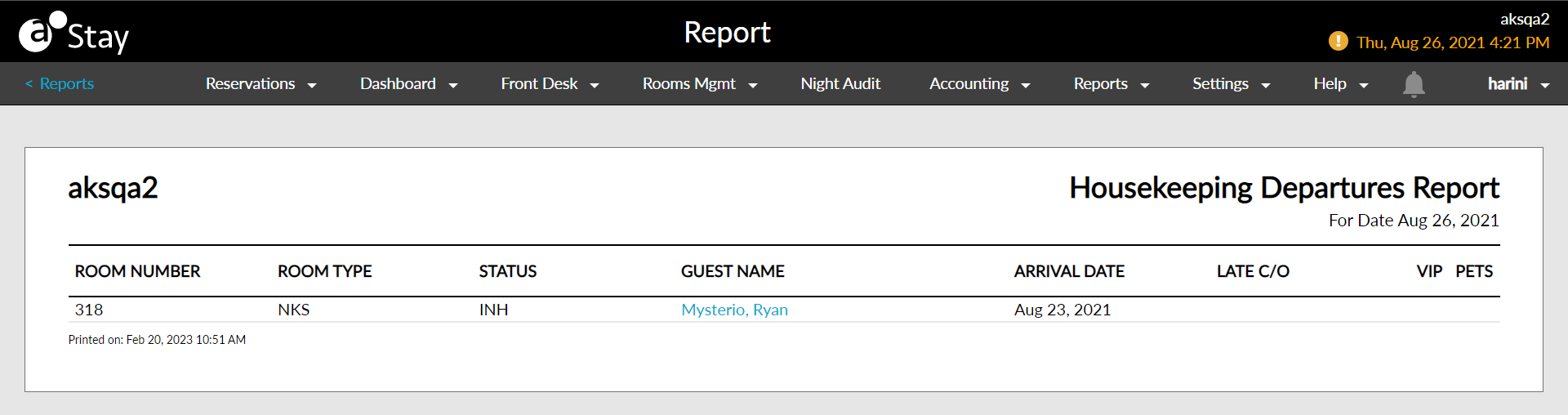
Report Parameters
This report displays the following parameters:
|
Field |
Description |
|---|---|
|
Room Number |
The room number that the guest is staying in, if assigned. The housekeeping features if available are displayed below the room number. |
|
Room Type |
The type of room that the guest has reserved. |
|
Status |
The status of each reservation:
|
|
Guest Name |
The guest name on the reservation. |
|
Arrival Date |
The arrival date for the reservation. |
|
Late C/O |
The time prior to the property scheduled date/time that the guest checked out of the room. |