Departures
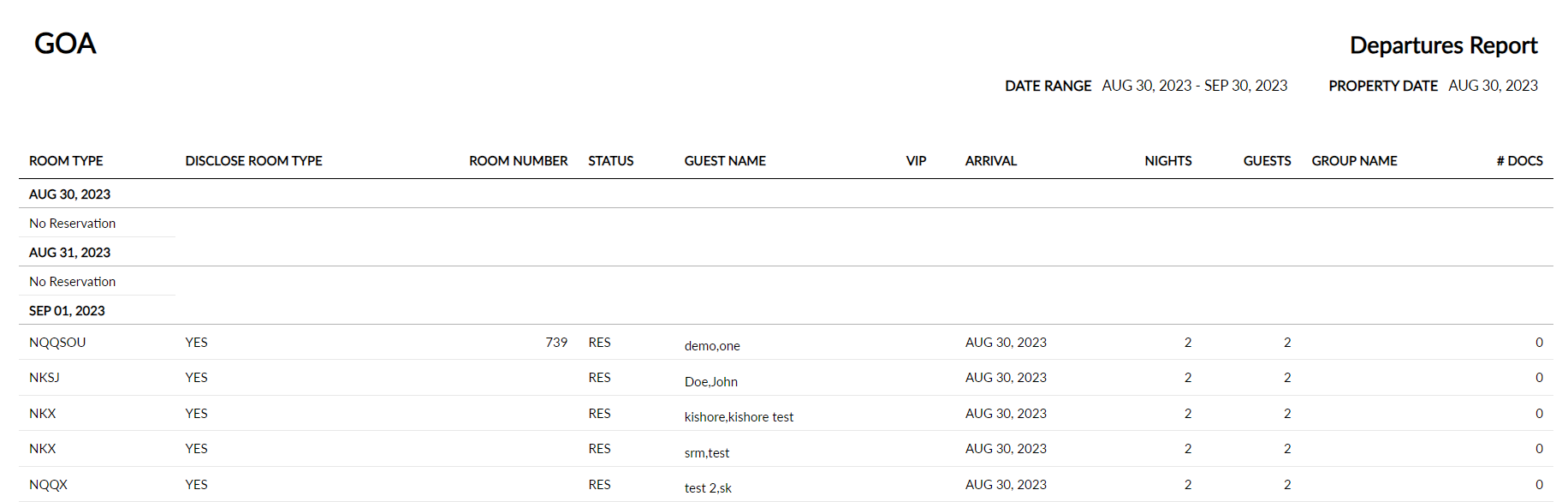
The Departures report allows users to view the list of guests departing the property on the selected date. As a property manager, this helps users to manage the volume of all departures, expected departures, or reservations that have already departed. If a package rate plan is associated with the reservation, it appears on the report with a palm tree icon.
Perform the following steps to generate the report:
Navigate to Reports ➜ All Reports ➜ Front Desk ➜ Departures.

Select the date range from the calendar to generate dates for the report.
Select the Exclude Actual Departures checkbox to exclude reservations that are already checked out.
Select the Exclude Remaining Departures checkbox to exclude any reservations that have not already checked out.
Click Generate. The report with the selected data appears.
Click Print to send a copy of the report to the printer.
Sample Report
Report Parameters
This report displays the following parameters:
|
Field |
Description |
|---|---|
|
Room Type |
The type of room that the guest has reserved. |
|
Disclose Room Type |
Displays Yes when the Do not disclose room type to guest flag is disabled and displays No when the flag is enabled. |
|
Room Number |
The room number that the guest is staying in, if assigned. |
|
Status |
The reservation status that indicates whether the guest is still in house, due to depart, or already departed. |
|
Guest Name |
The guest name on the reservation. |
|
VIP |
The VIP status of the guest. |
|
Arrival |
The arrival date for the reservation. |
|
Nights |
The number of nights that the guest is staying for the reservation. |
|
Guests |
The number of guests associated with each reservation. |
|
Group Name |
The group name associated with the reservation, if one applies. |