Detailed Flash Report

The Detailed Flash report allows users to view the current room occupancy and reservation count for the property.

Perform the following steps to generate the report:

Navigate to Reports Dynamic Reports Revenue/Forecasting Detailed Flash.

Refer to the following table and fill in the fields.

Field

Description

Report Name

Detailed Flash.

Property

This is a mandatory multi-select drop-down list that displays the current property by default. Users can select the preferred properties for report generation.

Date

The start date for report generation. This is a mandatory field that displays the current property date by default. Users can select any date in the past, present, or future.

Group By

This is a mandatory single-select drop-down list that displays the following options:

  • Property: When selected, the records are grouped by properties.

  • Building: When selected, the records are grouped by buildings.

Exclude OOO Rooms

When selected, the OOO rooms are excluded from the forecast for the property.

Exclude Groups Not Picked Up

When selected, the group rooms that are not picked up are excluded from the forecast for the property.

Click Run to generate the report.

Click Save to save the report under User Favorites section.

Sample Report
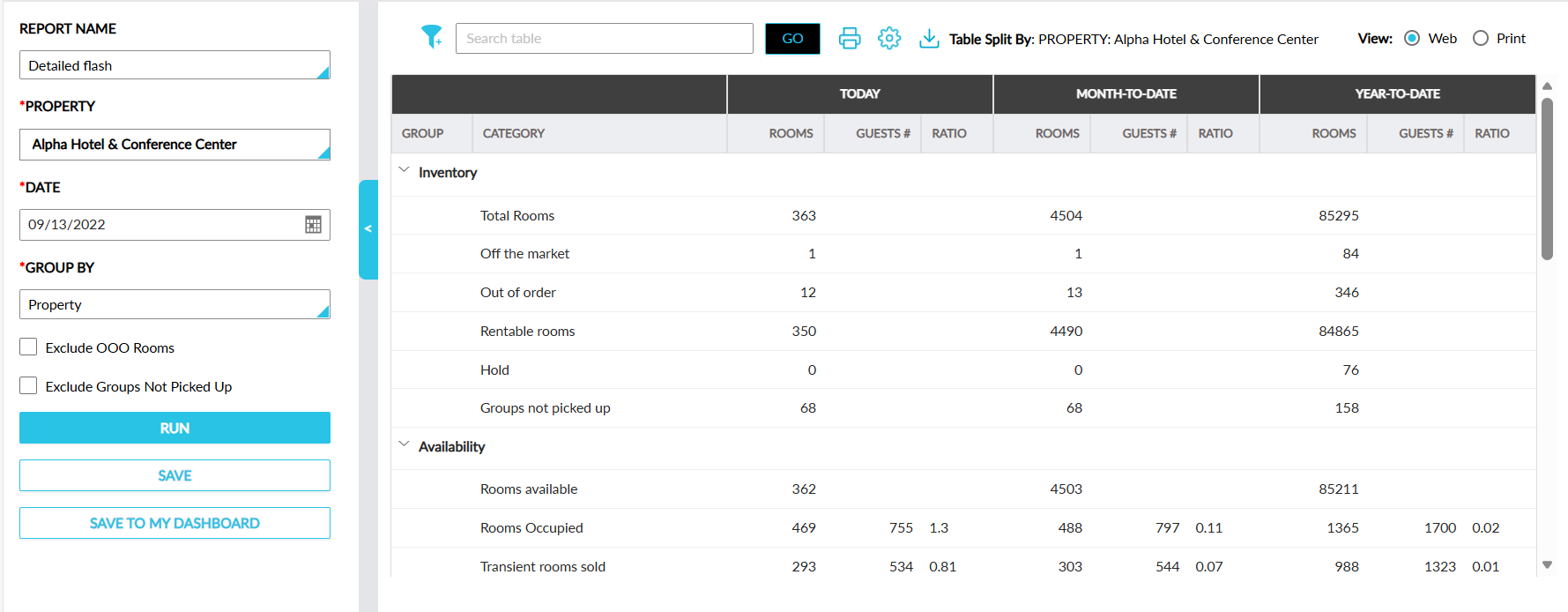
Report Fields

This report displays the following fields:

Field

Description

Group

The records are grouped under the following default criteria:

  • Inventory

  • Availability

  • Revenue

  • Reservations

These categories are displayed with an accordion. When the accordion is expanded, the column details are displayed.

Category

The following categories are displayed for each group:

Inventory

  • Total Rooms

  • Off the market    

  • Out of order    

  • Rentable rooms    

  • Hold

  • Groups not picked up

    Availability

  • Rooms available

  • Rooms Occupied

  • Transient rooms sold

  • Group rooms sold

  • Total rooms sold

  • Comp rooms

    Revenue

  • Room Revenue Transient    

  • Room Revenue Transient Tax    

  • Room Revenue Transient Total    

  • Room Revenue Group    

  • Room Revenue Group Total

  • Room Revenue Group Tax

  • ADR Sold

  • ADR Occupied

  • RevPAR

    Reservations

  • Remaining Departures    

  • Total Departures    

  • Remaining Arrivals    

  • Total Arrivals

  • Stay Overs

  • Same Day

  • No Shows

  • No Rate Rooms

  • Total guests

Today

Rooms

The following details are displayed for each group and its categories:

Inventory:

  • Total Rooms: The total available rooms for the selected date.

  • Off the market: The total off the market rooms for the selected date.

  • Out of order: The total out of order rooms for the selected date.

  • Rentable rooms: The total rooms available to be sold for the selected date.

  • Hold: The total number of rooms on hold for the selected date.

  • Groups not picked up: the total group rooms blocked that are yet to be picked up for the selected date.

    Availability

  • Rooms available: The number of rooms available for the selected date.

  • Rooms Occupied: The number of rooms occupied on the selected date.

  • Transient rooms sold: The number of non-group rooms sold on the selected date.

  • Group rooms sold: The number of group rooms sold on the selected date.

  • Total rooms sold: The total number of rooms sold on the selected date.

  • Comp rooms: The total number of comp rooms sold/occupied on the selected date.

    Revenue

  • Room Revenue Transient: The total non-group rooms revenue on the selected date.    

  • Room Revenue Transient Tax: The total tax charged for the non-group rooms on the selected date.

  • Room Revenue Transient Total: The total non-group rooms revenue that includes the room charges and tax on the selected date.    

  • Room Revenue Group: The group rooms revenue on the selected date.

  • Room Revenue Group Total: The total group rooms revenue on the selected date.

  • Room Revenue Group Tax: The total tax charged for the group rooms on the selected date.

  • ADR Sold: The average daily rate of rooms sold on the selected date.

  • ADR Occupied: The average daily rate of rooms occupied on the selected date

  • RevPAR: Indicates a property’s ability to generate revenue from its available rooms on the selected date.

    Reservations

  • Remaining Departures: The total number of departures remaining on the selected date.    

  • Total Departures: The total number of departed and yet to depart reservations on the selected date.

  • Remaining Arrivals:    The total number of remaining arrivals on the selected date.

  • Total Arrivals: The total number of reservations that have arrived and yet to arrive on the selected date.

  • Stay Overs: The total number of reservations staying overnight on the selected date.

  • Same Day: The total number of same day reservations on the selected date.

  • No Shows: The total number of no-show reservations on the selected date.

  • No Rate Rooms: The total number of comp room reservations on the selected date.

  • Total guests: The total number of guests associated with the reservations for the selected date.

Guests#

The total number of guests in each category are displayed for the following groups:

  • Availability

  • Reservations

Ratio

The proportion of rooms sold or occupied relative to the total rooms available for the period.

Month-to-Date

Rooms

The following details are displayed for each group and its categories:

Inventory:

  • Total Rooms: The total available rooms on the same month up to the selected date.

  • Off the market: The total off the market rooms on the same month up to the selected date.

  • Out of order: The total out of order rooms on the same month up to the selected date.

  • Rentable rooms: The total rooms available to be sold on the same month up to the selected date.

  • Hold: The total number of rooms on hold on the same month up to the selected date.

  • Groups not picked up: the total group rooms blocked that are yet to be picked up on the same month up to the selected date.

    Availability

  • Rooms available: The number of rooms available on the same month up to the selected date.

  • Rooms Occupied: The number of rooms occupied on the same month up to the selected date.

  • Transient rooms sold: The number of non-group rooms sold on the same month up to the selected date.

  • Group rooms sold: The number of group rooms sold on the same month up to the selected date.

  • Total rooms sold: The total number of rooms sold on the same month up to the selected date.

  • Comp rooms: The total number of comp rooms sold/occupied on the same month up to the selected date.

    Revenue

  • Room Revenue Transient: The total non-group rooms revenue on the same month up to the selected date.    

  • Room Revenue Transient Tax: The total tax charged for the non-group rooms on the same month up to the selected date.

  • Room Revenue Transient Total: The total non-group rooms revenue that includes the room charges and tax on the same month up to the selected date.    

  • Room Revenue Group: The group rooms revenue on the same month up to the selected date.

  • Room Revenue Group Total: The total group rooms revenue on the same month up to the selected date.

  • Room Revenue Group Tax: The total tax charged for the group rooms on the same month up to the selected date.

  • ADR Sold: The average daily rate of rooms sold on the same month up to the selected date.

  • ADR Occupied: The average daily rate of rooms occupied on the same month up to the selected date.

  • RevPAR: Indicates a property’s ability to generate revenue from its available rooms on the same month up to the selected date.

    Reservations

  • Remaining Departures: The total number of departures remaining on the same month up to the selected date.    

  • Total Departures: The total number of departed and yet to depart reservations on the same month up to the selected date.

  • Remaining Arrivals:    The total number of remaining arrivals on the same month up to the selected date.

  • Total Arrivals: The total number of reservations that have arrived and yet to arrive on the same month up to the selected date.

  • Stay Overs: The total number of reservations staying overnight on the same month up to the selected date.

  • Same Day: The total number of same day reservations on the same month up to the selected date.

  • No Shows: The total number of no-show reservations on the same month up to the selected date.

  • No Rate Rooms: The total number of comp room reservations on the same month up to the selected date.

  • Total guests: The total number of guests associated with the reservations on the same month up to the selected date.

Guests#

The total number of guests in each category are displayed for the following groups:

  • Availability

  • Reservations

Ratio

The proportion of rooms sold or occupied relative to the total rooms available for the period.

Year-to-Date

Rooms

The following details are displayed for each group and its categories:

Inventory:

  • Total Rooms: The total available rooms on the same year up to the selected date.

  • Off the market: The total off the market rooms on the same year up to the selected date.

  • Out of order: The total out of order rooms on the same year up to the selected date.

  • Rentable rooms: The total rooms available to be sold on the same year up to the selected date.

  • Hold: The total number of rooms on hold on the same year up to the selected date.

  • Groups not picked up: the total group rooms blocked that are yet to be picked up on the same year up to the selected date.

    Availability

  • Rooms available: The number of rooms available on the same year up to the selected date.

  • Rooms Occupied: The number of rooms occupied on the same year up to the selected date.

  • Transient rooms sold: The number of non-group rooms sold on the same year up to the selected date.

  • Group rooms sold: The number of group rooms sold on the same year up to the selected date.

  • Total rooms sold: The total number of rooms sold on the same year up to the selected date.

  • Comp rooms: The total number of comp rooms sold/occupied on the same year up to the selected date.

    Revenue

  • Room Revenue Transient: The total non-group rooms revenue on the same year up to the selected date.    

  • Room Revenue Transient Tax: The total tax charged for the non-group rooms on the same year up to the selected date.

  • Room Revenue Transient Total: The total non-group rooms revenue that includes the room charges and tax on the same year up to the selected date.    

  • Room Revenue Group: The group rooms revenue on the same year up to the selected date.

  • Room Revenue Group Total: The total group rooms revenue on the same year up to the selected date.

  • Room Revenue Group Tax: The total tax charged for the group rooms on the same year up to the selected date.

  • ADR Sold: The average daily rate of rooms sold on the same year up to the selected date.

  • ADR Occupied: The average daily rate of rooms occupied on the same year up to the selected date.

  • RevPAR: Indicates a property’s ability to generate revenue from its available rooms on the same year up to the selected date.

    Reservations

  • Remaining Departures: The total number of departures remaining on the same year up to the selected date.    

  • Total Departures: The total number of departed and yet to depart reservations on the same year up to the selected date.

  • Remaining Arrivals:    The total number of remaining arrivals on the same year up to the selected date.

  • Total Arrivals: The total number of reservations that have arrived and yet to arrive on the same year up to the selected date.

  • Stay Overs: The total number of reservations staying overnight on the same year up to the selected date.

  • Same Day: The total number of same day reservations on the same year up to the selected date.

  • No Shows: The total number of no-show reservations on the same year up to the selected date.

  • No Rate Rooms: The total number of comp room reservations on the same year up to the selected date.

  • Total guests: The total number of guests associated with the reservations on the same year up to the selected date.

Guests#

The total number of guests in each category are displayed for the following groups:

  • Availability

  • Reservations

Ratio

The proportion of rooms sold or occupied relative to the total rooms available for the period.