Direct Bill Override Report
The Direct Bill Override Report tracks the details of the payments made for an A/R invoice that contains transferred charges.
Perform the following steps to generate the report:
Navigate to Reports ➜ Dynamic Reports ➜Accounting ➜ Direct Bill Override Report.
Refer to the following table and fill in the fields.
|
Field |
Description |
|---|---|
|
Report Name |
Direct Bill Override Report |
|
A/R Account |
The A/R accounts to be included for report generation. |
|
Account Status |
The status of the A/R accounts to be included for report generation. |
|
Start Date |
The start date from which the report must be generated. Users can select the current property date and past dates. Future dates cannot be selected. |
|
End Date |
The end date up to which the report must be generated. Users can select the current property date and past dates up to a maximum of 3 years from the current property date. Future dates cannot be selected. |
Click Run to generate the report.
Click Save to save the report under User Favorites section.
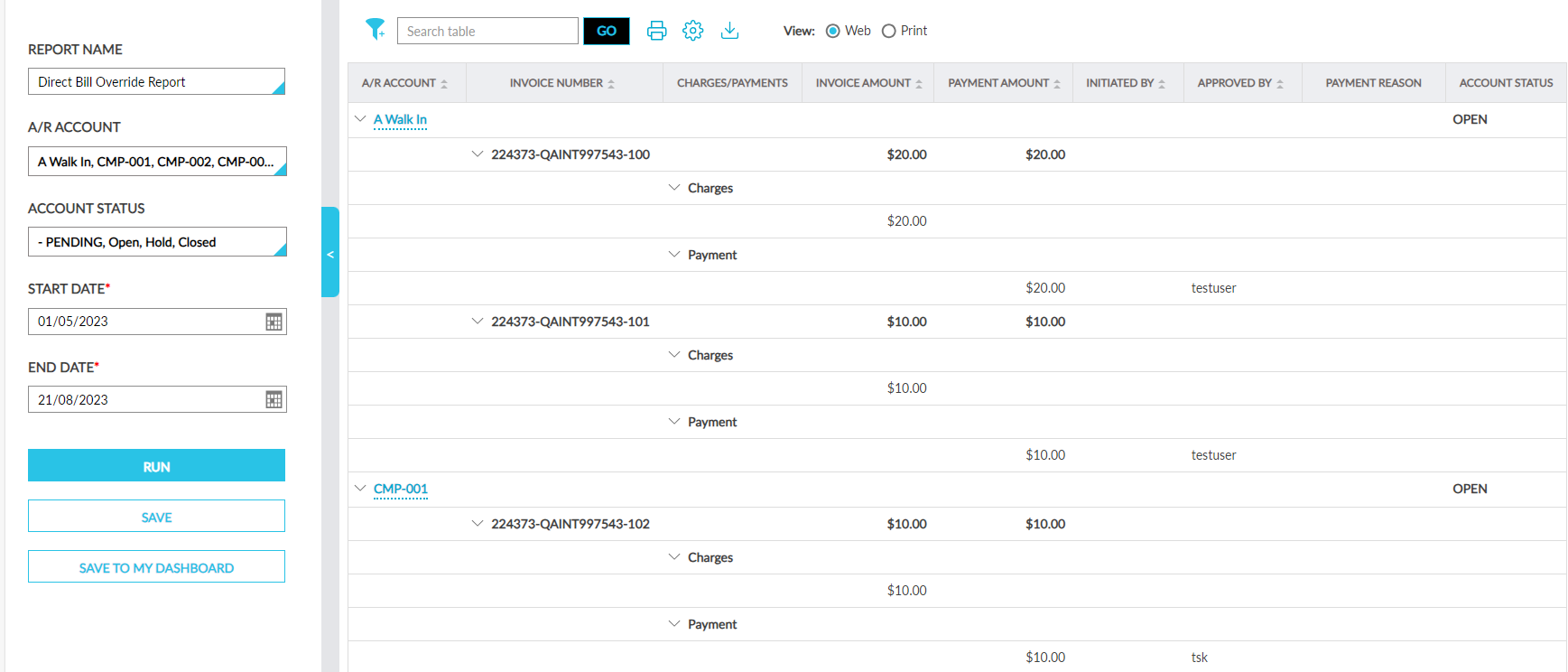
Sample Report
Report Fields
This report displays the following fields:
|
Field |
Description |
|---|---|
|
A/R Account |
Displays the A/R account name as a hyperlink. An accordion is provided for each account that is expanded by default. When expanded, the invoices available for an A/R account is displayed. Users can search and filter record using this value. This column can be sorted. |
|
Invoice Number |
The invoice number of an invoice created for an A/R account. An accordion is provided for each invoice that is expanded by default. When expanded, the charges and payments made for an invoice is displayed. Users can search for a record using this value. This column can be sorted. |
|
Charges/Payments |
The charges and payments made for the invoice. An accordion is provided for the charges and payments. When the accordion for charges is expanded, the invoice amount is displayed and when the accordion for payment is expanded, the payment amount is displayed. |
|
Invoice Created By |
The username of the user who created the invoice. This column can be sorted. |
|
Charges Transferred By |
The username of the user who transferred the charges to the invoice. This column can be sorted. |
|
Invoice Amount |
The invoice amount of an invoice. This column can be sorted. |
|
Payment Amount |
The amount for which a payment was made for an invoice. This column can be sorted. |
|
Initiated By |
The username of the user who initiated the payment. |
|
Approved By |
The username of the user who approved the payment. This column can be sorted. |
|
Payment Reason |
The reason for the payment. |
|
Payment Reference Number |
The reference number for the payment. Users can search for a record using this value. |
|
Account Status |
The status of the A/R account. Users can filter records using this value. |