Gift Card Activity Report
The Gift Card Activity report allows users to track the transactions performed using gift cards.
Perform the following steps to generate the report:
Navigate to Reports ➜ Dynamic Reports ➜ Accounting ➜ Gift Card Activity Report.
Refer to the following table and fill in the fields.
|
Field |
Description |
|---|---|
|
Start Date |
The start date from which the report must be generated. By default, the current property date is displayed. Users can select a date that is a maximum of 365 days in the past from the current property date. |
|
End Date |
The end date up to which the report must be generated. By default, the current property date is displayed. Users can select a date that is a maximum of 30 days from the start date. |
|
Group By |
Users can select from the following options:
|
|
Date |
When selected, records are grouped based on the date and time the transactions were performed using the gift card. |
|
Transaction Type |
When selected, records are grouped based on the following transaction types:
|
|
Account |
When selected, records are grouped based on the source account in which the transaction is initiated. |
|
Destination |
When selected, records are grouped based on the destination account in which the transaction is settled. |
|
Account Name |
When selected, records are grouped based on the account name. |
Click Run to generate the report.
Click Save to save the report under User Favorites section.
Sample Report
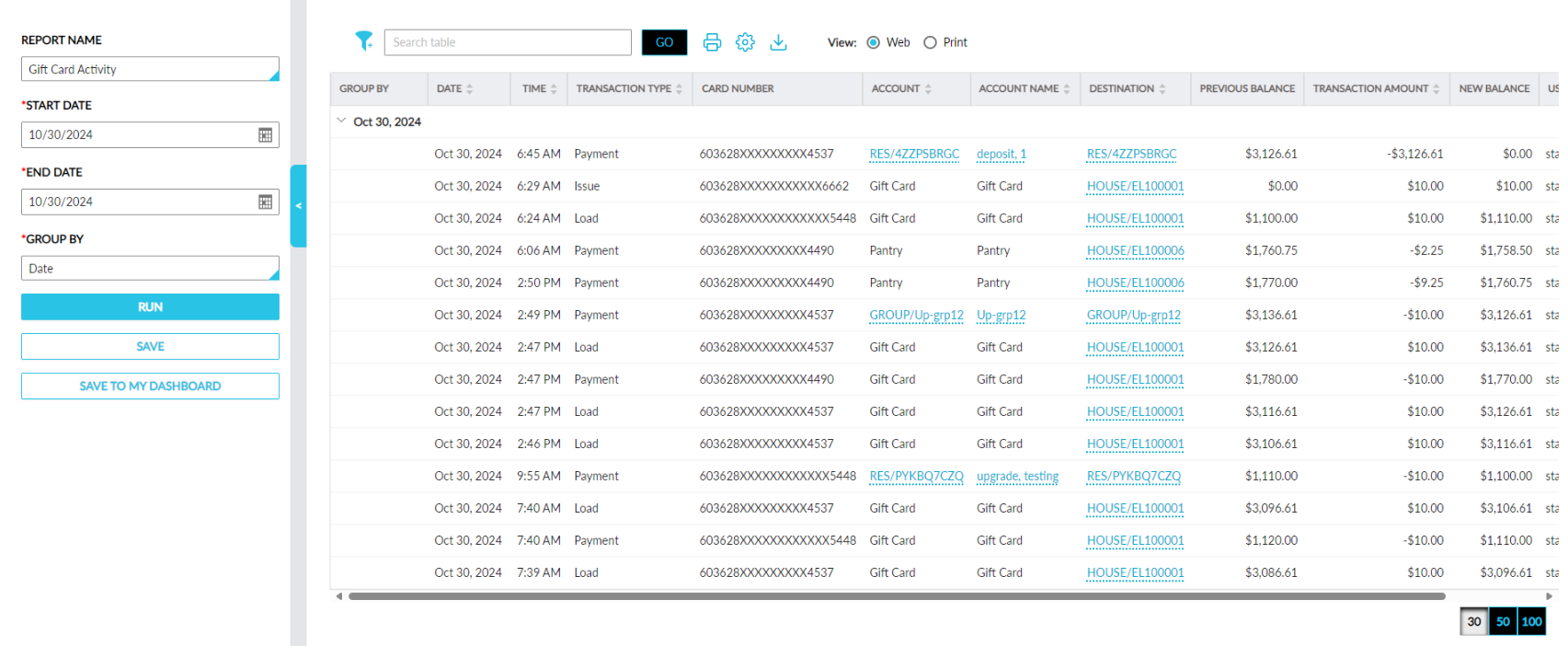
Report Fields
This report displays the following fields:
|
Field |
Description |
|---|---|
|
Group By |
The records are displayed based on the Group By option selected. By default, the records are displayed grouped by date. |
|
Date |
This column displays dates that have transactions for the selected date range. Users can select a maximum date range of 30 days. The recent transaction date is displayed first followed by the oldest. Users can search and filter records using the transaction date. This column can be sorted. |
|
Time |
The time when the transaction was initiated. The recent transaction time is displayed first followed by the oldest. This column can be sorted. |
|
Transaction Type |
The following transaction types are displayed:
Users can search and filter records using the transaction type. This column can be sorted. |
|
Card Number |
The gift card number used for the transaction. The first 6 digits and the last 4 digits of the gift card number is displayed. |
|
Account |
The account where the transaction was initiated displayed as a hyperlink. When clicked, users are navigated to the account.
Users can search and filter records using the account. This column can be sorted |
|
Account Name |
The account name from which the transaction is initiated displayed as a hyperlink.
|
|
Destination |
The account in which the transaction is completed displayed as a hyperlink.
Users can search and filter records using the destination. This column can be sorted. |
|
Previous Balance |
The initial balance of the gift card before the transactions are performed. |
|
Transaction Amount |
The amount paid, loaded, refunded, or issued during transactions. This column can be sorted. |
|
New Balance |
The balance amount after the transaction is completed. |
|
User |
The username of the user who performed the transaction. |
|
Approver |
The username of the authorizer who performed the transaction. |