Guest Ledger Summary Report
The Guest Ledger Summary report allows users to track in-house reservations with a balance due.
Perform the following steps to generate the report:
Navigate to Reports ➜ Dynamic Reports ➜ Accounting ➜ Guest Ledger Summary report.
Click Run to generate the report.
Click Save to save the report under User Favorites section.
Sample Report
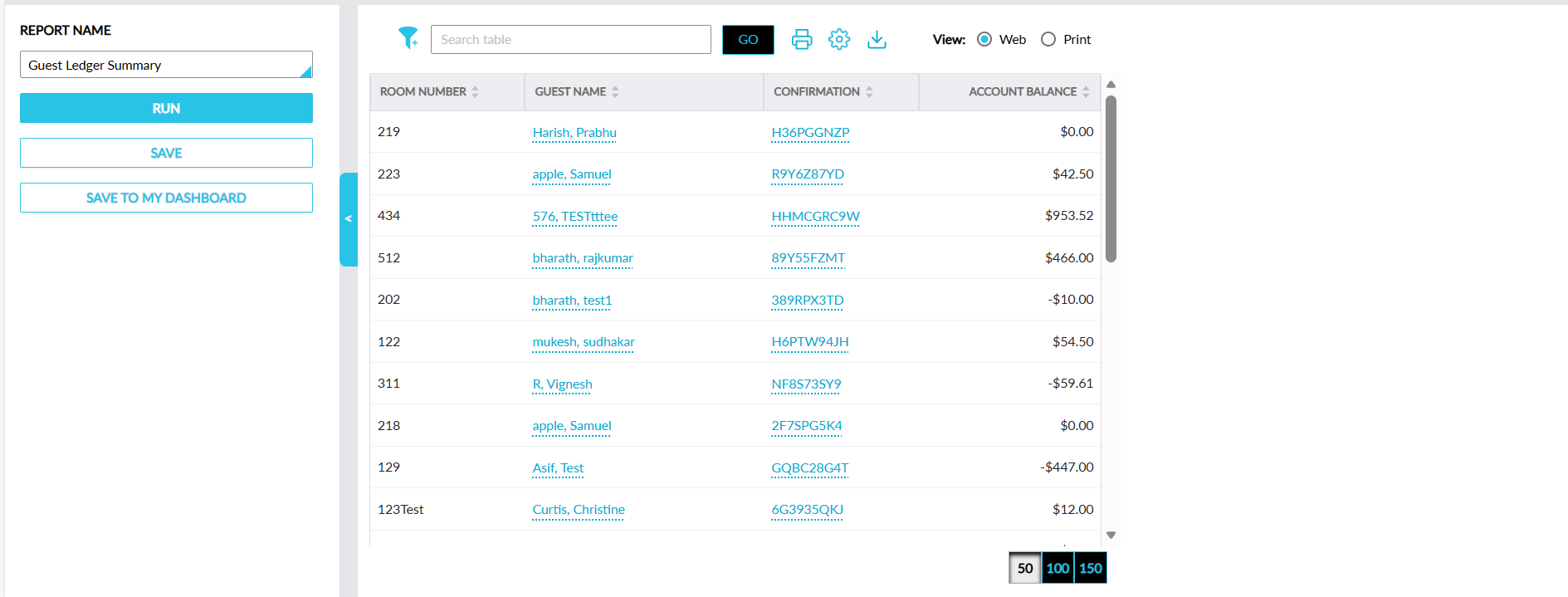
Report Fields
This report displays the following fields:
|
Field |
Description |
|---|---|
|
Room Number |
The room number assigned to a reservation. This column can be sorted and filtered. |
|
Guest Name |
The guest name associated with a reservation displayed as a hyperlink. When clicked, users are navigated to the guest profile in a new tab in the browser. This column can be sorted and filtered. |
|
Confirmation |
The confirmation number of the reservation displayed as a hyperlink. When clicked, users are navigated to the respective reservation in a new tab in the browser. This column can be sorted and filtered. |
|
Account Balance |
The balance due for the reservation. This column can be sorted. |