Housekeeping Departures Report
The Housekeeping Departures report allows users to track the housekeeping service requests created for the departing and departed reservations in a property.
Perform the following steps to generate the report:
Navigate to Reports ➜ Dynamic Reports ➜ Housekeeping ➜ Housekeeping Departures report.
Refer to the following table and fill in the fields.
|
Field |
Description |
|---|---|
|
Report Name |
Housekeeping Departures. |
|
Property |
This is a mandatory multi-select drop-down list that allows users to select the properties for report generation. The current property is selected by default. |
|
Reservation Status |
This is a mandatory multi-select drop-down list that displays the following options:
|
|
For Date |
This is a mandatory field that allows users to select the date on which the service requests created should be retrieved. The current property date is displayed by default. |
|
Include Housekeeping Features |
When selected, the housekeeping features available in the room will be displayed. |
Click Run to generate the report.
Click Save to save the report under User Favorites section.
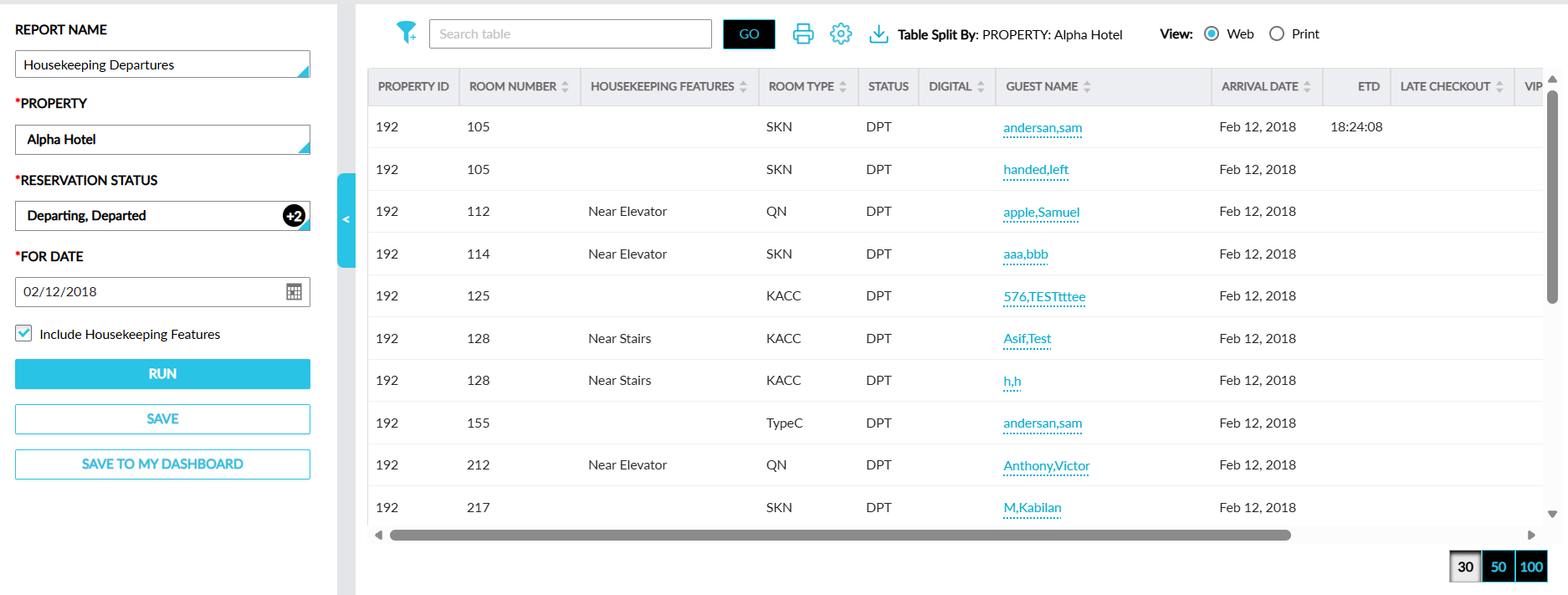
Sample Report
Report Fields
This report displays the following fields:
|
Field |
Description |
|---|---|
|
Property ID |
The property ID in which the request was created. |
|
Room Number |
The room number for which the request was created. This column can be sorted. |
|
Housekeeping Features |
The housekeeping features available in the room. This column can be filtered and sorted. |
|
Room Type |
The room type of the room for which the request was created. This column can be filtered and sorted. |
|
Status |
The status of the request. |
|
Digital |
Indicates whether the reservation was checked out digitally. This column can be sorted. |
|
Guest Name |
The guest name associated with the request. This column can be sorted. |
|
Arrival Date |
The arrival date of the guest. This column can be sorted. |
|
ETD |
The estimated time of departure of the guest. |
|
Late Checkout |
The late checkout time of the guest. This column can be sorted. |
|
VIP |
The VIP status of the guest. |
|
Tier |
The loyalty tier of the guest. This column can be filtered. |
|
Player ID |
The patron ID of the guest. |
|
Pets |
The count of pets in the room. |
|
Non Registered Guest |
Indicates whether the guest who stayed in the room is a non-registered guest. This column can be filtered and sorted. |