Housekeeping Forecast by Feature Report
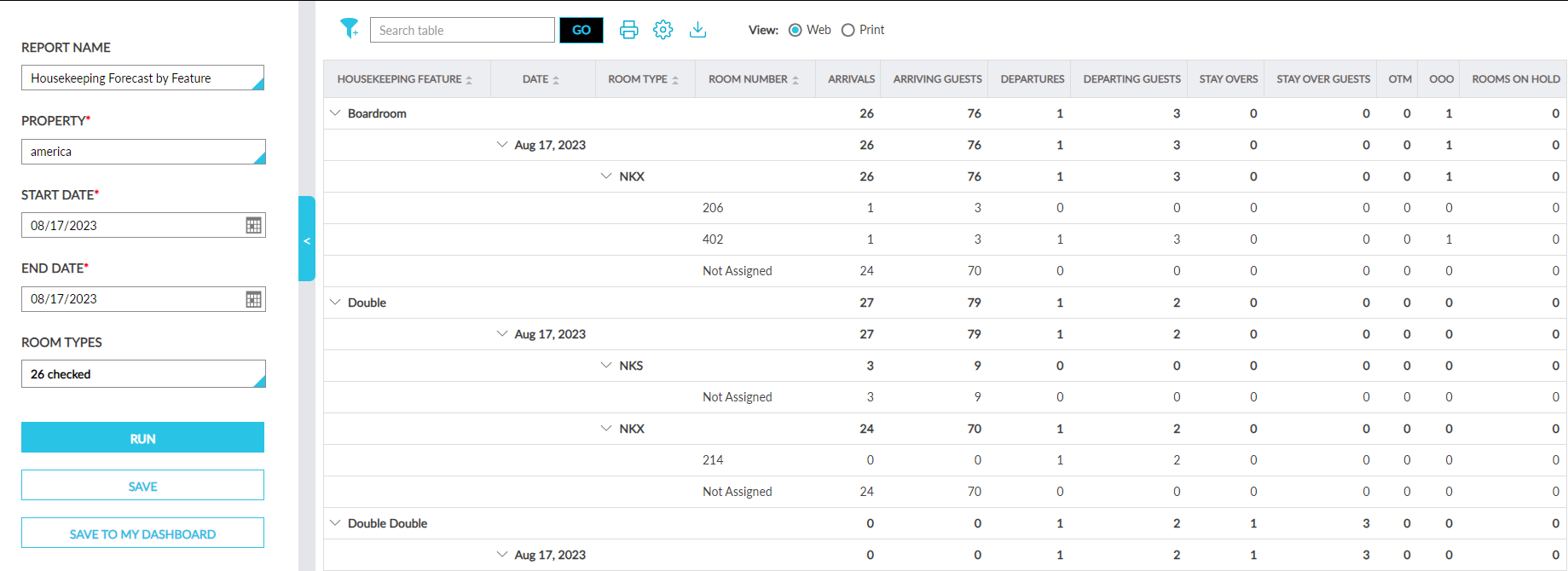
The Housekeeping Forecast by Feature report provides a forecast of the number of rooms at the property with Housekeeping Features that require a service for the selected date range.
This report will be displayed under the Housekeeping section of the Dynamic Report screen only when the Housekeeping Features feature setting is enabled.
Perform the following steps to generate the report:
Navigate to Reports ➜ Dynamic Reports ➜ Housekeeping ➜ Housekeeping Forecast by Feature report.
Refer to the following table and fill in the fields.
|
Field |
Description |
|---|---|
|
Report Name |
Housekeeping Forecast by Feature |
|
Property |
Displays the current property by default. Users can select a different property if required. |
|
Start Date |
Displays the current property date by default. Users can select any future dates. Past dates cannot be selected. |
|
End Date |
Displays the current property date by default. Users can select a maximum of 365 days from the start date. |
|
Room Type |
This is a multi-select drop-down list that displays the room types available at the property. Users can select the preferred room types to be included in the generated report. |
Click Run to generate the report.
Click Save to save the report under User Favorites section.
Sample Report
Report Fields
This report displays the following fields:
|
Field |
Description |
|---|---|
|
Housekeeping Feature |
|
|
Date |
|
|
Room Type |
|
|
Room Number |
|
|
Arrivals |
Displays the count of reservations that are set to arrive for the day. The reservations under each room type with housekeeping features for which rooms are assigned or not assigned are displayed. |
|
Arriving Guests |
Displays the count of guests who are set to arrive for the day. The guests for each room type with housekeeping features for which rooms are assigned or not assigned are displayed. |
|
Departures |
Displays the count of reservations that are set to depart for the day. The reservations under each room type with housekeeping features for which rooms are assigned or not assigned are displayed. |
|
Departing Guests |
Displays the count of guests who are set to depart for the day. The guests for each room type with housekeeping features for which rooms are assigned or not assigned are displayed. |
|
Stay Overs |
Displays the count of stay over reservations for the day. The reservations under each room type with housekeeping features for which rooms are assigned or not assigned are displayed. |
|
Stay Over Guests |
Displays the count of stay over guests for the day. The guests for each room type with housekeeping features for which rooms are assigned or not assigned are displayed. |
|
OTM |
Displays the count of rooms in each room type with housekeeping features for which an Off the Market (OTM) inventory is created. |
|
OOO |
Displays the count of rooms in each room type with housekeeping features for which an Out of Order (OOO) inventory is created. |
|
Rooms on Hold |
Displays the count of rooms in each room type with housekeeping features for which an On Hold inventory is created. |