Ledger Summary by GL Code Report
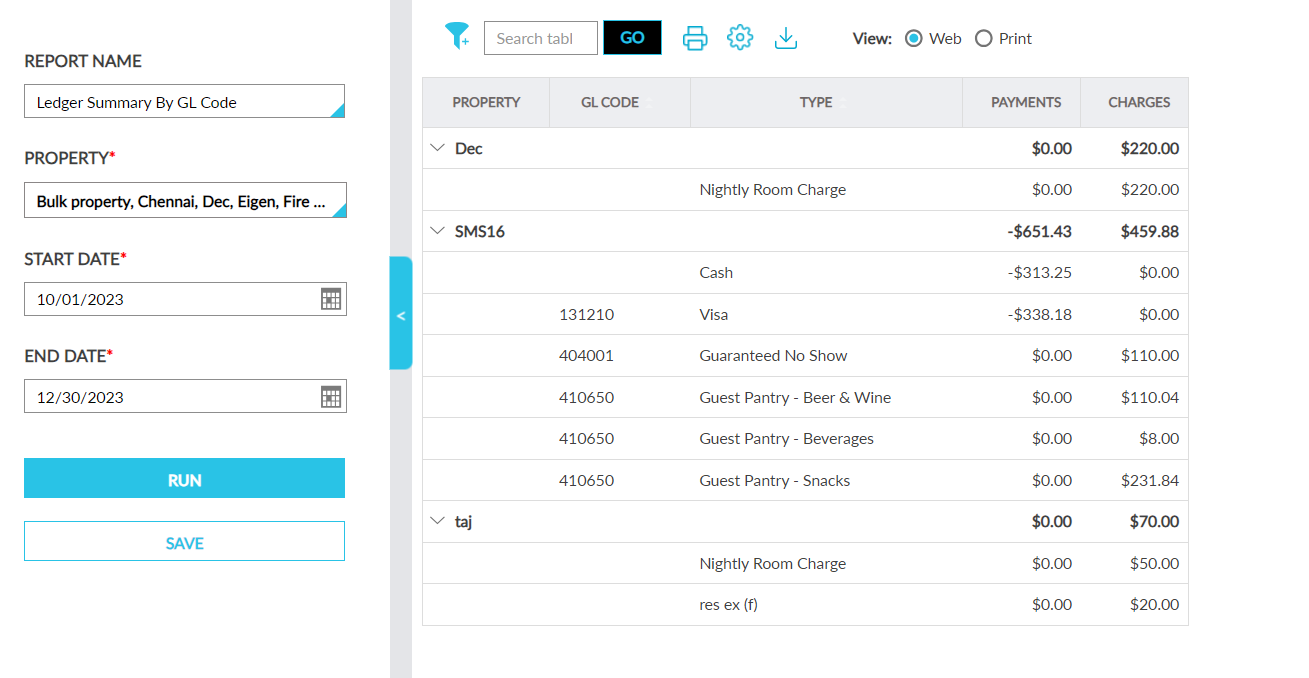
The Ledger Summary by GL Code Report displays the grand total of the charges posted and the payments made for each transaction item in the property, in the ascending order of the GL code associated with the items, for the selected date range.
Perform the following steps to generate the report:
Navigate to Reports ➜ Dynamic Reports ➜ Accounting ➜ Ledger Summary by GL Code.
Refer to the following table and fill in the fields.
|
Field |
Description |
|---|---|
|
Report Name |
Ledger Summary by GL Code. |
|
Property |
This is a mandatory field that displays the current property by default. Users can select the preferred properties for which the report must be generated. |
|
Start Date |
The start date from which the report must be generated. Users can select any date in the past up to the current property date. Future dates cannot be selected. |
|
End Date |
The end date up to which the report must be generated. Users can select any date in the past that is greater than the start date, up to the current property date. Future dates cannot be selected. |
Click Run to generate the report.
Click Save to save the report under User Favorites section.
Sample Report
Report Fields
This report displays the following fields:
|
Field |
Description |
|---|---|
|
Property |
|
|
GL Code |
|
|
Type |
|
|
Payments |
|
|
Charges |
|