Linked/Back to Back Reservations
The Linked/Back to Back Reservations report allows users to track the back-to-back or linked reservations created during the selected date range.
Perform the following steps to generate the report:
Navigate to Reports ➜ Dynamic Reports ➜ Guests/Reservations ➜ Linked/Back to Back Reservations report
Refer to the following table and fill in the fields.
|
Field |
Description |
|---|---|
|
Report Name |
Linked/Back to Back Reservations. |
|
Start Date |
The start date for report generation. The current property date is displayed by default. This is a mandatory field that allows users to select past or future dates. |
|
End Date |
The end date for report generation. The current property date is displayed by default. This is a mandatory field that allows users to select past or future dates. |
|
Reservation Type |
This is an optional single-select drop-down list that displays the following options:
|
Click Run to generate the report.
Click Save to save the report under User Favorites section.
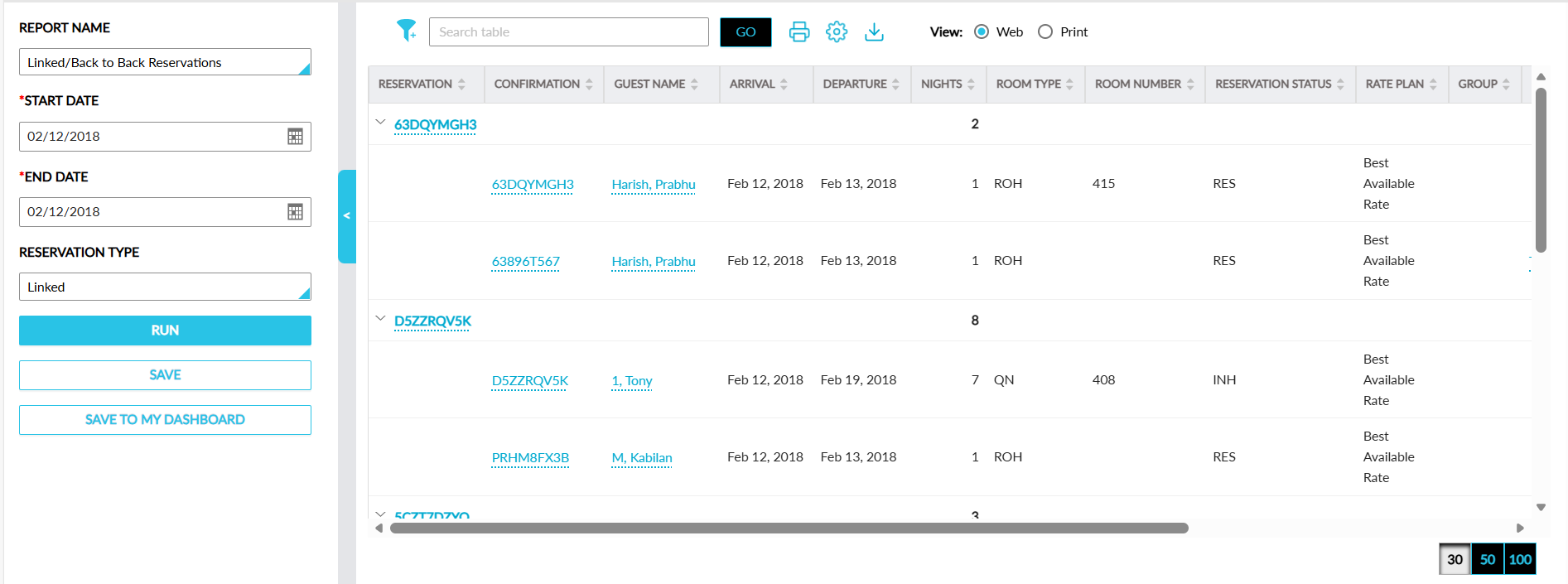
Sample Report
Report Fields
This report displays the following fields:
|
Field |
Description |
|---|---|
|
Reservation |
The confirmation ID of the first reservation in the B2B link or the first arriving reservation in the linked link is displayed as a hyperlink along with an accordion. When clicked, users are navigated to the respective reservation in a new tab in the browser. The records are grouped based on the confirmation ID. When the accordion is collapsed, value for the Nights column alone is displayed. When the accordion is expanded, values are displayed for the remaining columns. Users can search for a record using this value. This column can be sorted. |
|
Confirmation |
The confirmation IDs of the reservations in the B2B/linked link displayed as a hyperlink. When clicked, users are navigated to the respective reservation in a new tab in the browser. Users can search for a record using this value. This column can be sorted. |
|
Guest Name |
The guest name associated with the reservation. Users can search for a record using this value. This column can be filtered sorted. |
|
Arrival |
The arrival date of the reservation. This column can be sorted. |
|
Departure |
The departure date of the reservation. This column can be sorted. |
|
Nights |
The total number of stay nights of the reservation. This column can be sorted. |
|
Room Type |
The room types used for booking the reservation. This column can be filtered and sorted. |
|
Room Number |
The room numbers assigned to the reservation. Users can search for a record using this value. This column can be filtered and sorted. |
|
Reservation Status |
The status of the reservation. This column can be filtered and sorted. |
|
Rate Plan |
The rate plans used for booking the reservation. This column can be filtered and sorted. |
|
Group |
The group name associated with the reservation displayed as a hyperlink. When clicked, users are navigated to the respective group page. Users can search for a record using this value. This column can be filtered and sorted. |
|
Company Name |
The company name associated with the reservation displayed as a hyperlink. When clicked, users are navigated to the respective company profile. Users can search for a record using this value. This column can be filtered and sorted. |
|
Default Payment |
The default payment method associated with the reservation. Users can search for a record using this value. This column can be filtered and sorted. |
|
Guests |
The total number of guests associated with the reservation. This column can be sorted. |
|
Loyalty Program |
The loyalty program associated with the reservation is displayed in the following format: Loyalty program code – Member ID. Users can search for a record using this value. This column can be filtered and sorted. |
|
First Arrival |
The arrival date of the first reservation in the B2B link or the earliest arrival date among the reservations in the linked link is displayed. This column can be sorted. |
|
Last Departure |
The departure date of the last reservation in the B2B link or the latest departure date among the reservations in the linked link is displayed. This column can be sorted. |
|
Market Segment |
The market segment associated with the reservation. Users can search for a record using this value. This column can be filtered and sorted. |
|
Source Of Business |
The source of business associated with the reservation. Users can search for a record using this value. This column can be filtered and sorted. |