Lost Business Tracking Report
The Lost Business Tracking report allows users to track the reservations that were cancelled/aborted halfway through the booking process.
Navigate to Reports ➜ Dynamic Reports ➜ Manager ➜ Lost Business Tracking.
Refer to the following table and fill in the fields.
|
Field |
Description |
|---|---|
|
Report Name |
Lost Business Tracking. |
|
Property |
This is a mandatory multi-select drop-down list that allows users to select the properties for report generation. The current property is selected by default. |
|
Start Date |
The start date for report generation. By default, the current property date is selected. This is a mandatory field that allows users to select past or future dates. |
|
End Date |
The end date for report generation. By default, the current property date is selected. This is a mandatory field that allows users to select past or future dates. |
|
Type |
This is a mandatory muti-select drop-down list that allows users to select from the following options:
|
|
Reason |
This is a mandatory multi-select drop-down list that allows users to select the reasons for lost business tracking. |
Click Run to generate the report.
Click Save to save the report under User Favorites section.
Sample Report
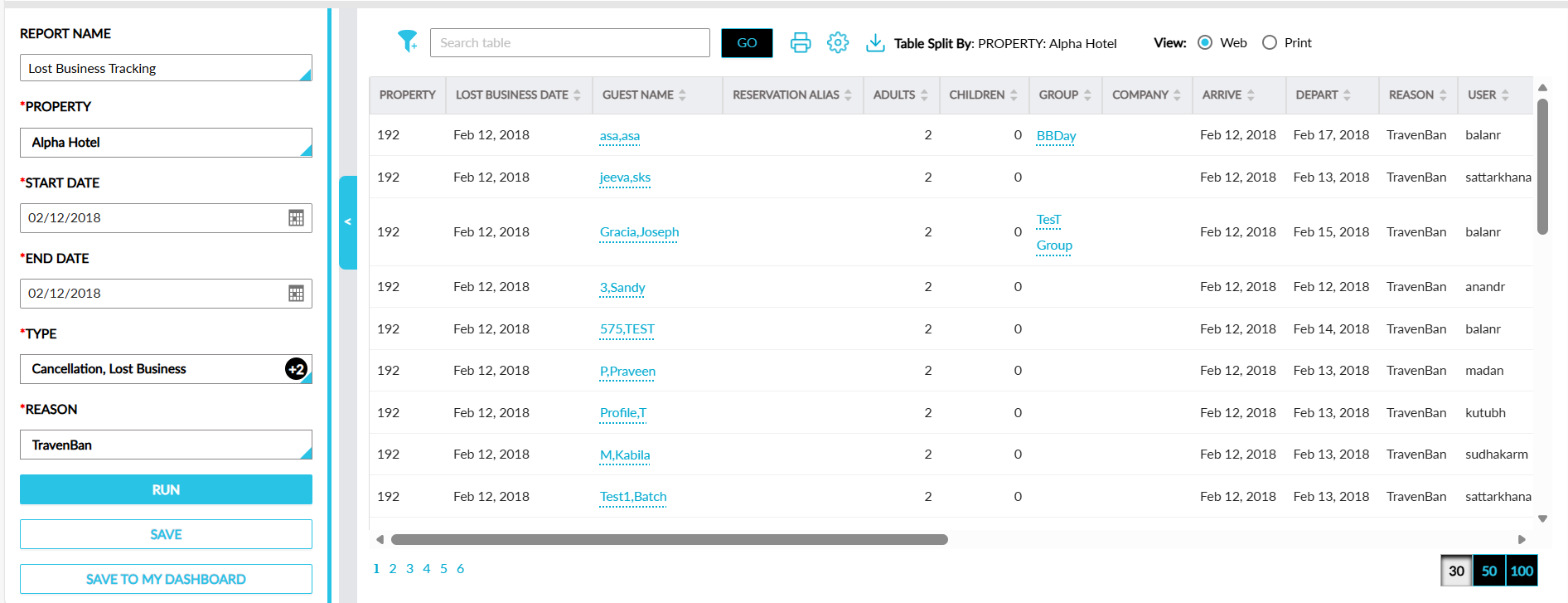
Report Fields
This report displays the following fields:
|
Field |
Description |
|---|---|
|
Property |
The property for which the reservation was being booked. |
|
Lost Business Date |
The date when the reservation booking was cancelled/aborted. This column can be sorted. |
|
Guest Name |
The guest name associated with the reservation. This column can be sorted. |
|
Reservation Alias |
The alias name configured for the guest. This column can be sorted. |
|
Adults |
The count of adults added to the reservation. This column can be sorted. |
|
Children |
The count of children added to the reservation. This column can be sorted. |
|
Group |
The group name associated with the reservation. This column can be sorted. |
|
Company |
The company name associated with the reservation. This column can be sorted. |
|
Arrive |
The arrival date of the reservation. This column can be sorted. This column can be sorted. |
|
Depart |
The departure date of the reservation. This column can be sorted. |
|
Reason |
The reason entered when the reservation booking was cancelled/aborted. This column can be filtered and sorted. |
|
User |
The user who cancelled/aborted the reservation booking process. This column can be sorted. |
|
Phone Number |
The phone number of the guest. This column can be sorted. |
|
Email ID |
The email address of the guest. This column can be sorted. |
|
Lost Revenue |
The revenue lost for the reservation that was cancelled/aborted. This column can be sorted. |
|
Cancellation Fee |
The cancellation fee for the reservation. This column can be sorted. |
|
Deposit |
The deposit amount for the reservation. This column can be sorted. |
|
Lost Business Tracking Type |
The lost business type selected for the cancelled/aborted reservation. This column can be filtered and sorted. |
|
Confirmation Code |
The confirmation code of the reservation. This column can be sorted. |