Market Segment Revenue by Room Type Report
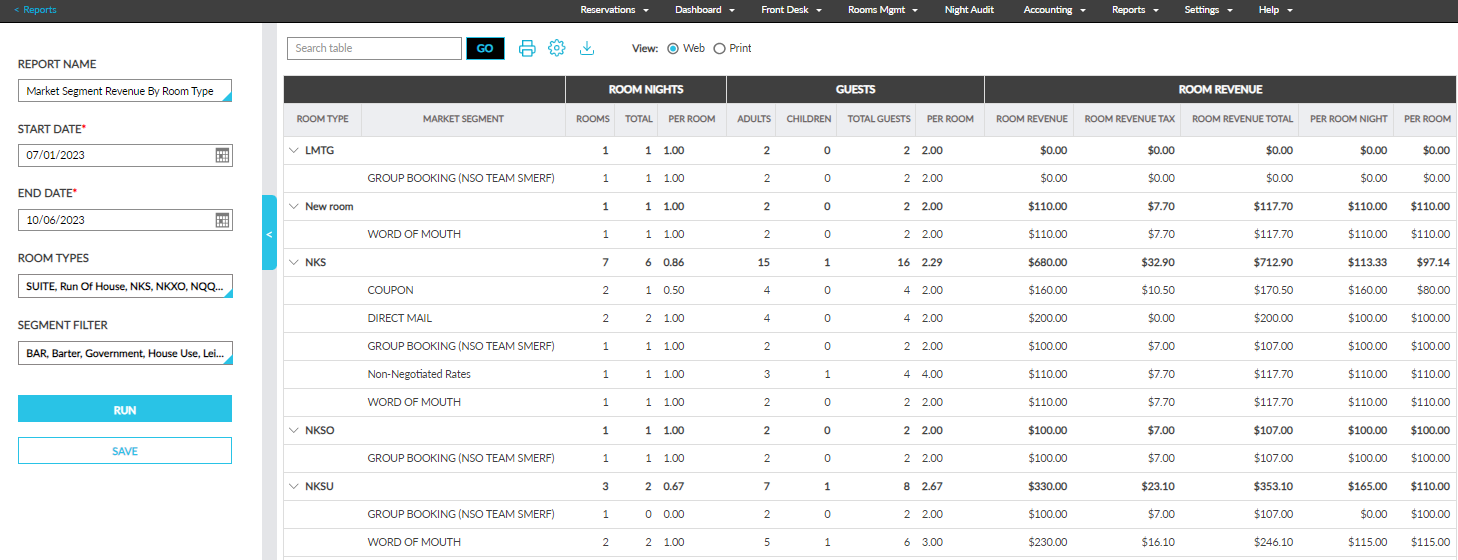
The Market Segment Revenue by Room Type Report allows users to track the revenue generated from a market segment for every room type available at the property for a selected date range.
Perform the following steps to generate the report:
Navigate to Reports ➜ Dynamic Reports ➜ Revenue/Forecasting ➜ Market Segment Revenue by Room Type.
Refer to the following table and fill in the fields.
|
Field |
Description |
|---|---|
|
Report Name |
Market Segment Revenue by Room Type |
|
Start Date |
The start date from which the report must be generated. Users can select any dates in the past, present, or future. |
|
End Date |
|
|
Room Types |
|
|
Segment Filter |
|
Click Run to generate the report.
Click Save to save the report under User Favorites section.
Sample Report
Report Fields
This report displays the following fields:
|
Field |
Description |
|---|---|
|
Room Type |
|
|
Market Segment |
|
|
Room Nights |
|
|
Rooms |
|
|
Total |
|
|
Per Room |
|
|
Guests |
|
|
Adults |
|
|
Children |
|
|
Total |
|
|
Per Room |
|
|
Room Revenue |
|
|
Room Revenue |
|
|
Room Revenue Tax |
|
|
Room Revenue Total |
|
|
Per Room Night |
|
|
Per Room |
|