Out of Order Rooms Report
The Out of Order Rooms report allows users to view a list of all rooms for which inventory blocks are created.
Perform the following steps to generate the report:
Navigate to Reports ➜ Dynamic Reports ➜ Housekeeping ➜ Out of Order Rooms report.
Refer to the following table and fill in the fields.
|
Field |
Description |
|---|---|
|
Report Name |
Out of Order Rooms. |
|
Buildings |
This is an optional multi-select drop-down list that allows users to select the buildings to be included for report generation. |
|
Start Date |
The start date for report generation. The current property date is displayed by default. This is a mandatory field that allows users to select past or future dates. |
|
End Date |
The end date for report generation. The current property date is displayed by default. This is a mandatory field that allows users to select past or future dates. |
Click Run to generate the report.
Click Save to save the report under User Favorites section.
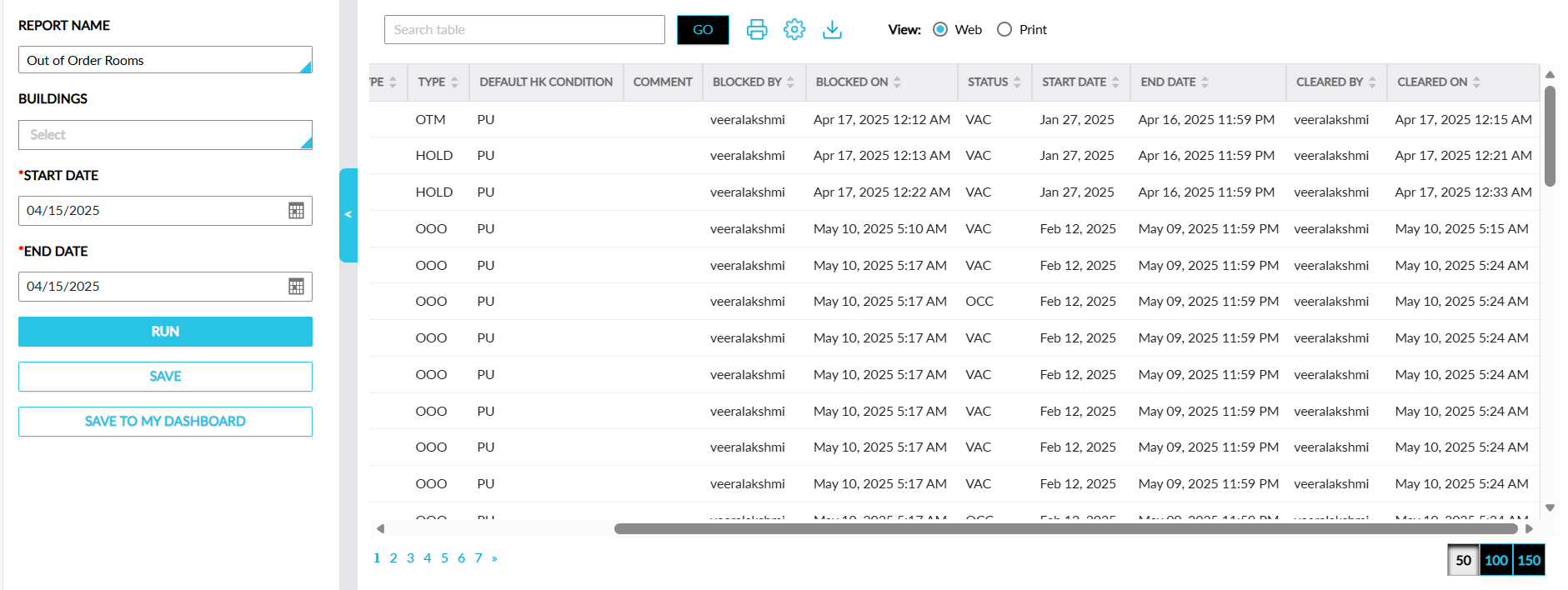
Sample Report
Report Fields
This report displays the following fields:
|
Field |
Description |
|---|---|
|
Building |
The building associated with the room for which inventory block is created. |
|
Room Number |
The room number of the room for which inventory block is created. This column can be sorted. |
|
Room Type |
The room type of the room for which inventory block is created. This column can be sorted. |
|
Type |
The type of inventory block created for the room, that is, OOO or OTM or Hold. This column can be sorted. |
|
Default HK Condition |
The default housekeeping condition to which the room must be reverted. |
|
Comment |
The comment entered when the inventory block was created for the room. |
|
Blocked By |
The user who created the block. This column can be sorted. |
|
Blocked On |
The date when the block was created. This column can be sorted. |
|
Status |
The housekeeping status of the room. This column can be sorted. |
|
Start Date |
The start date for the room block. This column can be sorted. |
|
End Date |
The end date for the room block. This column can be sorted. |
|
Cleared By |
The user who cleared the inventory block for the room. This column can be sorted. |
|
Cleared On |
The date when the block was cleared for the room. This column can be sorted. |