Pantry Items Inventory Count Report
The Pantry Items Inventory Count report allows users to keep track of the current availability of the pantry inventory items and the quantity that must be replenished.
Perform the following steps to generate the report:
Navigate to Reports ➜ Dynamic Reports ➜ Accounting ➜ Pantry Items Inventory Count report
Refer to the following table and fill in the fields.
|
Field |
Description |
|---|---|
|
Report Name |
Pantry Items Inventory Count. |
|
Date |
This is a mandatory field that displays the current property date by default. This report can be generated for the current property date only. Past or future dates cannot be selected. |
|
Pantry Item Name |
This is a mandatory multi-select drop-down list that allows users to select the pantry items whose inventory details are to be tracked. |
|
Inactive Items |
When selected, the inactive pantry items are included in the report. |
|
Items Without Inventory |
When selected, pantry items for which inventory tracking is not required is displayed in the report. |
Click Run to generate the report.
Click Save to save the report under User Favorites section.
Sample Report
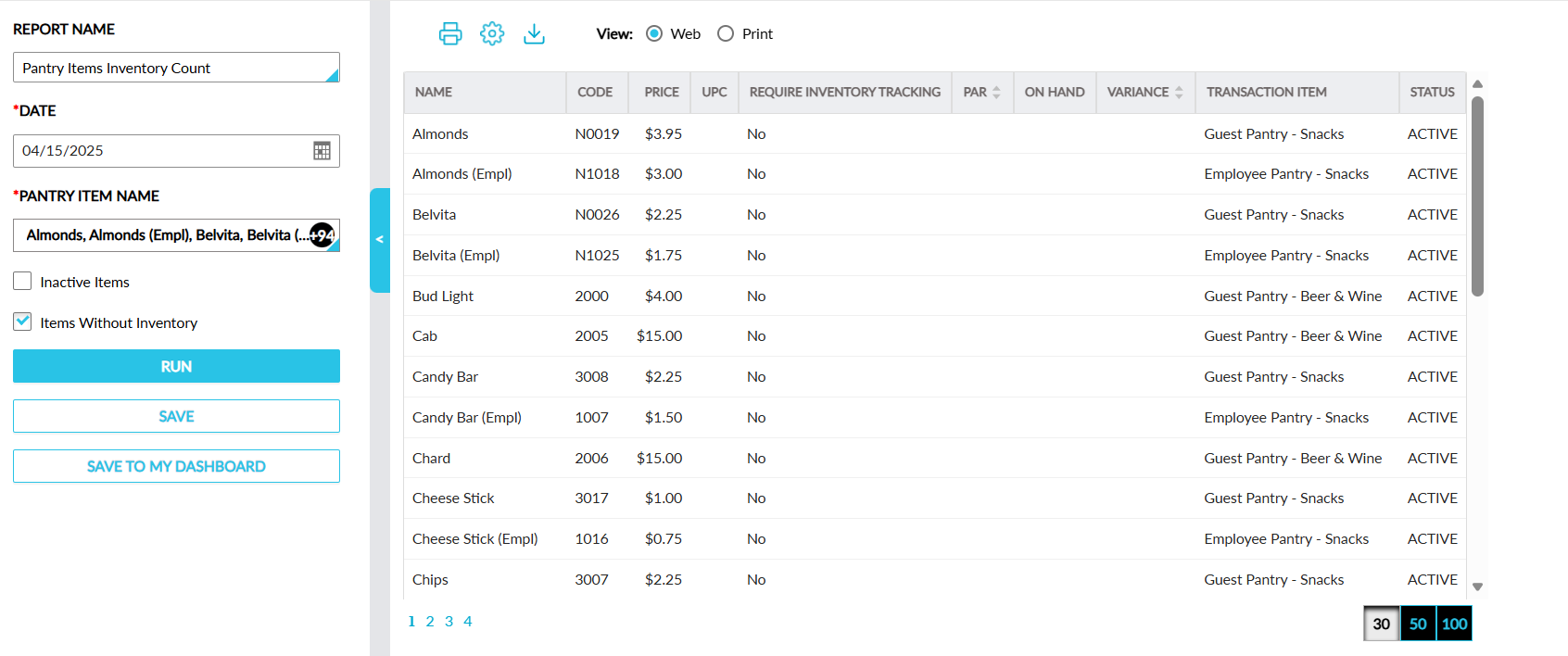
This report displays the following fields:
|
Field |
Description |
|---|---|
|
Name |
The pantry item name. |
|
Code |
The pantry item code. |
|
Price |
The price configured for the item. |
|
UPC |
The UPC (universal product code) value of the item. |
|
Require Inventory Tracking |
Indicates whether inventory tracking is required for the item. |
|
PAR |
The periodic automatic replenishment value, that is, the preferred quantity configured for each item. This column can be sorted. |
|
On Hand |
The quantity of the pantry inventory item that is currently available to be sold. |
|
Variance |
The difference between the available quantity (on hand) and PAR. This column can be sorted. |
|
Transaction Item |
The transaction item associated with the pantry inventory item. |
|
Status |
The status of the item. |