Redemption Stays Report
The Redemption Stays Report allows users to track the redemption stays available at the property for the selected date range. The reservations created using rate plans/packages for which offers were redeemed are denoted as redemption stays. Reservations for which the redemption rate code is used for at least one night of stay are displayed in this report.
Perform the following steps to generate the report:
Navigate to Reports ➜ Dynamic Reports ➜ Guests/Reservations ➜ Redemption Stays Report.
Refer to the following table and fill in the fields.
|
Field |
Description |
|---|---|
|
Report Name |
Redemption Stays Report |
|
Property |
The properties for which the report must be generated. |
|
Start Date |
The start date from which the report must be generated. |
|
End Date |
The end date up to which the report must be generated. |
|
Room Types |
The room types that must be included in the report. |
|
Rate Plan |
The rate plans that must be included in the report. |
|
Status |
The status of the reservations that must be included in the report. |
Click Run to generate the report.
Click Save to save the report under User Favorites section.
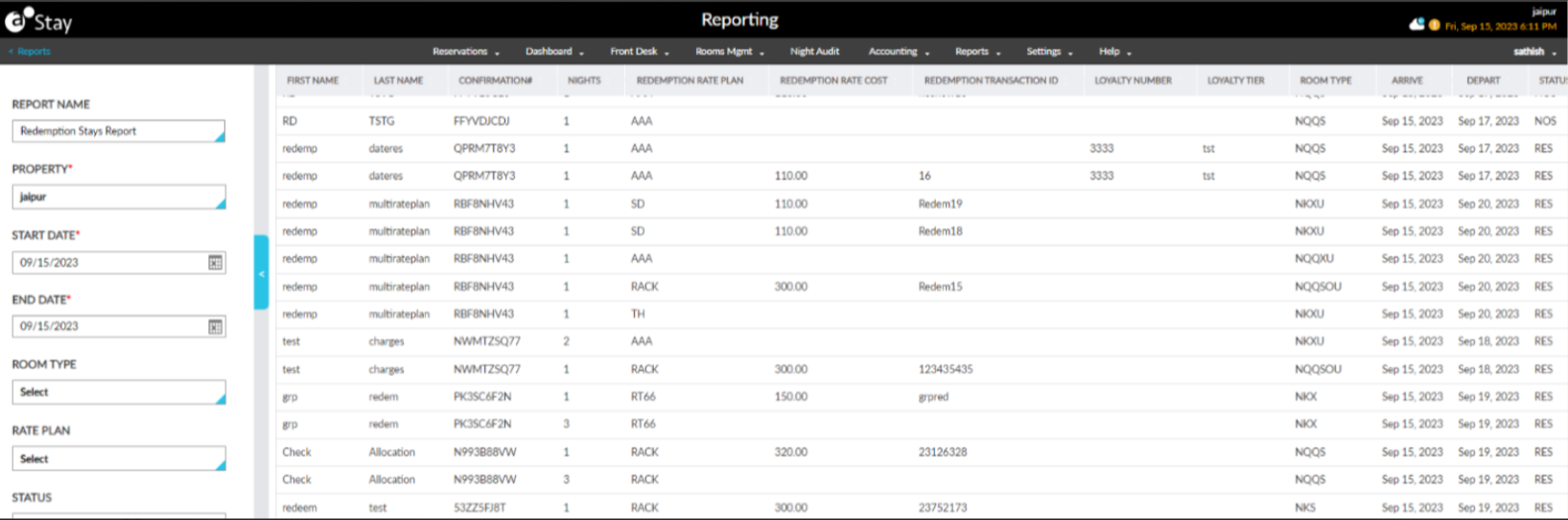
Sample Report
Report Fields
This report displays the following fields:
|
Field |
Description |
|---|---|
|
First Name |
The first name of the guest profile associated with the reservation. This column can be sorted. |
|
Last Name |
The last name of the guest profile associated with the reservation. This column can be sorted. |
|
Confirmation# |
The confirmation ID of the reservation. This column can be sorted. |
|
Nights |
The stay nights associated with each rate plan used for the reservation. This column can be sorted. |
|
Redemption Rate Plan |
The redemption rate plan used for the reservation. This column can be sorted. |
|
Redemption Rate Cost |
The redemption rate received from ACRS that is applied for the reservation. This column can be sorted. |
|
Redemption Transaction ID |
The identifier sent from ACRS which indicates that the rate plan used is a redemption rate plan. This column can be sorted. |
|
Loyalty Number |
The loyalty number of the loyalty program associated with the guest profile. This column can be sorted. |
|
Loyalty Tier |
The tier details of the loyalty program associated with the guest profile. This column can be sorted. |
|
Room Type |
The room type used for the reservation. This column can be sorted. |
|
Arrive |
The arrival date of the reservation. This column can be sorted. |
|
Third-Party Confirmation |
The third-party confirmation number for the reservation if applicable. |
|
Depart |
The departure date of the reservation. This column can be sorted. |
|
Status |
The status of the reservation. This column can be sorted. |
|
Third-Party Cancellation |
The third-party cancellation number for the reservation if available. |