Tax Postings Report
The Tax Postings report allows users to track the tax amount posted for a transaction/inventory item that is posted to an account, for a selected date range.
Perform the following steps to generate the report:
Navigate to Reports ➜ Dynamic Reports ➜ Accounting ➜ Tax Postings Report.
Refer to the following table and fill in the fields.
|
Field |
Description |
|---|---|
|
Report Name |
Tax Postings. |
|
Start Date |
The start date for report generation. This is a mandatory field that displays the current property date by default. Users can select any date in the past up to the current property date. Future dates cannot be selected. |
|
End Date |
The end date for report generation. This is a mandatory field that displays the current property date by default. Users can select any date in the past up to the current property date. Future dates cannot be selected. |
|
Account Types |
This is an optional multi-select drop-down list that allows users to select the account types to be included in the report. |
|
Transaction Type |
This is an optional multi-select drop-down list that allows users to select the transaction types to be included in the report. |
|
Sort By |
This is an optional single-select drop-down list that displays the following options:
|
Click Run to generate the report.
Click Save to save the report under User Favorites section.
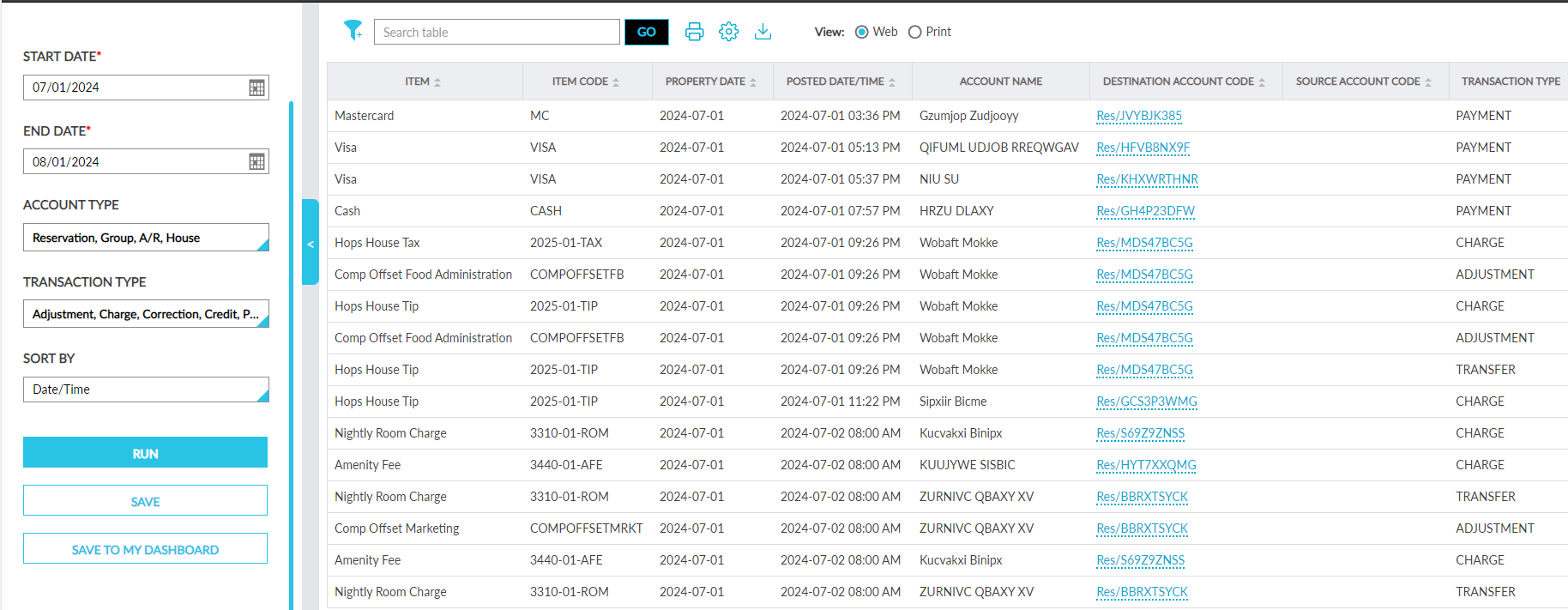
Sample Report
Report Fields
This report displays the following fields:
|
Field |
Description |
|---|---|
|
Item |
The item for which tax was posted. This column can be filtered and sorted. Users can search for a record using this value. |
|
Item Code |
The item code of the item for which tax was posted. This column can be filtered and sorted. Users can search for a record using this value. |
|
Property Date |
Each date in the selected date range. This column can be filtered and sorted. |
|
Posted Date/Time |
The date and time when the tax amount was posted. This column can be sorted. |
|
Account Name |
The name of the account to which the tax amount was posted. This column can be filtered. Users can search for a record using this value. |
|
Destination Account Code |
The account code of the account to which the tax amount was posted. This column can be sorted. Users can search for a record using this value. |
|
Source Account Code |
The source account code of the account to which the tax amount was posted originally. This column can be sorted. Users can search for a record using this value. |
|
Transaction Type |
The type of transaction performed. This column can be filtered. |
|
Amount |
The tax amount posted. This column can be sorted. |