Additional User Actions to be Performed When Initiating Multiple Date Rolls Manually
The current verification process that is followed in Stay when users attempt to perform a date roll within 12 hours of the last date roll is improved by prompting additional confirmation from the users.
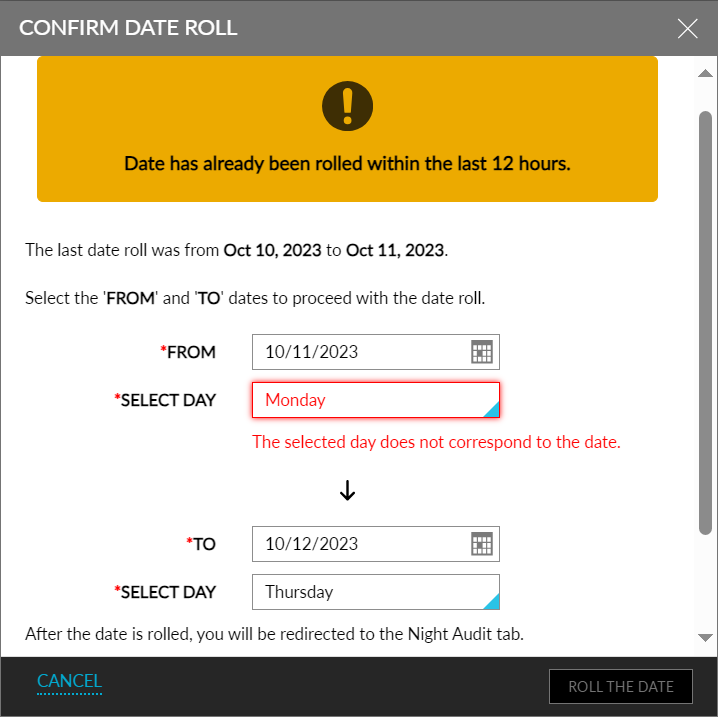
The following fields in the Confirm Date Roll pop-up screen support this feature:
-
A notification box displays the following message: Date has already been rolled within the last 12 hours.
-
The date details of the date roll that was last performed is displayed below this notification box.
-
Users must select the date and day from which they want to roll the date to the date and day of the intended date roll.
-
From: This date picker displays the dates of the current month when clicked. Users can select any date from the past, present, or future from which the date must be rolled. This field is displayed blank by default. Users can select only one date.
-
Select Day: This is a drop-down list that displays the seven days of a week. This field is displayed blank by default. Users can select the day from which the date must be rolled.
-
To: This date picker displays the dates of the current month when clicked. Users can select any date from the past, present, or future to which the date must be rolled. This field is displayed blank by default. Users can select only one date.
-
Select Day: This is a drop-down list that displays the seven days of a week. This field is displayed blank by default. Users can select the day to which the date must be rolled.
-
-
The Roll the Date option is enabled only when the values for the mentioned fields are selected.
-
If there is a mismatch between the selected day and dates, the following messages are displayed below the fields:
-
The selected date does not correspond to the day
-
The selected day does not correspond to the date.
-
-
Although users can select any dates in the From and To date pickers, the date roll starts and completes successfully only when the following conditions are satisfied:
-
The date selected in the From field is equal to the current property date.
-
The day selected in the Select Day field is equal to the current property day.
-
The date selected in the To field is one day ahead of the current property date, that is, the next calendar date.
-
The day selected in the Select Day field is one day ahead of the current property day, that is, the next day.
-