Alert Users When Modifying Payment Methods with Authorization Held
Stay alerts users of the impact on the authorized amount when the payment method associated with a reservation folio is changed. With this feature, the amount to be authorized is dynamically recalculated and reauthorized by the new payment method. Previously, users had to manually release the authorized amount and reauthorize the new credit card when the payment method was changed.
Feature Setting
-
Name: Enhanced Authorization
-
Value: Must be enabled
-
Comments: License is not required
Viewing Expected Authorization for Credit Card Payment Methods
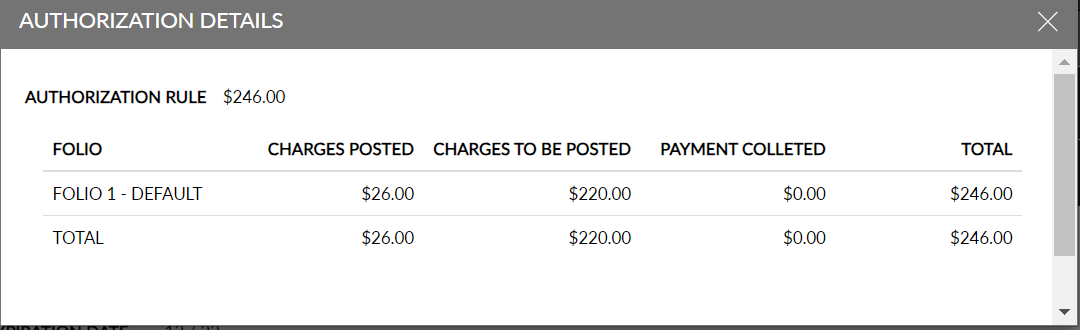
Users can view the expected authorization by clicking on the Auth Details hyperlink on the Payment Methods section of the reservation. This hyperlink is displayed only when the Enhanced Authorization feature setting is enabled and when a credit card payment method is associated with the reservation. This hyperlink is not displayed when the reservation has cash/check/direct bill payment methods.
The Authorization Details screen displays the following information:
|
Field |
Description |
|---|---|
|
Authorization Rule |
Displays the expected amount to be authorized based on the auth calculation rule associated. |
|
Folio |
Displays all the folios associated with the credit card payment method. |
|
Charges Posted |
Displays the sum of all the charges and credits already posted to the folios inclusive of tax. |
|
Charges to be Posted |
Displays the sum of the charges from the Estimated Charges section that is inclusive of tax and yet to be posted to the folios. |
|
Payment Collected |
Displays the total payments collected for the folios. |
|
Total |
Displays the total amount calculated as the sum of Charges Posted + Charges to be Posted - Payment collected. |
When there is no expected authorization amount for the payment method, the following message is displayed: No authorization information to display.
Changing Payment Methods Associated with Folios
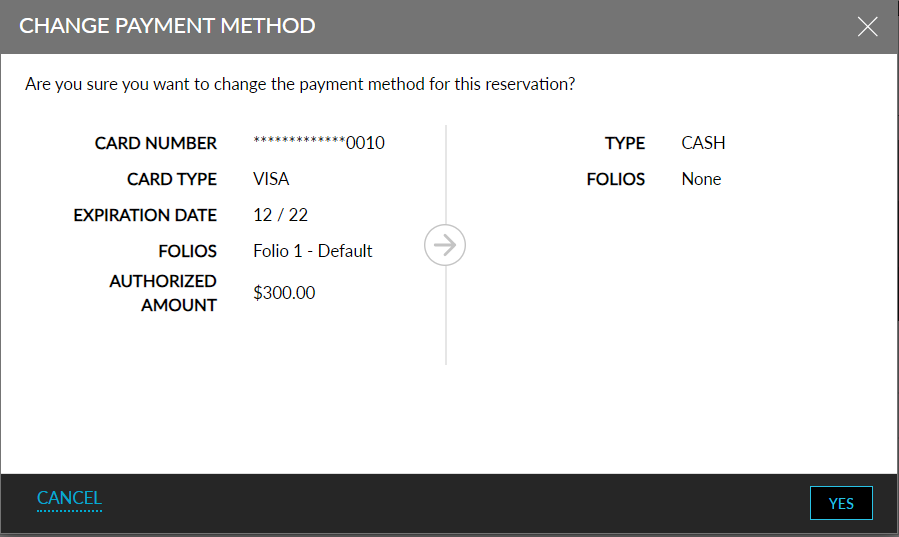
When users try to change the payment method associated with a folio, the Change Payment Method screen appears that displays the following details:
-
The message, Changing the payment method for this reservation will impact any authorization held on the file, is displayed. If the user has selected Any Payment Method option in the Payment Method Update Warning section, the message is displayed whenever the payment method changes. If the user has selected Authorization Impact option, the message is displayed when the change in payment method impacts the authorization amount.
-
The following details are displayed for the current and the new payment method:
Credit Card
|
Field |
Description |
|---|---|
|
Card Number |
Displays the credit card number in masked form. |
|
Card Type |
Displays the issuer of the card. |
|
Expiration Date |
Displays the expiration date of the card in MM/YY format. |
|
Folios |
The folios associated with the card is displayed. |
|
Authorized Amount |
The amount authorized is displayed. |
Cash/Check
|
Field |
Description |
|---|---|
|
Type |
Displays cash or check. |
|
Folios |
Displays the associated folios. |
Direct Bill
|
Field |
Description |
|---|---|
|
Type |
Displays Direct Bill |
|
Account |
Displays the company name. |
|
Folios |
Displays the associated folios. |
When users click Yes, the payment method is changed successfully if there is no impact on the authorized amount. If there is an impact on the authorized amount, users are navigated to the Authorization screen and the Change Payment Method screen closes.
Authorization Screen
This screen is displayed when there is an impact on the authorized amount when the payment method is changed. This screen displays the details of the current and new payment method. Users can click on the Adjust Authorization button to automatically release the authorized amount from the current credit card and reauthorize the new credit card.
The Adjust Authorization button is enabled only when Release and Reauthorize hyperlinks are enabled for the current and new credit cards. When users click the Adjust Authorization button, the Adjust Authorization pop-up screen appears that displays the following message: Are you sure you want to release current authorization and reauthorize new payment? When users click YES, the authorization amount is automatically adjusted. When users click NO, the pop-up screen closes and users are navigated to the Authorization screen where users can manually release and reauthorize the amount.
When users create a new credit card method and associate the payment method with the default folio of the reservation, the Change Payment Method and Authorization pop-up screen are not displayed.
Changing Payment Method of Third-Party Folios
When users change the payment method of third-party folios to cash/check, the Change Payment screen appears that displays the details of the current and new payment methods. When users click Yes, the payment method is changed successfully.
When the payment method is changed to a credit card, the Change Payment screen appears and when users click Yes, the Authorization screen appears. The following additional details are displayed on the Authorization screen:
|
Field |
Description |
|---|---|
|
Third Party Folio |
|
|
Available Credit |
Displays the current available credit limit of the associated A/R account. |
|
Amount to be Settled |
Displays the amount to be settled calculated as the sum of Charges Posted + Charges to be Posted - Payment collected. |
If a credit card is marked as a third-party payment method, the Available Credit is displayed as NA.
Changing Destinations of Routing Rules Associated with Reservations
When the user changes the destination of a routing rule to some other folio in the reservation, the Authorization screen is displayed if the payment method of the current destination folio is a credit card and has an authorization amount captured.
The authorized amount in the current destination folio is released, the auth amount is recalculated, and the credit card associated with the new destination folio is reauthorized based on the charges to be posted to the folio.
When the destination is changed to a third-party folio, the third-party folio details are displayed on the Authorization screen additionally. The Release Auth option is removed from the screen as it is not applicable for direct bill payments.
The Authorization screen is not displayed if the payment method associated with the new destination folio is cash/check.
The following fields support this feature:
-
The Payment Method Update Warning section in the Credit Cards tab on the Guest Accounting screen displays the following options:
-
Any payment method: When selected, the users are alerted whenever the payment method is changed even if there is no impact on the authorized amount.
-
Authorization Impact: When selected, the users are alerted only when the change in payment method impacts the authorized amount in the current or new payment method.
-
When either one of the options is selected, the other option gets disabled.
-
This section is displayed only when the Enhanced Authorization feature setting is enabled.
-
-
The Auth Details hyperlink is displayed next to the Release hyperlink on the Payment Methods section of the reservation. When clicked, the Authorization Details screen appears that displays the expected authorization for each credit card payment method associated with the reservation.