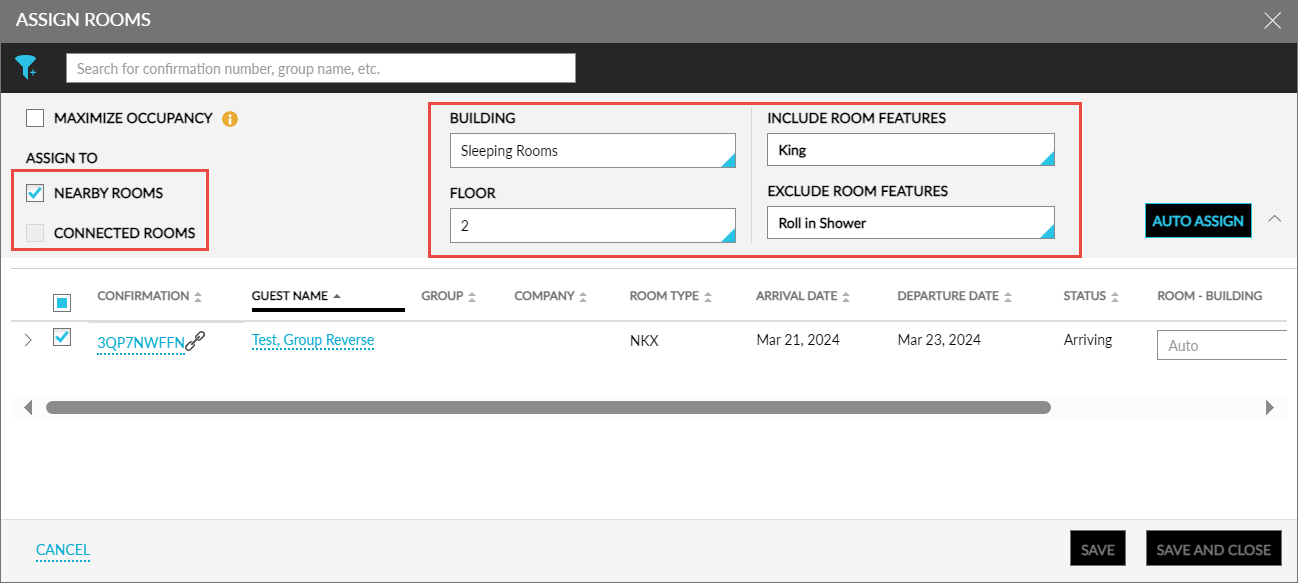
Assign Guest Preferred Rooms
Users can assign rooms to multiple reservations from the mentioned screens based on the following new criteria:
-
Rooms that are nearby to each other
-
Rooms that are connected to each other
-
Rooms located in the same building
-
Rooms located in the same floor
-
Rooms that include selected features
-
Rooms that exclude selected features
The following new fields have been added to the Assign Rooms pop-up screen that is accessed from the Tape Chart screen and the Check-In tab of the Batch Operations screen to help users assign the guest’s preferred rooms:
|
Field |
Description |
|---|---|
|
Include Room Features |
The drop-down list is enabled for selection when users select one or more reservations. The features that are available for the room types of the selected reservations are displayed. For example, if reservations from King and Queen room types are selected, the features available for these room types are displayed in the drop-down list. Once the features are selected by the users, the rooms for which the selected features are available are assigned to the reservations. |
|
Exclude Room Features |
This drop-down list displays the list of features in the property that have the Exclude from Auto Room Assignment flag enabled. Once the features are selected by the users, the rooms with the selected features are not assigned to the reservations. |
|
Connected Rooms |
When this checkbox is selected, the rooms that are marked as Connected are assigned to the selected reservations. For example, when users request connected rooms for 4 reservations, rooms will be assigned only when 4 connected rooms are available. When connected rooms are not available, the following message will be displayed: There are no connecting rooms available, and no other rooms will be assigned. This checkbox will be disabled for selection when the Nearby Rooms checkbox is selected. |
|
Nearby Rooms |
When this checkbox is selected, the rooms that are in proximity are assigned to the selected reservations. For example, when users request nearby rooms for 4 reservations, rooms will be assigned only when 4 nearby rooms are available. When nearby rooms are not available, the following message will be displayed: There are no nearby rooms available, and no other rooms will be assigned to the reservations. This checkbox will be disabled for selection when the Connected Rooms checkbox is selected. |
|
Building |
This drop-down list displays the buildings that are available at the property. By default, the Any building option will be selected. When there is only one building available at the property, the building is selected by default. When users do not select a building, rooms are assigned based on the other criteria selected by the users, or the Room Assignment option selected by the property. |
Rooms are assigned to the reservations based on the following order of precedence of the selection criteria:
-
Building
-
Floor
-
Include Features
-
Exclude Features
-
Nearby or Connected Rooms
When no rooms that match the selected criteria are available, the following message will be displayed: Failed: Rooms not found.