Assign
The Assign option allows users to assign the maintenance staffs to their respective roles. After the user has defined all the maintenance roles and service details, the user is ready to add the staff as assign them housekeeping roles.
Perform the following steps to assign the maintenance staffs to the roles:
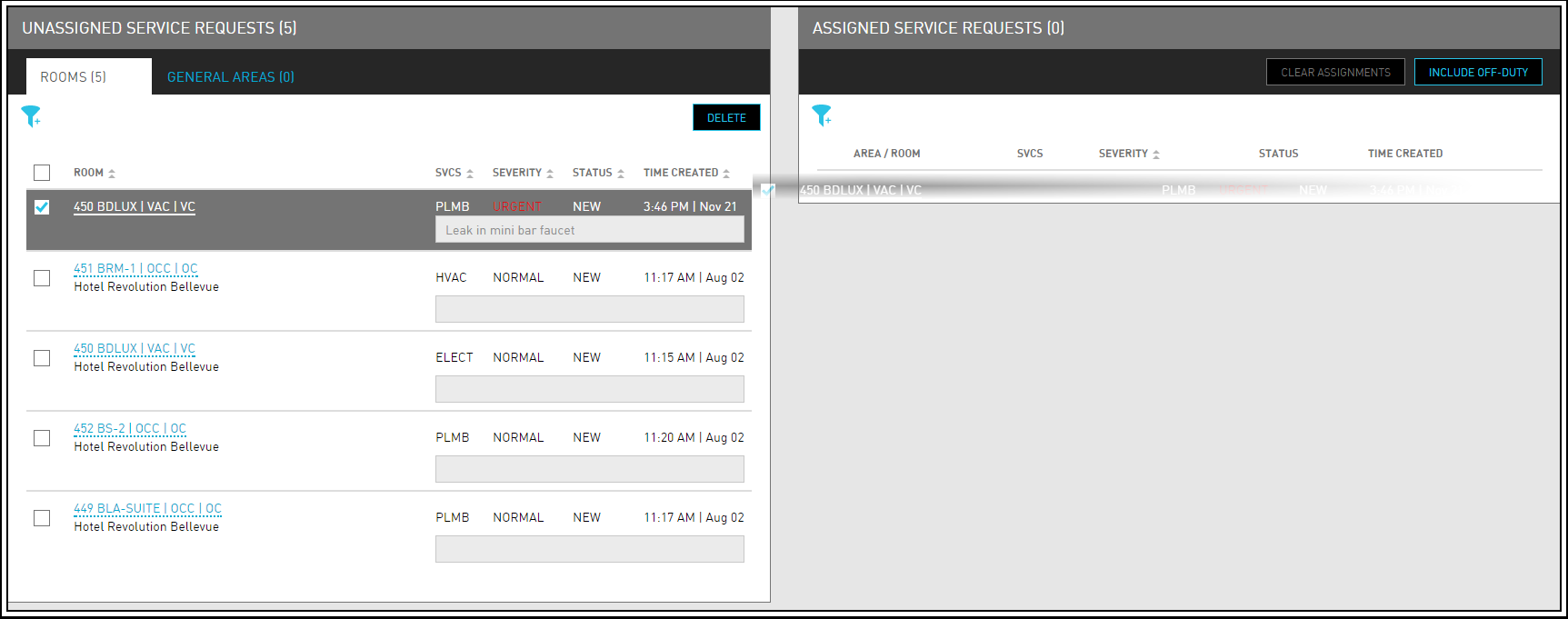
Navigate to Rooms Mgmt ➜ Maintenance ➜ Assign. Rooms or areas that need some type of service appears in the Unassigned Service Requests box.
If the user has a large property, use the filters in each section to narrow down the list of unassigned service requests by service, buildings, inventory status, maintenance condition or room types.
Select the checkbox next to the Room or General Area to select all rooms/areas in the list at once.
Select the box next to the room or area that the user wants to move between boxes.
Click and drag it to the Assigned Service Requests box.
Click the Area/Room link. The Overview dialog box appears.
Update the Housekeeping Condition if needed.
Click Request Service, if more are needed.
Click the arrow next to the Assigned Service Request to expand the details.
Click Save to review the full list of unassigned services.
The scheduled date and time, reasons and comments entered when creating maintenance service requests are displayed inside the accordion in the Unassigned Service Requests & Assigned Service Requests grid.