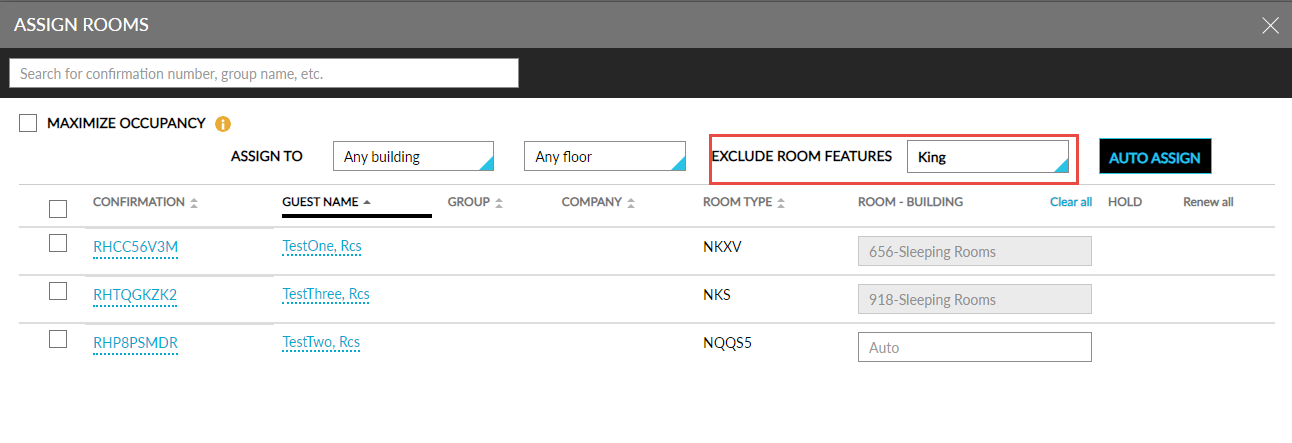
Assigning Rooms from Batch Operations - Check-In tab
When users select multiple reservations and click the Assign Rooms option on the Check-In tab of the Batch Operations screen, the rooms with the Exclude from Auto Room Assignment flag enabled will not be auto assigned. The message, Exclude room features will be ignored from auto room assignment when the Maximize Occupancy has been selected, is displayed is displayed in the Assign Rooms pop-up screen.
When users enable the Maximize Occupancy option in the Assign Rooms screen, the message, Exclude Auto-Assignment has been ignored, is displayed and the rooms with excluded features are assigned to reservations.
The excluded features for the rooms are displayed in the Exclude Room Features drop-down list on the Assign Rooms screen. All the features in the drop-down list are pre-selected by default when users want to maximize the occupancy. Users can uncheck the features if required. Based on the features selected, the rooms are assigned to reservations.