Configure Character Limit for Group Name
Stay allows users to configure a character limit for group names.
Set Character Limit
The Group Name Restriction flag in the Groups Default section in the Groups tab of the Property Setup screen (All Settings ➜ General ➜ Property, Buildings & Outlets) must be enabled to use this feature. An information icon added next to this flag displays the following message when hovered upon: When enabled, the property’s group name character limit is enforced for new groups created in the PMS.
This flag is disabled by default. When enabled, a new text input field, Character Limit, is displayed. Users can enter the preferred character limit in this field. This is a mandatory field that is displayed only when the Group Name Restriction flag is enabled. The default character limit is displayed as 100. Users can enter any value that ranges between a minimum value of 1 and a maximum value of 100. When users enter a value less than 1 or greater than 100, the text field is highlighted in red, and the following messages are displayed:
-
Minimum value should be 1
-
Maximum value should be 100
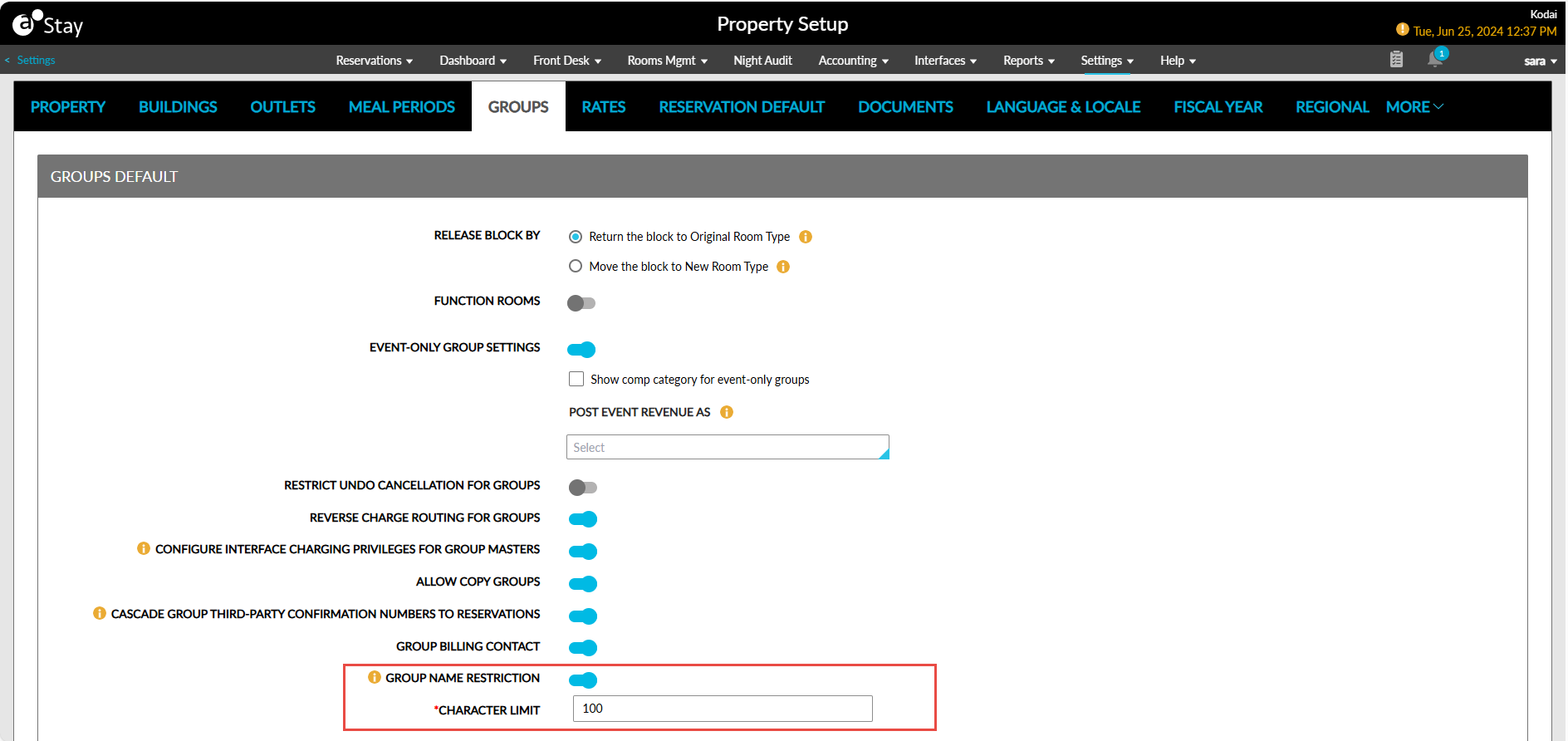
When the flag is turned off, users can continue to configure group names up to a maximum of 100 characters.
Create Groups in Stay
The character limit configured for a property is applied when groups are created from the following screens:
-
Create a new group ➜ Group Booking tab ➜ Details section
-
Group ➜ More ➜ Copy Group
-
Book Function Room ➜ Create a Group
When the group name is entered in these screens, the entered name is validated against the configured limit. The Group Name field is highlighted in red, and the following message is displayed when the count of characters in the name is greater than the limit: Enter Less than {character limit+1} character(s) with the group.
For example, when the limit configured is 5 and users enter a name that exceeds 5 characters, the message, Enter Less than 6 characters, is displayed.
Create Groups from Interfaces
Apart from the groups created in Stay, groups are also created through ACRS, Amadeus Sales and Event Management (ASEM), and Agilysys Sales & Catering. When an inbound request to create a group is received in Stay from any of the interfaces, the group is created in Stay with the name sent in the request without any restrictions.
The restriction limit configured for a property is not applied to groups created through interfaces.
Update Group Name
For groups created in Stay and through interfaces, the group name can be modified in the Group Name field (Group ➜ Group Booking tab ➜ Details section ➜ Group Name) in Stay. For the groups created when the Group Name Restriction flag is turned on, when users modify the group name, the modified name is validated against the character limit configured for the property and the mentioned message is displayed when the modified name does not satisfy the limit.
For the groups created when the Group Name Restriction flag is turned off, the group name entered at the time of creation is displayed in the Group Name field. When the group name is modified with the flag enabled, the modified name is compared against the character limit configured for the property and the mentioned message is displayed when the modified name does not satisfy the limit.