Create a Statement at the Property/Tenant Level
This option allows users to select one or more A/R accounts at the tenant level and generate a statement (at the property or tenant level) for all open invoices
Perform the following steps to create a statement at the property:
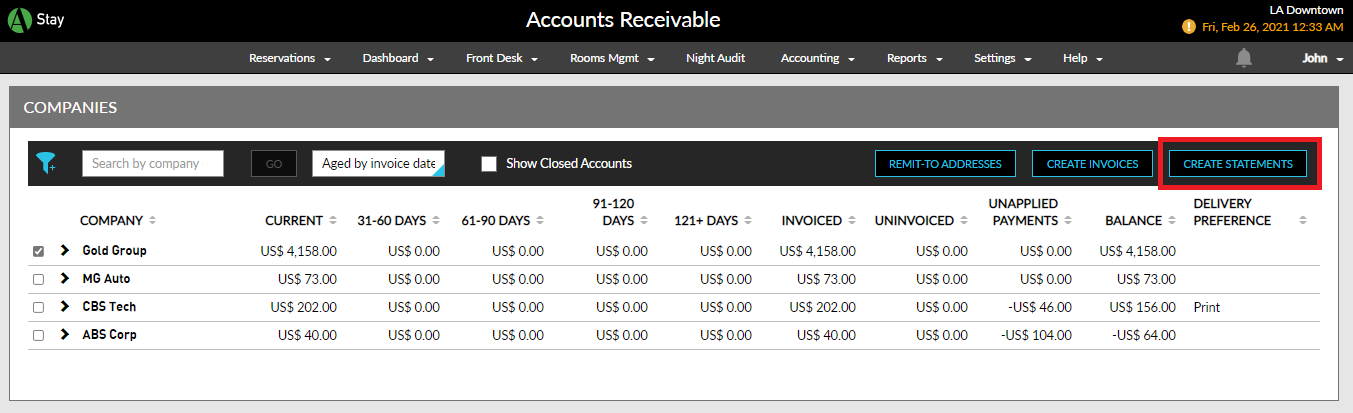
Navigate to Accounting ➜ Accounts Receivable. The Companies page is displayed.
Select one or more A/R accounts at the tenant level and generate an invoice (at the property level).
Click Create Statements.
Select the type of statement the user wants to create:
-
Property Statement
-
Tenant Statement
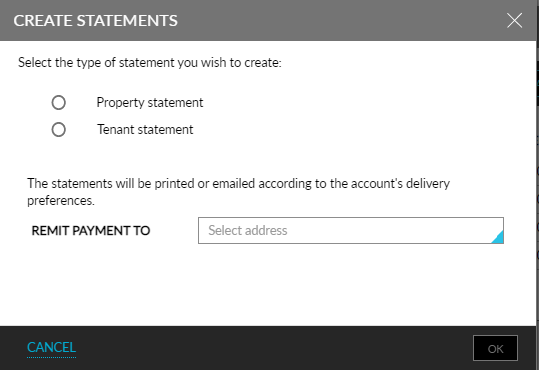
Select the remit-to address from the Remit Payment To drop-down list.
Click OK. The statement is automatically printed or emailed based on the A/R account preferences.
Create Statements Inside the A/R Account
A unique statement number is generated for the statements created for A/R Invoices via print or email when the Generate Statement Number flag is enabled inside the A/R, irrespective of whether the flag is enabled or disabled in the Accounting tab, and in the A/R Account Default Settings screen. Example scenarios are as follows:
-
When the flag, Generate Statement Number, is enabled in the Accounting tab in Guest Accounting, the flag is automatically enabled in the Summary section, and in the A/R Account Default Settings screen for all the A/R accounts in the property and statement numbers are generated for the statements.
-
When the flag, Generate Statement Number, is enabled in the Accounting tab and if the user manually overrides and disables the flag in the Summary section of the A/R, statement numbers are not generated for the statements.
-
When the flag, Generate Statement Number, is disabled in the Accounting tab but enabled in the Summary section, and in the A/R Account Default Settings screen, statement numbers are generated for the statements.
-
When the flag, Generate Statement Number, is disabled in the Accounting tab and in the A/R Account Default Settings screen, but the user overrides and enables the flag in the Summary section of the A/R, statement numbers are generated for the statements.
The statement numbers are displayed in the following format in email and print: Tenant-Property-Account-###, where ### is unique (the last 3 digits are expanded to 4, 5, and so on, based on the uniqueness). When statements are created at the property level by print, statement numbers are generated based on the settings configured in the Summary section of the A/R.
The Statement Number column in the Statement History tab on the History section of the A/R displays the statement numbers generated during print/email and can be sorted.