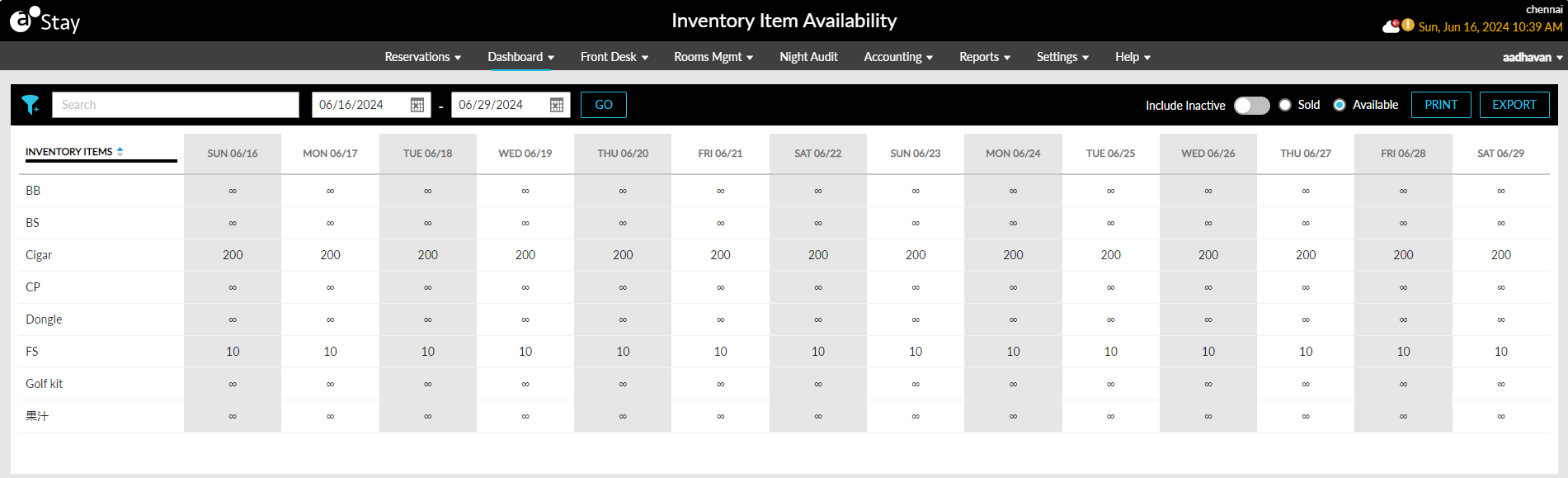
Inventory Item Availability Dashboard
Stay displays the availability of inventory items in a property, in the Inventory Item Availability dashboard available in the Dashboard menu. This dashboard displays details of inventory items that are available and sold for a selected date range. This dashboard also allows users to print and export the availability details displayed. The availability of inventory items is tracked when utilized in the following ways:
-
When inventory items such as cribs, swimming gear, and so on are purchased by guests for reservations.
-
When inventory items are posted as Add-Ons to reservations.
-
When inventory items are posted as auto recurring fees to reservations.
-
When inventory items are purchased as fixed/allowance components of a package.
The Inventory Item Availability dashboard can be accessed by all users with the permission to view the Dashboard menu. When users access the dashboard, by default, the availability details are displayed from the current property date - to 14 days in the future. The dashboard displays the following fields:
|
Field |
Description |
|---|---|
|
Filter |
Users can filter details based on the category of the inventory items. All categories available at the property are displayed. |
|
Search |
Users can search for an inventory item using the item name. |
|
Date Range |
The availability details can be viewed for a maximum duration of 365 days between the start and end dates. |
|
Go |
This button is enabled for selection when users select valid start and end dates. When clicked, the availability details will be retrieved for the selected date range. |
|
Include Inactive |
This flag is disabled by default. Users must enable this flag to view the availability details of inventory items in the Inactive status. The inactive items are represented by a hyphen (-). |
|
Sold |
This option is not selected by default. Users must select this option to view details of inventory items sold for the selected date range. |
|
Available |
This option is selected by default. When selected, the availability details of inventory items available for the selected date range is displayed. |
|
|
When selected, the dashboard details can be printed for a maximum duration of 14 days at a time. |
|
Export |
When selected, the dashboard details can be exported as a CSV file. |
The inventory items can be sorted alphabetically. The availability of inventory items with an infinite or unlimited quantity is represented by an infinity symbol in the dashboard. When an inventory item is not available or when the property has sold the item in excess, the item is highlighted in red.