Lost and Found Enhancements
The Show Additional Options hyperlink displayed below the Tracking Number field in the Release pop-up screen must be clicked to apply the rounding behavior. This hyperlink is displayed only when the status of the item is set as Closed Sent. When clicked, an accordion is expanded that displays the Rounding flag.
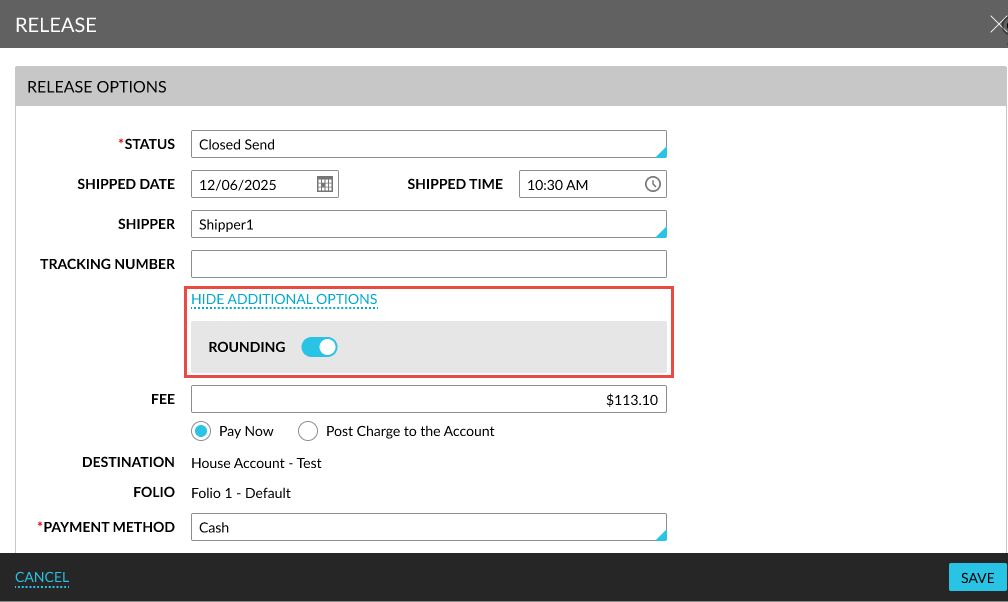
When the setting includes a fee, the amount will be populated in the Fee field. This amount reflects the rounded amount based on the configured rounding rule and defined denomination values.
For example, consider the following values:
-
Setup fee: $30.07
-
Rounding rule: Round Down
-
Smallest denomination: $0.05
The fee will be auto-populated as $30.05 when:
-
Status is set to Closed Sent
-
Shipper is selected
When the user modifies the fee manually, the value must comply with the configured denomination rules. When the entered value does not match the allowed denominations, an appropriate message will be displayed.