Payment Method Enhancements
The Rounding Setting section in the Edit pop-up screen that appears when users modify a payment method (All Settings ➜ Guest Accounting ➜ Payment Method) allows users to configure the rounding configurations. This section includes an Active flag that supports the following functionality:
-
When enabled, rounding configuration options are displayed.
-
When disabled, no rounding is applied for the selected payment method.
This flag is disabled by default for all properties.
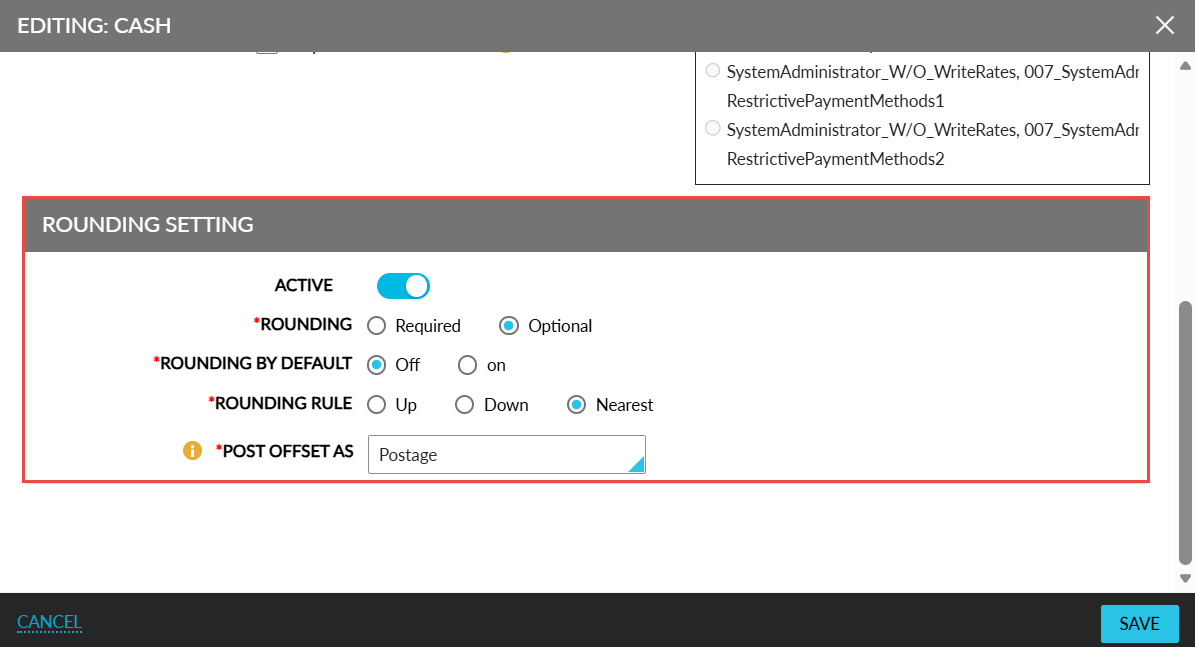
When the Active flag is enabled, the following fields are displayed:
|
Field |
Description |
|---|---|
|
Rounding |
This is a mandatory field that displays the following options:
|
|
Rounding By Default |
This is a mandatory field that displays the following options:
|
|
Rounding Rule |
This is a mandatory field that displays the following options:
|
|
Post Offset As |
This is a mandatory field that displays the list of transaction items. The selected item will be associated with the payment method and used to offset the folio balance to zero. The adjusted amount will be posted as either a charge or credit under the selected transaction item. The selected transaction item must not include price or tax values. The transaction items already associated with a payment method cannot be deactivated. An information icon added to this field displays the following message when hovered upon: Selected transaction item should not have a price or associated tax class. |