Reservation Summary Section
When users expand the Reservation Summary section of reservations, a new label, Cancellation Numbers, is displayed in the Reservation Details section that contains the following fields:
-
Third-Party Source: This is a single-select drop-down list that allows users to select the third-party source for the reservation.
-
Cancellation: This is a text field that allows users to enter the cancellation number.
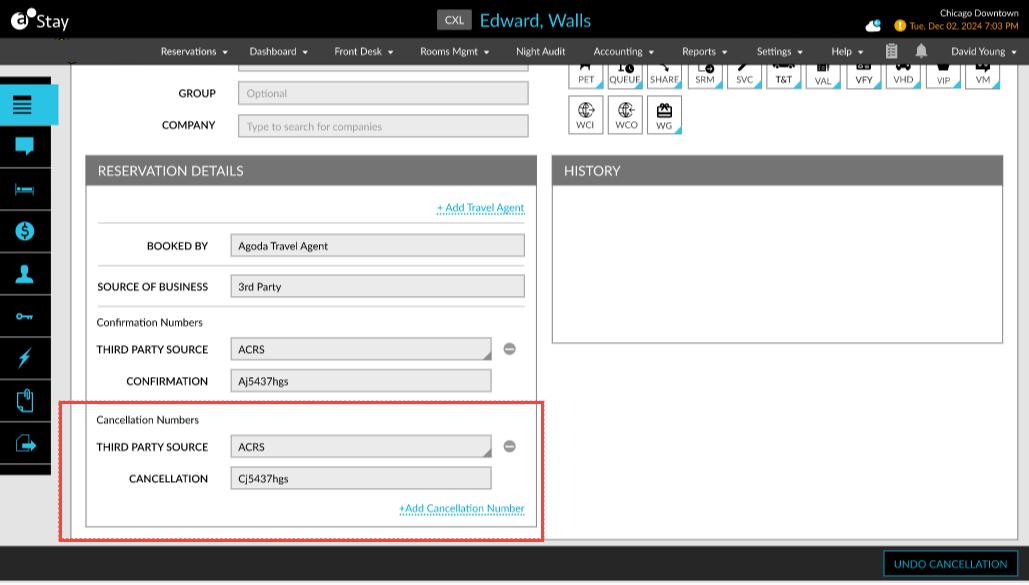
The third-party source and cancellation number is updated when a reservation is cancelled. When the reservation is cancelled through an interface, the cancellation number is updated in this section against the respective source.
Users can add additional cancellation numbers by clicking on the +Add Cancellation Number hyperlink. Multiple cancellation numbers can be added if applicable. When an Undo Cancellation is performed, the previously saved cancellation number remains associated with the reservation but will be hidden. When the reservation is canceled again, the previous cancellation number will be displayed along with the new cancellation number.
When the third-party cancellation number is updated for a reservation, a record is created for the same in the Reservation History and Audit Log screen.