Rounding Behavior for Cancel/No-Show and Check-Out Reservations
Stay supports rounding behavior during cancellation, no-show, and check-out processes.
Cancel/No-Show Reservation Enhancements
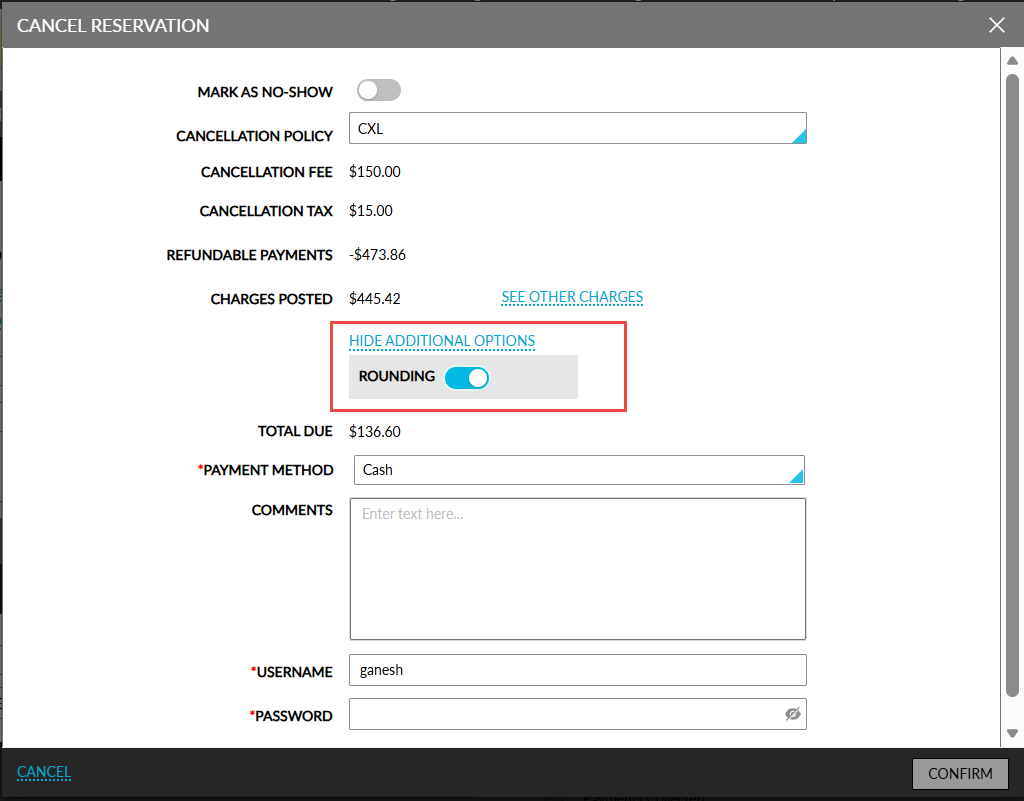
When collecting a cancellation fee, when the total due is less than the smallest denomination, rounding is applied. The Show additional options hyperlink displayed near the Pay All option must be clicked. When clicked, an accordion expands that displays the Rounding flag. When enabled, the amount in the Total Due field is automatically rounded. When disabled, the exact amount will be displayed.
The rounded amount will not be posted as an offset charge or credit. For cash payment method, users must make a payment manually to close the folio.
Check-Out Reservation Enhancements
During check-out, when the total due is less than the smallest denomination, rounding is applied based on configuration. The Show additional options hyperlink displayed in the Check-Out Reservation pop-up screen must be clicked. When clicked, an accordion is expanded that displays the Rounding flag.
When enabled, the amount displayed in the Cash Balance field will be rounded automatically. The rounded amount will not be posted as an offset charge or credit. For cash payment method, users must make a payment manually to close the folio.
This functionality is also applicable when guests are checked out early.