Staff
The Staff option allows users to segregate the maintenance staff members at the property who are on and off duty. When the property gets a new staff member, the user can indicate if the staff member is available for assignment by indicating if they are active or not. Once they are active, they are still off duty until the users indicates that they are on duty. This is useful for new staff that may be training. They can be active members of the staff as they learn, and the user can move them to on duty when they are ready to be assigned to rooms or areas.
Alternatively, if an on-duty staff member leaves for a vacation, the user can take them out of the assignment pool by setting them off duty.
Perform the following steps to segregate the maintenance staff members:
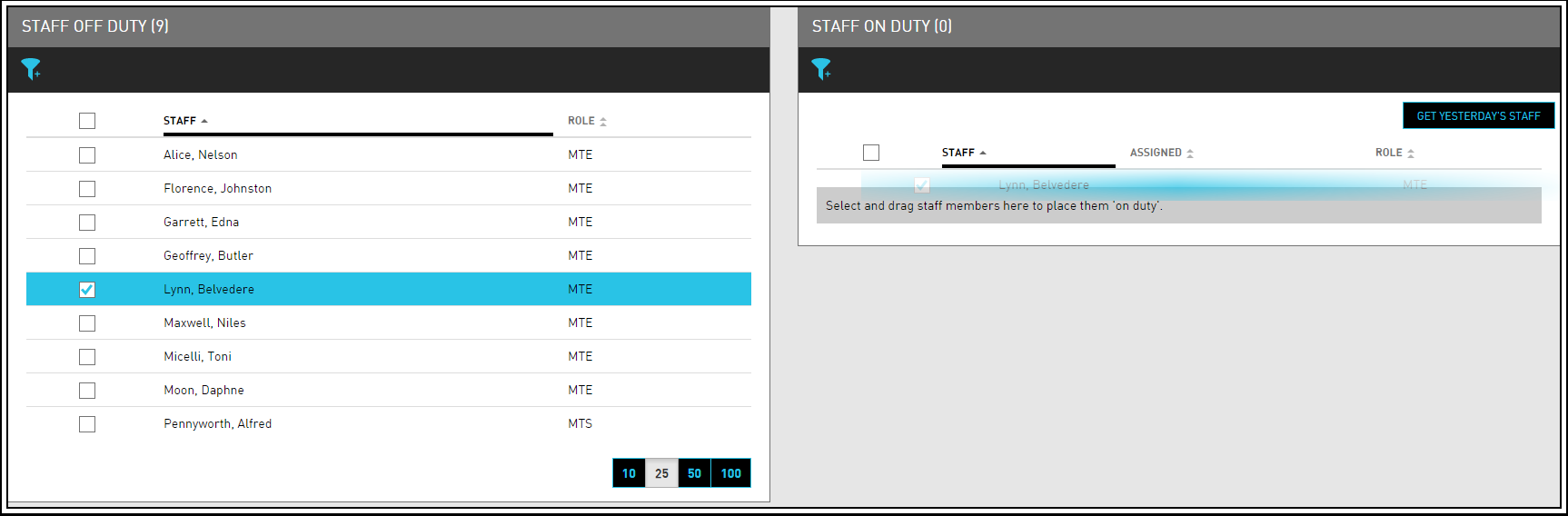
Navigate to Rooms Mgmt ➜ Maintenance ➜ Staff. The list of off-duty and on-duty staff appears in the Staff Off Duty and Staff On Duty sections of the page.
If the user has a large staff, use the filters in each section to narrow down the list of staff by role or property.
Click Get Yesterday's Staff to quickly duplicate the on-duty assignments from the previous day.
Select the checkbox next to Staff to select all staff in the list.
Select the box next to the name of any staff member that the user wants to move between boxes.
Click and drag their name to the Staff Off Duty box or the Staff On Duty box. Changes are automatically saved.
To manually request a service on behalf of the guest, click Request Service.