Upload Documents to a Profile
Documents can be attached/deleted/viewed to profiles. A Document Attachment tab is available in the following profile types: Guest, Company, and Travel Agent. The following are a list of permissions associated with System Administrator for this feature:
-
DeleteReservationDocument: SystemAdmin
-
DeleteCompanyARDocument: SystemAdmin
-
DeleteCompanyProfileDocument: SystemAdmin
-
DeleteGroupDocument: SystemAdmin
-
DeleteGuestProfileDocument: SystemAdmin
-
DeleteTravelagentDocument: SystemAdmin
Perform the following steps to upload a document:
Navigate to Reservations ➜ Search ➜ Profiles. The Profiles tab is displayed. To search the profile, enter the name of the guest, company, travel agent in the Search field, and click Go. Based on the entered details, the search results are displayed.
Click the profile for which the document must be attached.
Perform the following steps for a guest profile:
Click the guest profile from the search. The guest profile page is displayed.
Click the Document Attachment tab.
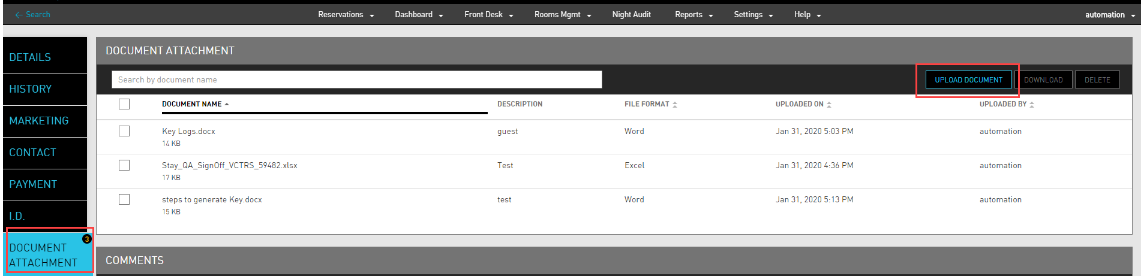
Click Upload Document. The Upload Document screen is displayed.
Click Choose File to attach the file from the computer. The maximum file size of the document must be 15 MB. The following file types are allowed: Word, Excel, PPT, PDF, JPEG, GIF, and PNG.
In the Description box, enter a relevant description for the attached file.
Enable the I agree that it is my obligation to properly handle and store any data considered “sensitive” by the company or by law checkbox to acknowledge if the user has understood the risk of any CC/PII information.
Click Upload. The document is attached successfully. The Document Attachment tab will indicate the number of documents that are attached to the profile.
Perform the following steps for a company or travel agent profile:
Click the company or travel agent profile from the search. The guest profile page is displayed.
Click the Document Attachment tab.
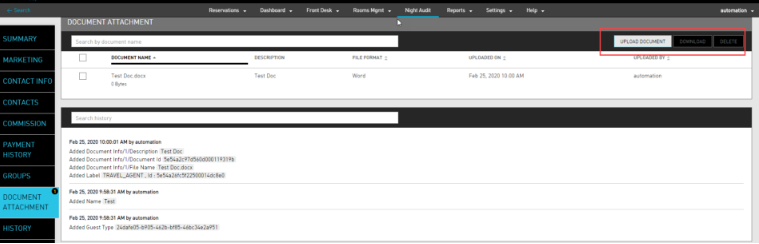
Click Upload Document. The Upload Document screen is displayed.
Click Choose File to attach the file from the computer. The maximum file size of the document must be 15 MB. The following file types are allowed: Word, Excel, PPT, PDF, JPEG, GIF, and PNG.
From the Document Type dropdown, select if the document is a Group Document or a Company Profile Document.
In the Description box, enter a relevant description for the attached file.
Enable the I agree that it is my obligation to properly handle and store any data considered “sensitive” by the company or by law checkbox to acknowledge if the user has understood the risk of any CC/PII information.
Click Upload. The document are attached successfully. The Document Attachment tab will indicate the number of documents that are attached to the profile.