View User Log of Users
Users with Stay_AccessUserLog permission can view the login and logout details of multiple users from the User Logs screen (Reports ➜ User Logs). Users can view the login and logout details for the selected username and date.
The following log generation parameters are displayed in the User Logs screen:
|
Field |
Description |
|---|---|
|
Date Range |
The date range for which logs must be generated. Users can select from the following options:
|
|
From Date and Time |
The start date from which logs must be generated. This is a mandatory field that allows users to select a date that is within the last 30 days from the current property date up to the current property date. For the following Date Range options, the value will be populated by default:
|
|
To Date & Time |
The date up to which logs must be generated. This is a mandatory field that allows users to select a date that is within the last 30 days from the current property date up to the current property date. For the following Date Range options, the value will be populated by default:
|
|
Username |
This is a mandatory field that allows users to select the usernames whose logs must be generated. By default, no username is selected. Users must search and select the usernames. A maximum of 10 usernames can be selected. |
|
Reset Filters |
When clicked, the dates selected in the From Date and Time and To Date and Time fields will be replaced with the current property date and the usernames selected will be removed. |
|
Run |
When clicked, the login and logout details for the selected usernames will be generated. |
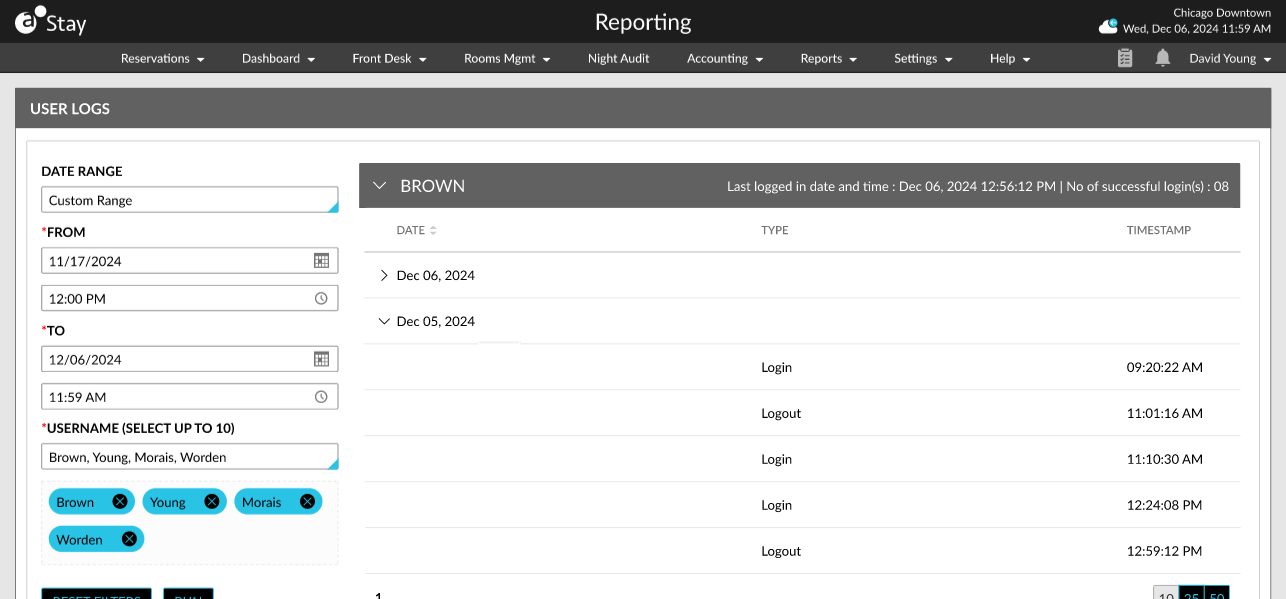
The following details are displayed in the generated logs:
-
The username of each user is displayed as a header with an accordion. The last logged-in date and time of the user is displayed in the header along with the number of successful logins for the selected date range.
-
When the accordion for the username is expanded, the following columns are displayed:
|
Column |
Description |
|---|---|
|
Date |
The latest date when the user was last logged into the system. |
|
Type |
The log type (login/logout). |
|
Timestamp |
The latest time when the user was last logged into the system. |