Ability to Set Rates for Multiple Rate Plans in the Daily Rates Tab
Stay is enhanced to allow users to set rates for multiple rate plans simultaneously in the Daily Rates tab in the Rates screen (Settings ➜ Rates ➜ Daily Rates).
Feature Setting
The following new feature setting has been added to allow users to set rates for multiple rate plans:
-
Name: Pricing Multiple Rate Plan
-
Value: Must be enabled
-
Comments: License is not required
When this feature setting is enabled, users can set rates for multiple rate plans using the Add New Rate option in the Set Rates screen (Settings ➜ Rates ➜ Daily Rates ➜ Set Rate). When clicked, users can select the rate plans from the Select Rate Plan drop-down list in the Rate Plans section. Users can select multiple rate plans, but the same rate plan cannot be selected more than once.
Once the rate plan is selected, users can configure the room type, additional guest charge, and the specific dates for which the configured rates must be applied. Users can configure multiple rate plans with different values using the Add New Rate option. The configured rates can be deleted using the Delete Rate option.
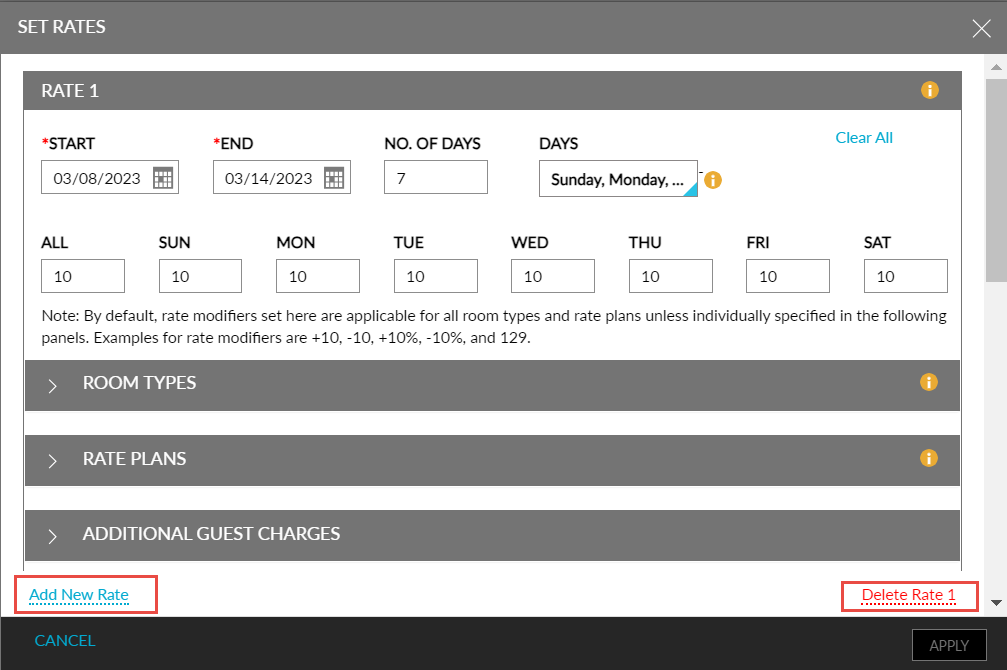
To support this enhancement, two new options, Add New Rate and Delete Rate are added to the Set Rates screen (Settings ➜ Rates ➜ Daily Rates ➜ Set Rate) that allows users to set rates for multiple rate plans.