Assign Units to Reservations Based on Grades and Owner RevPar Values
Stay is enhanced to assign units to reservations based on grades and Owner RevPar values calculated for the units. Users can configure grades for the rooms. Then, based on the Owner RevPar values calculated for each unit, the rooms that fall under the highest grade and has the least Owner RevPar value are assigned to the reservations in priority. The rooms are categorized in ascending order of priority of grades, that is, the rooms that are under grade 1 are assigned the highest priority.
This enhancement is applicable when units are assigned to reservations from the following areas:
-
Batch Operations ➜ Check-In ➜ Assign Rooms
-
Room Assignment section of the Book Reservation screen
-
Currently Selected Room section of the reservation
-
Other Matching Rooms section of the reservation
-
Recommended Upgrades section of the reservation
-
Scheduled Room Moves
The feature is also applicable when Stay is integrated with Agilysys Residence Management to create condo owner accounts.
This feature can be used only when the Owner feature setting is enabled for the property.
Property Settings
Users must select the Grade + Owner Revenue Par option as the room assignment logic from the Room Assignment drop-down list in the Room Assignment tab of the Rooms Setup screen (All Settings ➜ General ➜ Rooms & Room Types ➜Room Assignment).
Users can configure grades for the rooms in the Grade field displayed in the General section of the Add/Edit screen that appears when users add/edit rooms from the Property Configuration tab of the Rooms Setup screen (All Settings ➜ General ➜ Rooms & Room Types ➜ Property Configuration). Users can configure the same grade to multiple rooms.
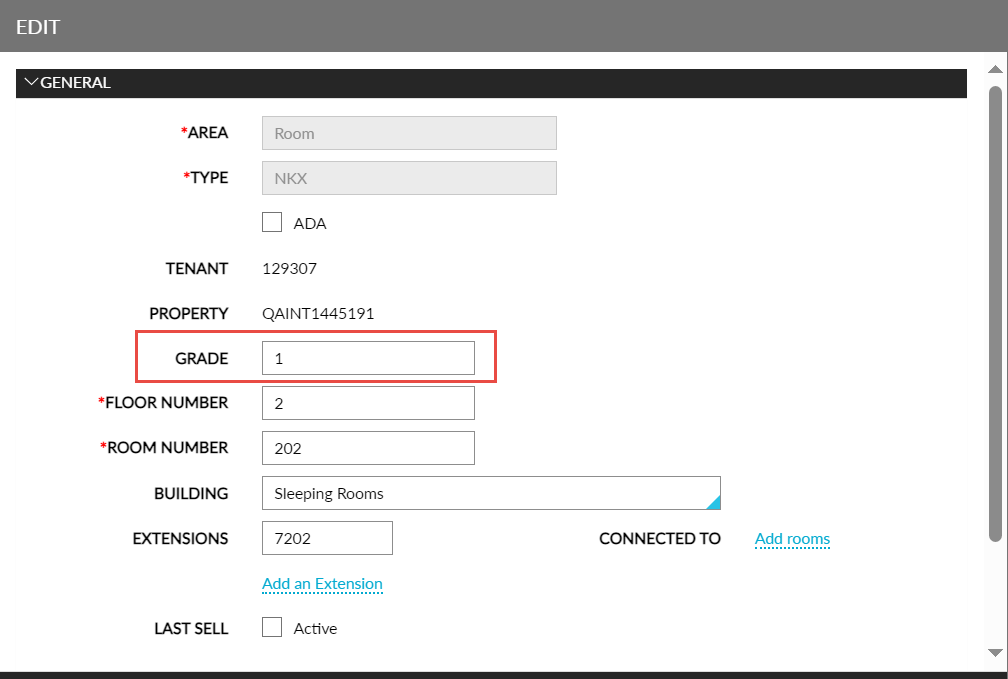
Once grades are configured, the rooms are sorted from highest to lowest grade in ascending order of priority. Within each grade, the Owner RevPar values are compared, and the Rotation Counter is assigned to the rooms in the Property Configuration tab in the order of increasing values of Owner RevPar, that is, the room with the lowest Owner RevPar value will be assigned to the next reservation in priority.
Sample Scenario
Consider the following rooms sorted by grades:
|
Room Number |
Grade |
Owner RevPar Value |
Rotation Counter |
|---|---|---|---|
|
101 |
1 |
400 |
2 |
|
102 |
1 |
300 |
1 |
|
103 |
2 |
200 |
3 |
|
104 |
3 |
100 |
4 |
Rooms 101 and 102 fall under the same grade (1). Out of these two rooms, 102 has the least value of Owner RevPar. Hence, 102 is assigned a rotation counter of 1, that is, room number 102 will be assigned to the next reservation in priority followed by room numbers, 101, 103, and 104.
When a grade is not configured for the rooms, the room assignment of those rooms will default to Rack Order.
To support this enhancement, the following changes have been made:
-
A new option, Grade + Owner Revenue Par, has been added to the Room Assignment drop-down list in the Room Assignment tab of the Rooms Setup screen (All Settings ➜ General ➜ Rooms & Room Types ➜Room Assignment). When selected, the units are assigned based on the grades assigned and Owner RevPar values calculated for the units.
-
A new field, Grade, has been added to the General section of the Add/Edit screen that appears when users add/edit rooms from the Property Configuration tab of the Rooms Setup screen (All Settings ➜ General ➜ Rooms & Room Types ➜ Property Configuration). This field allows users to configure a grade for the rooms.