Configure POS Account Lookup Settings
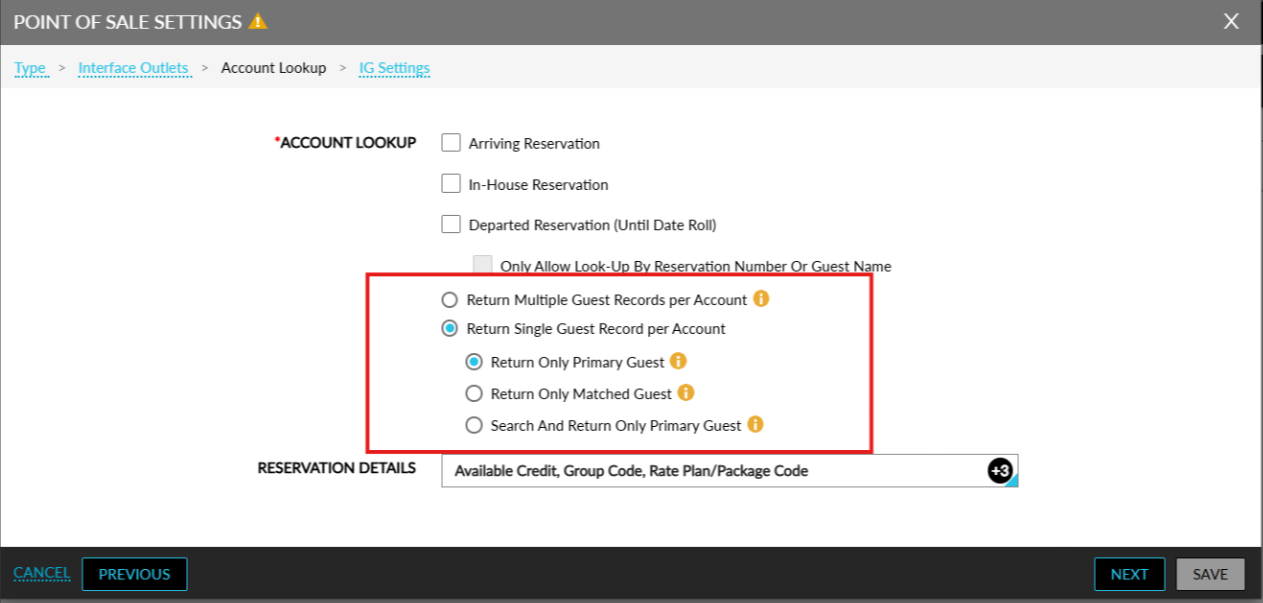
Stay is enhanced to allow users to configure account-lookup settings for POS systems based on the primary and secondary guests associated with a reservation. Users can choose whether a single record or multiple records should be retrieved for each account.
To support this enhancement, the following new fields have been added to the Account Lookup tab of the Point of Sale Settings pop-up screen (Interfaces ➜ On-Premise Settings ➜ Point of Sale):
-
Return Multiple Records Per Account - When selected, users can perform a lookup using the guest name of the primary and secondary guests or using the account/room number associated with the reservations. An information icon next to this field displays the following message when hovered upon: Returns all matching records when searching by name, and multiple records with full guest details when searching by room or account number.
-
When an account lookup is performed using the guest name, all records that match the primary and secondary guest names will be retrieved and displayed.
-
When an account lookup is performed using the account/room number, all records that match the entered details will be retrieved and displayed.
-
-
Return Single Guest Record per Account - The following options are displayed for this field:
-
Returns Only Primary Guest - When account lookup is performed using the primary/secondary guest name, account or room number, the matched record is displayed only with the primary guest name. An information icon next to this field displays the following message when hovered upon: Returns only the primary guest for each account, regardless of search input data.
-
Return Only Matched Guest - When account lookup is performed using primary/secondary guest name, account or room number, the account details of the first matched record per account is displayed. An information icon next to this field displays the following message when hovered upon: Returns the first matched name per account when searching by name, and only the primary guest when searching by room or account number.
-
Search And Return Only Primary Guest - When account lookup is performed using primary/secondary guest name, account or room number, the account details of the first matched record with only the primary guest name is retrieved and displayed. An information icon next to this field displays the following message when hovered upon: Searches and returns only primary guest, regardless of search input data.
-