Configure Stay Through Restrictions
Stay is enhanced to allow users to configure minimum and maximum length of stay restrictions for each night of stay when booking a reservation. These restrictions are referred to as stay through restrictions. Previously, when users configured minimum and maximum length of stay restrictions, the restrictions were validated only for the arrival date of the reservation and not for each night of stay.
For example, when a reservation is being booked for a duration of 5 days from January 20, 2024, to January 25, 2024, the 5 days must satisfy the minimum and maximum stay through restrictions configured for each night of stay. When the reservation’s length of stay does not satisfy the stay through restrictions configured for any one night, the rate plan/room type will not be displayed for selection when booking the reservation.
This enhancement is also applicable when Stay is integrated with Open APIV2.
Feature Setting
The following new feature setting must be enabled to use this feature.
-
Name: Stay Through LOS
-
Comments: License is not required
When the Stay Through LOS feature setting is enabled, users can configure the minimum and maximum length of stay through restrictions from the following screens:
-
Settings ➜ Rates ➜ Daily Rates ➜ Set Restrictions
-
Settings ➜ Rates ➜ Calendar ➜ Edit Days
Configure Stay Through Restrictions
Users can configure stay through restrictions in the Min Stay Thru and Max Stay Thru columns in the Edit Days pop-up screen (Settings ➜ Rates ➜ Calendar ➜ Edit Days) and the Set Restrictions pop-up screen (Settings ➜ Rates ➜ Daily Rates ➜ Set Restrictions). The value configured in the Min Stay Thru column must be less than or equal to the value configured in the Max Stay Thru column and vice versa. The values entered in the Min Stay Thru and Max Stay Thru columns are independent of the values configured in the Min LOS and Max LOS columns.
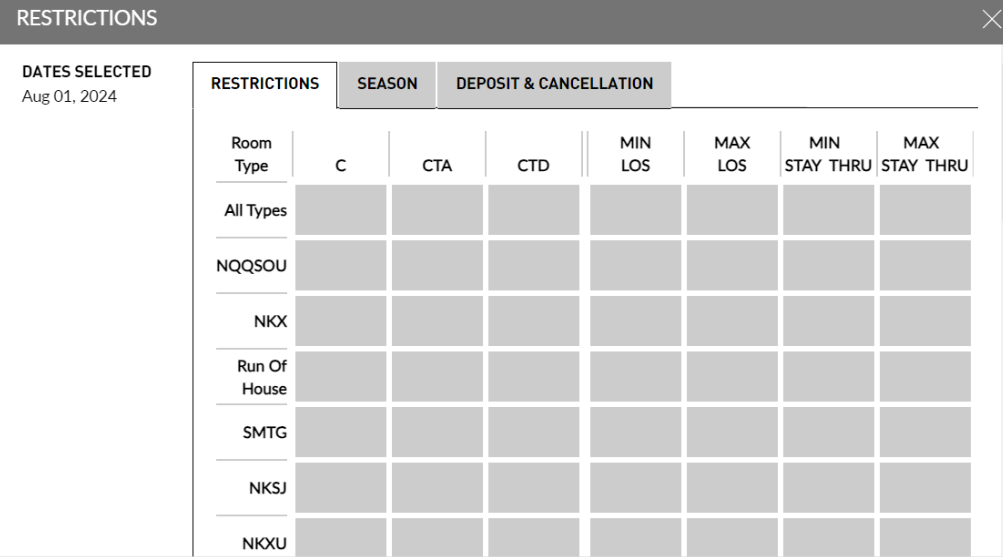
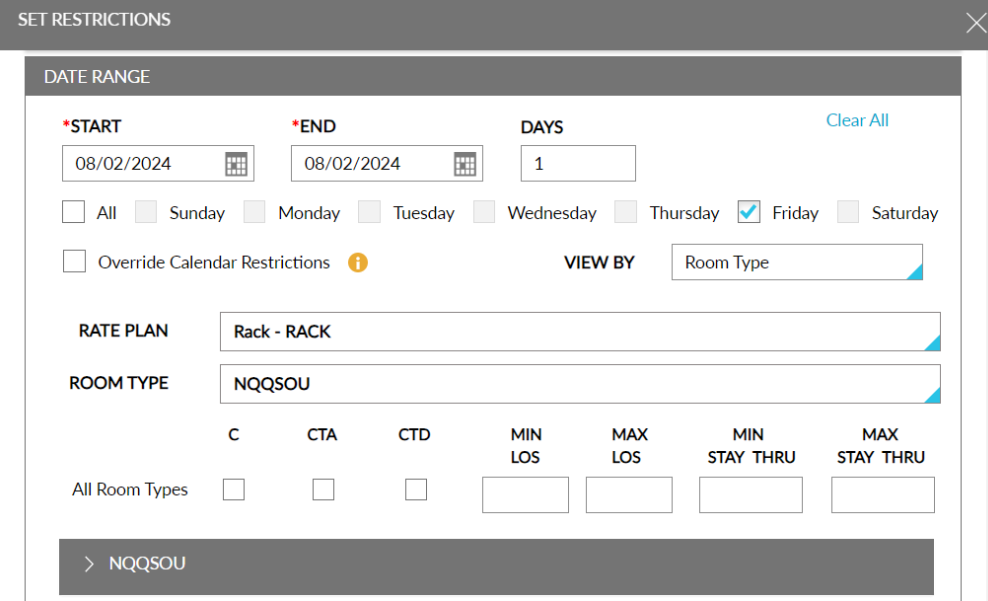
When users configure values in all 4 columns, the maximum value between Min LOS and Min Stay Thru, and the minimum value between Max LOS and Max Stay Thru is considered for validation for the first night of the reservation (arrival date) only. The values configured in the Min Stay Thru and Max Stay Thru columns is considered for the remaining nights of Stay. The stay through restrictions configured are displayed in the date tile in the Calendar screen.
When the length of stay restrictions are configured in both the Daily Rates and Calendar screens, the restrictions are applied as follows:
-
For Min LOS, the maximum value between values configured in the Rate Plan, Daily Rates, and Calendar screens will be applied.
-
For Max LOS, the minimum value between values configured in the Rate Plan, Daily Rates, and Calendar screens will be applied.
-
For Min Stay through LOS, the maximum value between the values configured in the Daily Rates and Calendar screens will be applied.
-
For Max Stay through LOS, the minimum value between the values configured in the Daily Rates and Calendar screens will be applied.
Sample Scenario
Let us consider the following restrictions configured for NKX room type in the mentioned screens for various dates.
|
Date |
Min LOS |
Max LOS |
S. Min LOS |
S. Max LOS |
|---|---|---|---|---|
|
Jan 10th |
2 |
12 |
3 |
15 |
|
Jan 11th |
2 |
15 |
1 |
18 |
|
Jan 12th |
1 |
4 |
1 |
8 |
|
Jan 13th |
2 |
12 |
2 |
7 |
Since all length of stay restrictions are configured, for a reservation’s first night of stay, the minimum length of stay must be 3 nights, and the maximum length of stay must be 12 nights. When a reservation is booked for the NKX room type from Jan 10th to 13th, the restrictions are validated for each stay night as follows:
|
Date |
Restriction |
|---|---|
|
Jan 10th |
Min LOS: 3, and Max LOS: 12 is satisfied. |
|
Jan 11th |
S. Min Los: 1 and S. Max LOS: 18 is satisfied. |
|
Jan 12th |
S. Min Los: 1 and S. Max LOS: 8 is satisfied. |
|
Jan 13th |
S. Min Los: 2 and S. Max LOS: 7 is satisfied. |
Since the restrictions are satisfied for each night of stay, the NKX room type will be available for booking in the Book a Reservation screen. When the restrictions are not satisfied for any one day, the room type will be displayed only when the Include unavailable rates checkbox is selected. When this checkbox is selected, an information icon will be displayed next to the room type. When hovered upon, the configured restriction that is not satisfied will be displayed. For example: SLOS:4.
Send Restrictions to Open APIV2
All restrictions configured in the Daily Rates screen, Calendar screen, and rate plans are sent to Open APIV2.
The following restrictions are sent from Stay:
-
For Min LOS, the maximum value between values configured in the Rate Plan, Daily Rates, and Calendar screens will be applied.
-
For Max LOS, the minimum value between values configured in the Rate Plan, Daily Rates, and Calendar screens will be applied.
-
For Min Stay through LOS, the maximum value between the values configured in the Daily Rates and Calendar screens will be applied.
-
For Max Stay through LOS, the minimum value between the values configured in the Daily Rates and Calendar screens will be applied.
-
For C, CTA, and CTD restrictions, the value is calculated by comparing Calendar and Daily Rates screens and the consolidated value is sent. For example, if C is configured only in the Daily Rates screen and not in the Calendar screen, the restriction is sent.
System Changes
To support this enhancement, two new columns, Min Stay Thru and Max Stay Thru have been added to the following screens:
-
Settings ➜ Rates ➜ Daily Rates ➜ Set Restrictions
-
Settings ➜ Rates ➜ Calendar ➜ Edit Days