Dashboard for Service Type Progress
Stay is enhanced to display the progress made by housekeeping staff on the housekeeping service requests created across all the service types available at the property, in a new dashboard in the Housekeeping screen. This dashboard helps users to track the total count of service requests created and the progress made by the staff on each service request.
View Status of Service Requests
The Service Type Progress section in the Housekeeping screen displays the count of the housekeeping service requests assigned to staff and its progress.
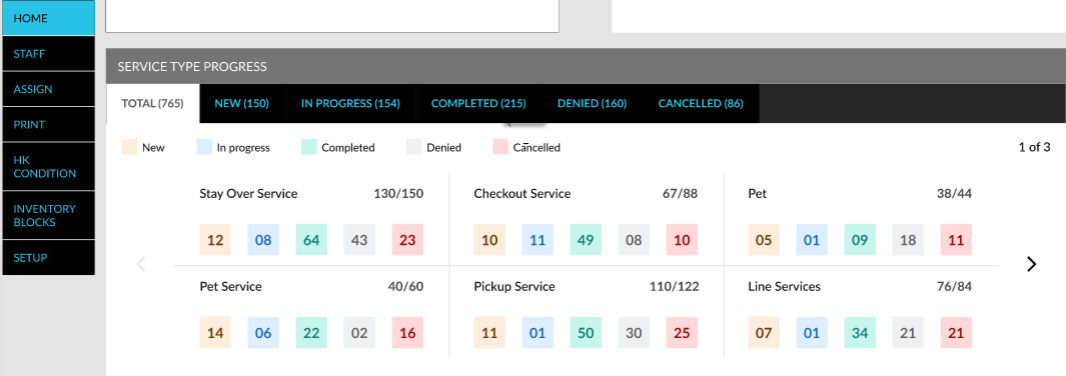
The following details are displayed in the Service Type Progress section:
|
Tab |
Description |
|---|---|
|
Total |
The total count of the housekeeping service requests created across all the service types configured by the property. This tab also displays the split-up of the service requests based on the following statuses and the progress made by the staff towards its completion:
|
|
New |
The total count of housekeeping service requests created across all the service types for the current property date. |
|
In Progress |
The total count of housekeeping service requests in the In-Progress status for the current property date. |
|
Completed |
The total count of housekeeping service requests completed by a staff for the current property date. |
|
Denied |
The total count of housekeeping service requests denied by a staff for the current property date. |
|
Cancelled |
The total count of housekeeping service requests cancelled for the current property date. |
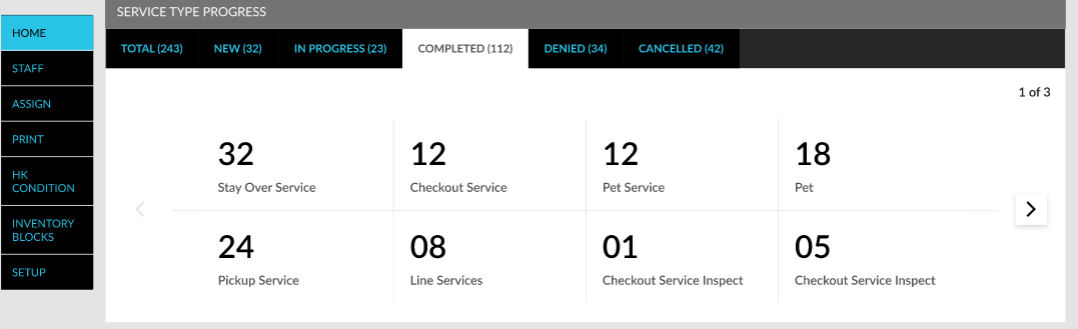
The split-up of service requests is displayed in each tab based on their service types. Each status tab contains cards that display the count of the service requests in the mentioned statuses.
System Changes
To support this enhancement, a new section, Service Type Progress has been added to the Housekeeping screen.