December 2023
Release 12.4.10
Auto Recurring Fees Enhancements: Configure Fee Amount for Age Categories or Season
Stay is enhanced to allow users to configure Auto Recurring Fees (Default Fees, Single Condition Rules, and Multi Condition Rules) to be posted to reservations based on the age categories configured at the property or season (specific date range).
Feature Setting
The following new feature setting has been introduced to enable users to configure the Auto Recurring Fees based on the age categories or seasons configured at the property:
-
Name: Custom Auto Recurring Fees
-
Value: Must be enabled
-
Comments: License is not required
When the new feature setting is enabled, users can configure the auto recurring fee amount for the age categories or for seasons by clicking the +Add hyperlink in the Frequency section of the Add/Edit Rule screen or the Add/Edit Auto Recurring Fees screen (Settings ➜ Guest Accounting ➜ Default Fees/Single Condition Rules/Multi Condition Rules). When clicked, the following fields appear:
|
|
|---|---|
|
|
|
|
|
|
Users can configure the fee amount for multiple date range and Charge By options using the +Add hyperlink. The dates selected for one Charge By option cannot be selected again.
The auto recurring fee amount for age categories or seasons can be configured either for all the items selected in the Add Items section or for selected items individually.
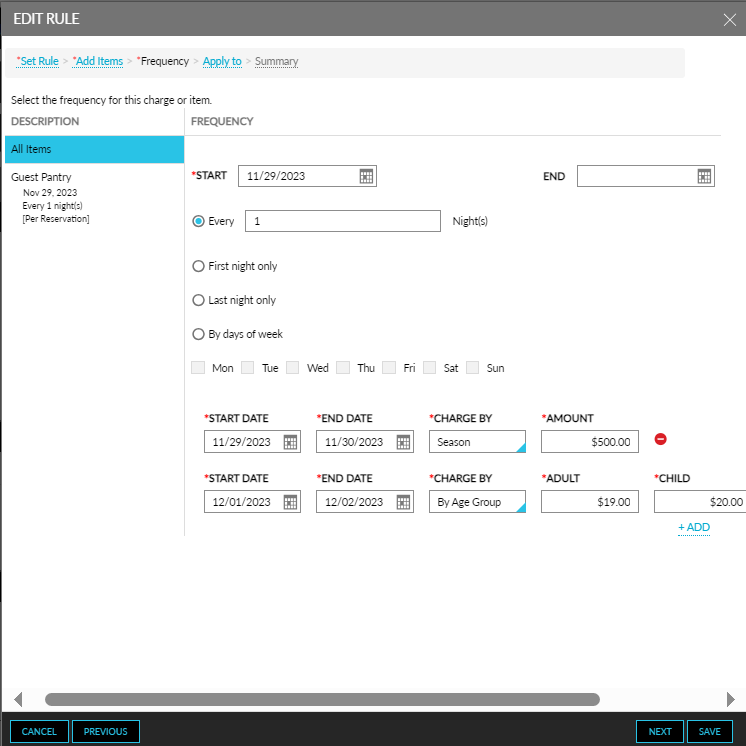
The auto recurring fee configured for the age categories and seasons is applied over the price configured for the items in the Add Items section of the Add/Edit Rule screen and the Add/Edit Auto Recurring Fees screen when the date range and the age categories of the guests included in the reservation with the Default Fees/Single Condition Rules/Multi Condition Rules matches the date range configured for the age categories and seasons.
To support this enhancement, a new hyperlink, +Add has been added to the Frequency section of the Add/Edit Rule screen or the Add/Edit Auto Recurring Fees screen (Settings ➜ Guest Accounting ➜ Default Fees/Single Condition Rules/Multi Condition Rules) that displays the following fields:
-
Start Date
-
End Date
-
Charge By
-
Amount/Age Categories