Display Transfer History in A/R Accounts
Stay is enhanced to display the history of charges that were transferred to/from A/R accounts to other accounts (including reservations, groups, house accounts, other A/R accounts).
Users can view the transfer history in the Transfer History tab on the History section of the A/R accounts for the charges transferred for a selected date range. Based on the date range selected in the date pickers, the history of the charges transferred is displayed. When there is no history available for the selected date range, the message, No Transfer History Found, is displayed. The Transfer History tab displays the following columns:
|
Column |
Description |
|---|---|
|
Date |
|
|
Direction |
Displays the direction of charge transfer.
This column can be sorted. |
|
From |
Displays the source account from which the charge was transferred as a hyperlink. When clicked, users are navigated to the account.
|
|
To |
Displays the destination account to which the charges are transferred to in the mentioned format as a hyperlink. When clicked, users are navigated to the account. Users can search records using this column. This column can be sorted. |
|
User ID |
Displays the username of the user who initiated the transfer. Users can search for records using this column. This column can be sorted. |
|
Transfer Reason |
Displays the reason entered for the transfer. This column is displayed only when the Show Transfer Reason checkbox is selected. |
|
Charges |
Displays the charge amount of the transferred item excluding tax. Users can search for records using this column. This column can be sorted. |
|
Tax |
Displays the tax amount of the transferred item. This column can be sorted. |
|
Total |
Displays the total amount of the transferred charges that are calculated as the sum of Charges and Tax. This column can be sorted. |
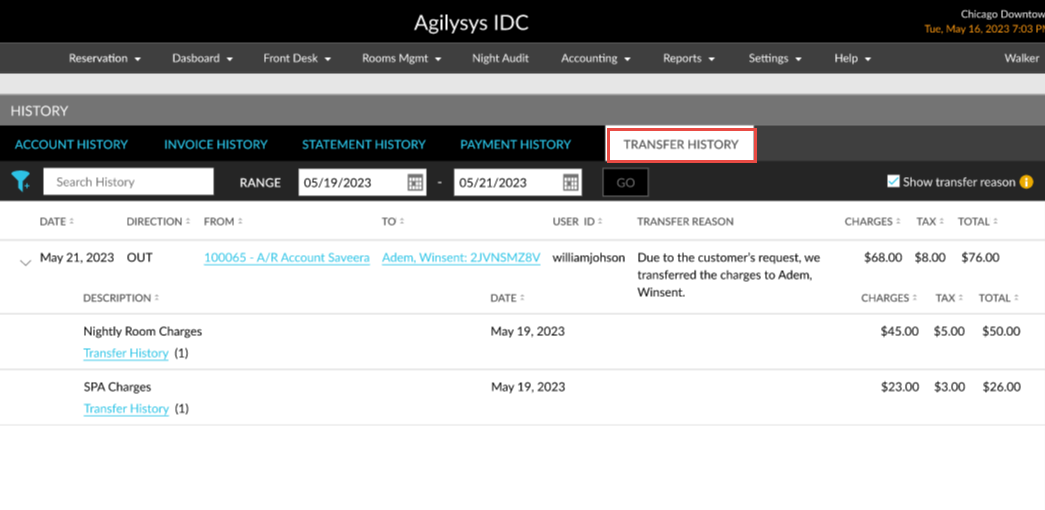
To support this enhancement, a new tab, Transfer History, has been added to the History section of the A/R accounts that allows users to view the history of transferred charges.