Display an Alert Message in the Book a Reservation Screen for Unavailable Dates
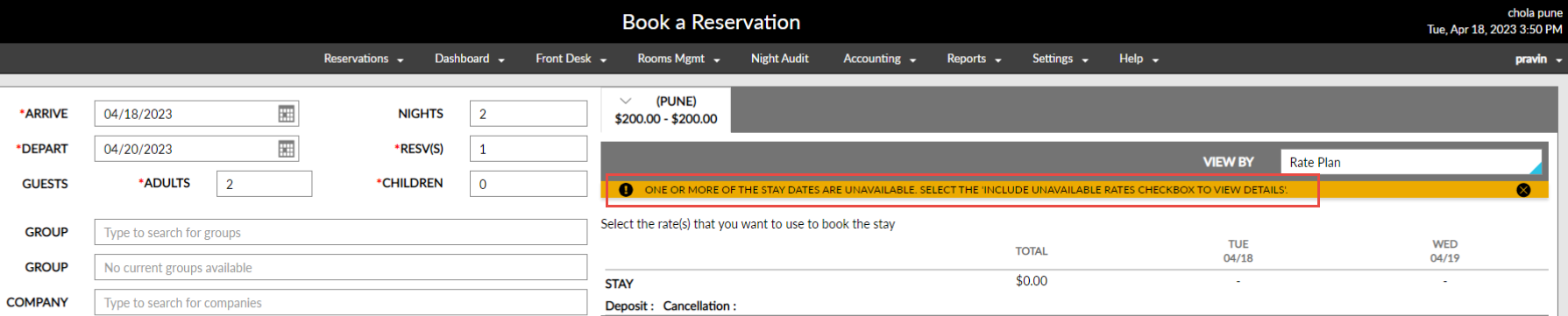
Stay is enhanced to display an alert message in the Book a Reservation screen, when the stay dates selected by the users are not available for booking. The message is displayed in the following scenarios:
-
When there are no rooms available for the selected dates
-
When restrictions are created in the property calendar for the selected dates
-
When rate plans are not available for the selected dates
For example, a Closed to Arrival restriction is placed in the property calendar for the dates, May 11, 2023 to May 15, 2023. When users try to book a reservation for these dates, the rate details will not be displayed. The rate details will be displayed only when users enable the Include Unavailable Rates checkbox and click on the Check Rates button.
To support this enhancement the following changes have been made:
-
The following message is displayed when users try to create reservations for the unavailable dates: One or more of the stay dates are unavailable. Select the Include Unavailable Rates checkbox to view details.
-
If the ROH room type is not configured in the property, it is not displayed when users click on the Check Rates button.